
Cutting paper checks every pay period costs you time, money, and your employees' patience. Switching to direct deposit payroll services gives your team faster access to their earnings and removes a recurring headache from your to-do list. But picking the right provider matters, the wrong fit can mean hidden fees, clunky setup, or poor support when something breaks.
We work with small business owners at Tax Experts of OC every day, handling payroll, tax compliance, and bookkeeping across all 50 states. That hands-on experience gives us a clear picture of what actually works when it comes to payroll platforms, and what causes problems down the road.
This guide breaks down five direct deposit payroll services built for small businesses. We cover what each one costs, how setup works, and which type of business each platform fits best, so you can make a confident decision without sorting through dozens of options yourself.
1. Tax Experts of OC Payroll Services
Tax Experts of OC offers fully managed payroll services for small and mid-sized businesses across all 50 states. Rather than handing you a software login and stepping back, a dedicated CPA or Enrolled Agent handles your payroll from start to finish, including direct deposit processing, tax withholdings, and compliance filings.
How direct deposit runs with a managed payroll firm
When you work with Tax Experts of OC, your employees receive direct deposits on your chosen pay schedule, whether that is weekly, bi-weekly, or semi-monthly. You submit hours and compensation details to your assigned professional, and they process the full pay run on your behalf, including ACH transfers to employee bank accounts.

Managed payroll means you are not learning new software or fixing errors yourself. Your payroll professional catches problems before employees ever see them.
Your pay schedule options include:
- Weekly
- Bi-weekly
- Semi-monthly
- Monthly
Setup requirements and timeline
Getting started requires your federal EIN, employee banking information, and details about your existing payroll history. Most clients are fully active within five to seven business days after submitting the required documents.
Your assigned professional will also review prior payroll records to catch any outstanding liabilities or filing gaps before running the first pay cycle.
Tax filing and compliance support you get
Tax Experts of OC handles federal and state payroll tax filings as part of the service, including Form 941 quarterly filings, year-end W-2s, and state-specific requirements. This is especially valuable if you have employees across multiple states, where direct deposit payroll services must account for different withholding rules and filing deadlines.
Pricing and what drives total cost
Pricing is customized based on your employee count, pay frequency, and state filing requirements. Tax Experts of OC provides upfront quotes during your free 30-minute consultation, with flexible payment options available for businesses managing tight cash flow.
2. Gusto
Gusto is a cloud-based payroll platform built primarily for small businesses. It handles direct deposit payroll services through an automated system you control directly from your dashboard, without needing to contact support for routine pay runs.
How Gusto handles payroll and direct deposit
With Gusto, direct deposits process in two to four business days by default, with next-day and same-day options available on higher-tier plans. You run payroll from your browser or mobile app, and Gusto automatically calculates withholdings and routes funds to employee accounts.
Next-day direct deposit is only available on Gusto's Premium plan, so confirm your plan tier before committing if deposit speed matters to your team.
Setup requirements and timeline
You need your federal EIN, employee bank details, and prior payroll records to get started. Most businesses complete setup within one to two business days using Gusto's guided onboarding flow.
Key features that matter for small teams
Gusto includes automated federal and state tax filings, new hire reporting, and employee self-service portals. Benefits administration is also built in, which helps small teams manage health insurance and retirement contributions without a separate platform.
Pricing and what drives total cost
The Simple plan starts at $40 per month plus $6 per employee. Higher tiers add next-day deposit, time tracking, and HR tools, which increases your monthly cost based on headcount.
3. OnPay
OnPay is a straightforward payroll platform designed for small businesses that want clean functionality without a steep learning curve. It covers the essentials well, including direct deposit, tax filings, and HR tools, all inside a single flat-rate pricing model.
How OnPay handles payroll and direct deposit
OnPay processes direct deposit payroll services with a standard two-day lead time, meaning you submit payroll two business days before your employees' pay date. Your employees receive funds directly in their accounts, and OnPay handles all ACH transfers automatically once you approve the pay run.
If your team expects same-day deposits, OnPay's two-day timeline is worth factoring into your pay schedule before you commit.
Setup requirements and timeline
You need your federal EIN, employee bank details, and prior payroll history to get started. Most businesses complete setup within one to two business days using OnPay's guided onboarding process.
Key features that matter for growing businesses
OnPay includes automated state and federal tax filings, multi-state payroll support, and employee self-service access. It also handles contractor payments alongside regular employee payroll, which suits businesses with a mixed workforce.
Pricing and what drives total cost
OnPay charges a flat monthly base fee of $40 plus $6 per employee, with no extra costs layered on for tax filings or direct deposit. Your total cost scales predictably as your headcount grows, which makes monthly budgeting simple.
4. QuickBooks Payroll
QuickBooks Payroll is a payroll platform built directly into the QuickBooks accounting ecosystem. If you already use QuickBooks for bookkeeping, adding payroll keeps your financial data in one place and cuts down on manual data entry between systems.
How QuickBooks Payroll handles direct deposit
QuickBooks Payroll offers same-day and next-day direct deposit on its higher-tier plans, with a standard two-day option on the base plan. You approve payroll from your QuickBooks dashboard, and the platform automatically transfers funds to employee accounts through ACH processing.
Same-day direct deposit requires submitting payroll before 7:00 AM PT on the pay date, so factor that deadline into your workflow before upgrading.
Setup requirements and timeline
You need your federal EIN, employee bank details, and prior payroll history to activate the service. Most users complete setup in one to two business days through the built-in guided setup flow.
Best-fit scenarios for QuickBooks users
QuickBooks Payroll is the strongest fit for businesses already running QuickBooks Online for accounting. The integration removes duplicate entry and keeps your direct deposit payroll services synced with your general ledger automatically.
Pricing and what drives total cost
Plans start at $45 per month plus $6 per employee. Same-day deposit and time tracking require higher-tier plans, which increase your monthly cost based on the features you add.
5. Patriot Payroll
Patriot Payroll is a budget-focused payroll platform designed for small businesses with straightforward pay needs. It covers direct deposit payroll services at a lower base price than most alternatives.
How Patriot handles direct deposit and pay runs
On the standard plan, Patriot processes direct deposits with a four-day lead time. This is longer than most competing platforms, so planning your submission schedule matters.
You submit payroll four days before the pay date, and Patriot handles all ACH transfers to employee accounts automatically once you approve the run.
Setup requirements and timeline
Getting started requires your federal EIN and employee bank details, along with prior payroll history. Most businesses complete setup in one to two business days using Patriot's guided onboarding flow.
- Federal EIN
- Employee bank account details
- Prior payroll records
Strengths and tradeoffs for lean teams
Patriot's main appeal is its low entry price for businesses with small, stable headcounts.

The key tradeoff is that full-service tax filing costs extra on the base plan, so your actual monthly expense rises once you need that coverage.
If your pay runs are simple and your team is small, Patriot can save you money each month compared to feature-heavy platforms.
Pricing and what drives total cost
Your cost depends on whether you need tax filing included. Both tiers stay among the lowest base rates for small business payroll:
- Basic payroll: $17/month + $4 per employee
- Full-service with tax filings: $37/month + $4 per employee
A simple way to choose
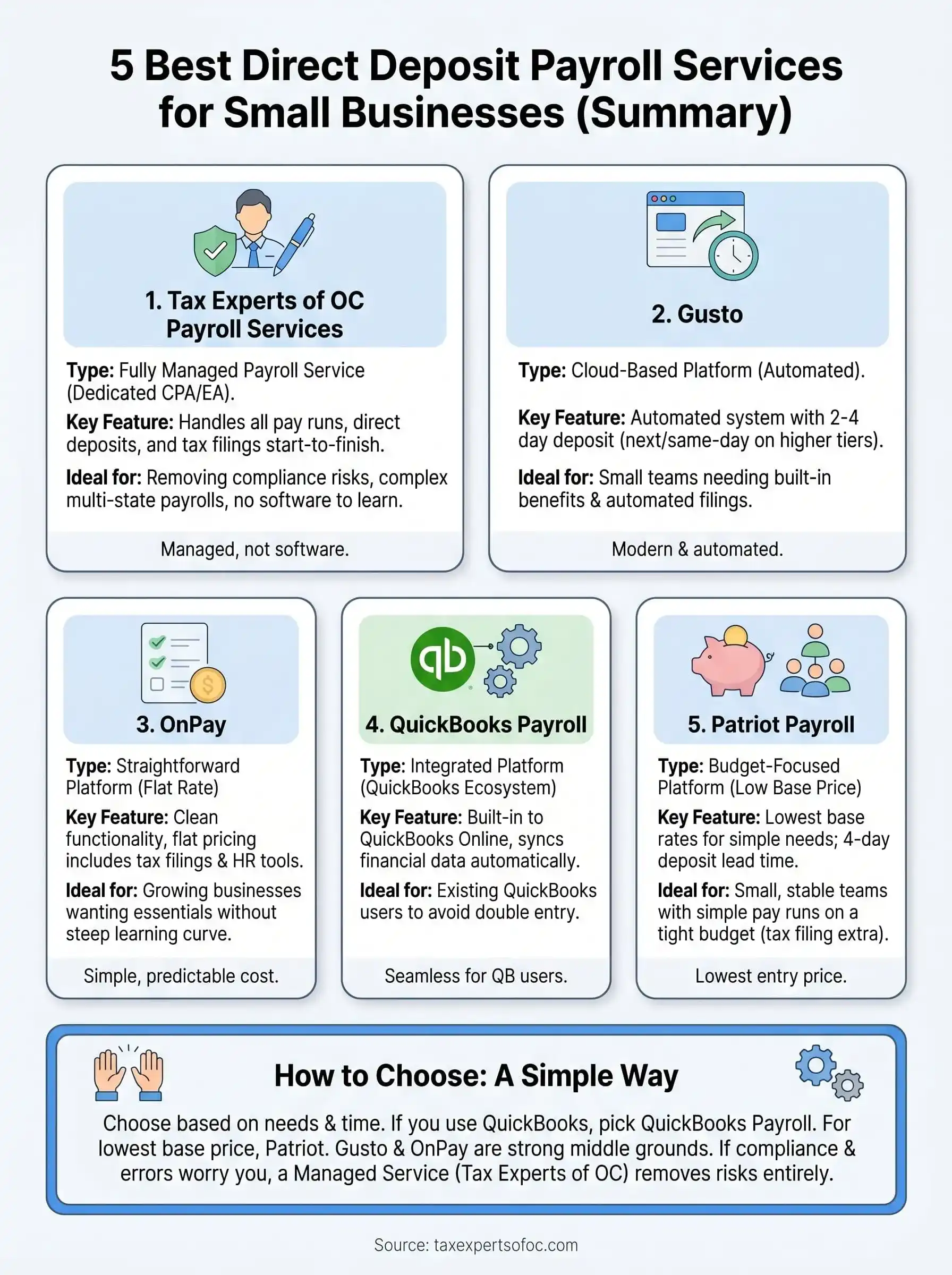
The right choice comes down to what you actually need and how much time you want to spend managing payroll yourself. If your business already runs QuickBooks, QuickBooks Payroll is a natural fit. If you want the lowest base price and simple pay runs, Patriot works. Gusto and OnPay both hit a strong middle ground for growing teams that want automated filings without a heavy price tag.
But if payroll errors, multi-state filings, or tax compliance gaps keep you up at night, a managed service removes those risks entirely. Tax Experts of OC handles your direct deposit payroll services from processing to filing, with a dedicated CPA or Enrolled Agent on your account, not a support queue. You get accurate pay runs and full tax coverage without logging into another platform. Schedule your free consultation with Tax Experts of OC to get a clear quote and see exactly what managed payroll costs for your business.