
Filing your taxes for the first time can feel overwhelming. Between W-2s, 1099s, deductions, and deadlines, there's a lot to keep track of, and mistakes can cost you money or trigger unwanted IRS attention. But here's the good news: learning how to file taxes for the first time is more straightforward than most people expect.
At Tax Experts of OC, we've helped countless first-time filers across all 50 states navigate their tax obligations with confidence. Whether you're a recent graduate entering the workforce, a freelancer with your first full year of self-employment income, or simply someone who's never filed before, the process follows the same basic steps. Understanding these steps now saves you stress later, and potentially puts more money back in your pocket.
This guide breaks down everything you need to know: the documents you'll need to gather, how to determine your filing status, which credits and deductions apply to you, and your options for filing software (including free ones). By the end, you'll have a clear roadmap for completing your return accurately and on time. Let's get started.
What to do before you file
Before you dive into the actual filing process, you need to confirm a few basic facts about your situation. These preliminary steps help you avoid common mistakes that first-time filers make, like filing when you don't need to or choosing the wrong filing status. Taking 30 minutes to answer these questions now can save you hours of rework later and ensure you claim every deduction and credit you're entitled to.
Determine your filing requirement
You're not required to file a federal tax return unless your income exceeds certain thresholds. For 2025 (filed in 2026), single filers under 65 must file if they earned at least $14,600 in gross income. If you're married filing jointly and both spouses are under 65, the threshold is $29,200. These amounts include wages, self-employment income, investment earnings, and other taxable income sources.
Even if you fall below these thresholds, you should still file if taxes were withheld from your paychecks. Filing is the only way to get a refund of that withheld money. You also need to file if you qualify for refundable credits like the Earned Income Tax Credit, which can put money in your pocket even if you owe no tax.
If you had any federal income tax withheld or qualify for refundable credits, file a return even if your income is below the filing threshold.
Confirm your filing status
Your filing status determines your standard deduction amount and tax bracket. The five options are Single, Married Filing Jointly, Married Filing Separately, Head of Household, and Qualifying Surviving Spouse. Most first-time filers choose Single, but your marital status on December 31 of the tax year is what matters, not your status today.

Head of Household offers better tax rates than Single, but you must meet specific requirements: you need to be unmarried, pay more than half the household costs, and have a qualifying dependent living with you for more than half the year. This status is common for single parents. If you got married in December, you file as Married Filing Jointly or Separately for the entire year, even if you were single for 11 months.
Check if someone can claim you as a dependent
If your parents or another taxpayer can claim you as a dependent, this affects your standard deduction and certain credits. For 2025, you're generally a qualifying child dependent if you're under 19 (or under 24 if a full-time student), lived with your parent more than half the year, and they provided more than half your financial support.
Students often assume they're independent because they work part-time or live in a dorm. That's not how the IRS sees it. If your parents pay your tuition, housing, and living expenses, they likely can claim you even if you earned $10,000 from a campus job. When someone claims you as a dependent, your standard deduction is limited (the greater of $1,300 or your earned income plus $450, up to the standard deduction amount), and you can't claim certain credits.
You should coordinate with whoever might claim you before filing. If both you and your parents accidentally claim your exemption, the IRS will reject one or both returns and require amended filings to resolve the conflict. This delays any refund by weeks or months. Ask directly: "Are you planning to claim me as a dependent?" Get a clear answer before you file.
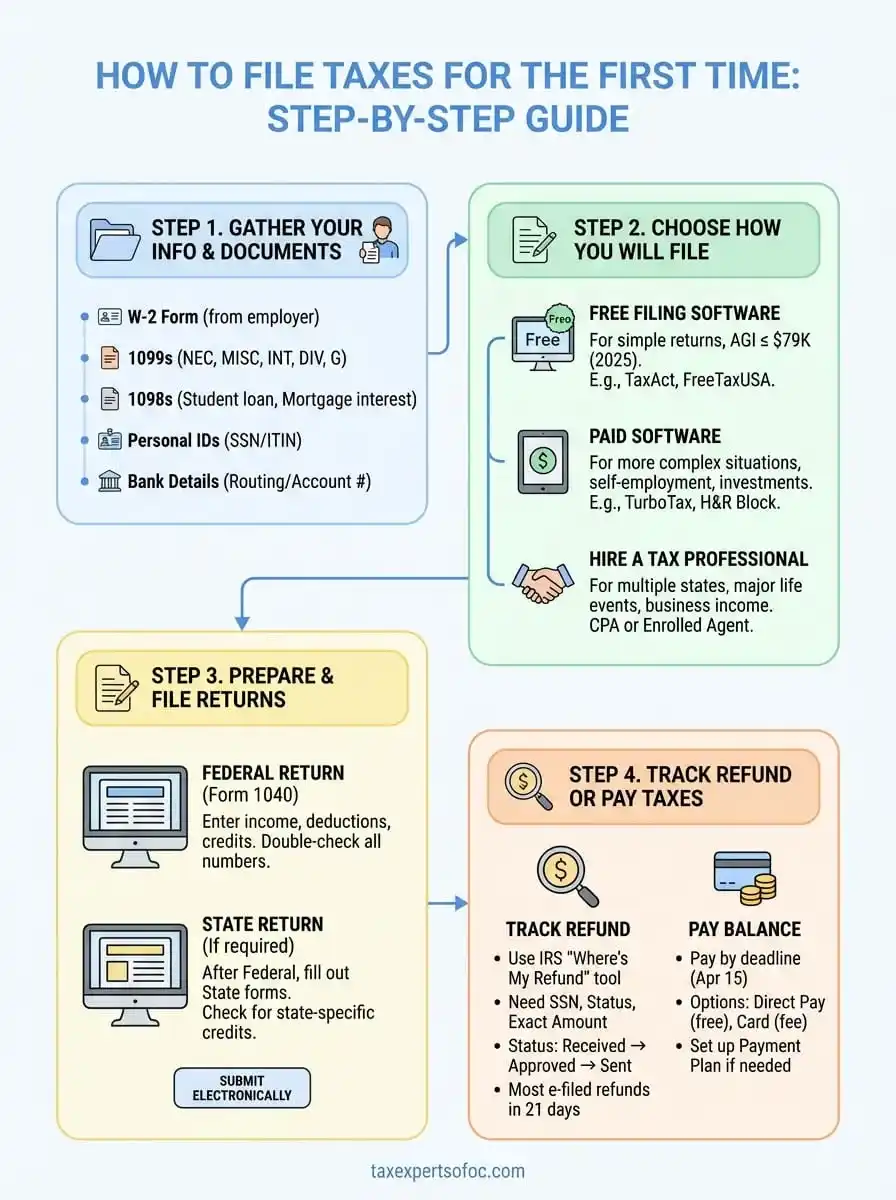
Step 1. Gather your info and tax documents
The most common reason first-time filers make mistakes is starting before they have all their documents. You need income statements, deduction records, and personal information in front of you before you open any filing software or start filling out forms. Missing even one document means you'll report incomplete income or miss deductions, which can trigger IRS notices or cost you money. Start collecting these materials in early January and keep them in one folder (physical or digital) so nothing gets lost.
Essential documents from employers and payers
Your employer must send you a W-2 form by January 31 showing your wages and the taxes withheld from your paychecks. This is the most important document when learning how to file taxes for the first time. If you worked multiple jobs during the year, you'll receive a separate W-2 from each employer. Don't file until you have all of them.
Beyond W-2s, you need these income documents:
- 1099-NEC or 1099-MISC: For freelance, contract, or side gig income over $600
- 1099-INT: Interest earned from bank accounts (usually $10 or more)
- 1099-DIV: Dividend payments from investments
- 1099-G: Unemployment compensation or state tax refunds
- 1098-E: Student loan interest you paid (deductible up to $2,500)
- 1098-T: Tuition payments for education credits
Employers and financial institutions must mail these forms by January 31 for W-2s and 1099-NECs, and by February 15 for most other 1099s. Give them until mid-February before following up.
Personal information you'll need
Beyond income documents, you need your Social Security number (or ITIN if you're a non-resident) and your bank account details for direct deposit of any refund. If you're claiming dependents, collect their names, Social Security numbers, and dates of birth. The IRS cross-checks this information, so even a single-digit error in a Social Security number will delay your return.
You'll also answer questions about your home address as of December 31, any moves during the year, and whether you had health insurance coverage for all 12 months. Keep records of any estimated tax payments you made if you're self-employed.
Additional forms for special situations
Bought a house last year? Your lender sends a 1098 form showing mortgage interest paid, which is deductible. Made charitable donations? You need written receipts for any single donation of $250 or more. Sold stocks or cryptocurrency? Your brokerage sends a 1099-B showing capital gains or losses. Each of these situations requires specific documentation, so review your financial activity from the entire tax year and identify which forms apply to you.
Step 2. Choose how you will file
Once you've gathered all your documents, you need to decide how you'll actually submit your return. You have three main options: free filing software, paid tax software, or hiring a tax professional. The right choice depends on your income level and complexity of your tax situation. Most first-time filers with straightforward W-2 income qualify for free options, while those with multiple income sources or deductions may benefit from paid software or professional help.
Free filing software for simple returns
The IRS partners with software companies to offer Free File for taxpayers earning $79,000 or less (adjusted gross income for 2025). This program gives you access to the same guided software that normally costs $50 to $100, completely free for both federal and state returns. You answer questions in plain English, and the software fills out the correct forms behind the scenes.
Visit the IRS Free File page directly through IRS.gov to see which providers serve your state and income level. Popular options include TaxAct, TaxSlayer, and FreeTaxUSA. Each provider has slightly different interfaces and eligibility rules, so compare a few before committing. If your income exceeds $79,000, you can use Free File Fillable Forms, which are just digital versions of paper forms with basic math calculations but no guidance.
Free File software walks you through the same interview process as paid versions, making it ideal for first-time filers who need step-by-step help without the cost.
Paid software for more complex situations
When learning how to file taxes for the first time, you might encounter situations that require paid software for better support. If you're self-employed, earned investment income, own rental property, or need to itemize deductions instead of taking the standard deduction, paid software offers more detailed guidance and error-checking features. Plans typically range from $60 to $120 depending on complexity and whether you need state filing included.
Software like TurboTax, H&R Block, and TaxAct (paid tiers) provide live chat support, maximum refund guarantees, and audit assistance. You import W-2s automatically, and the software identifies credits you might miss. Start with the free version, and if the software detects complexity requiring an upgrade, you'll be prompted to switch before filing.
Hiring a tax professional
You should consider hiring a CPA or Enrolled Agent if you have multiple states' income, significant self-employment income over $20,000, or faced a major life event like inheritance or divorce. Professional fees for basic returns start around $200 to $300 but increase with complexity. The value lies in personalized advice and representation if the IRS questions your return.
Tax professionals also handle filing extensions, estimated tax calculations, and multi-year planning that software can't match. For your first year, software usually suffices unless your situation involves business ownership or complicated deductions.
Step 3. Prepare and file your federal and state returns
With your documents organized and software selected, you're ready to complete your actual tax return. This step involves entering your information into your chosen platform, reviewing for accuracy, and submitting to the IRS and your state tax authority. Most software guides you through an interview-style process that asks plain-language questions and automatically fills the correct forms. Your job is to answer honestly and double-check every number before hitting submit.
Complete your federal return first
Start with your federal Form 1040, which is the main tax form everyone files. Your software walks you through each section: personal information, income, deductions, credits, and tax calculation. Enter your W-2 information exactly as it appears on the form, including employer identification numbers and wage amounts. If you're self-employed, report your 1099-NEC income and business expenses on Schedule C, which the software adds automatically.
The software calculates your adjusted gross income by subtracting eligible deductions like student loan interest and retirement contributions. Then you choose between the standard deduction (most first-time filers take this) or itemizing. For 2025, the standard deduction is $14,600 for single filers and $29,200 for married couples filing jointly. Itemizing only makes sense if your mortgage interest, state taxes, and charitable donations exceed these amounts.
Complete your federal return before your state return because many states use your federal adjusted gross income as the starting point for state calculations.
File your state return
After finishing your federal return, move to your state filing. Not all states require a return. Alaska, Florida, Nevada, South Dakota, Tennessee, Texas, Washington, and Wyoming have no state income tax. If you live in one of these states, you're done after the federal filing. For everyone else, your software automatically transfers most information from your federal return to your state forms.
State returns ask about state-specific deductions and credits that don't appear on federal forms. Common examples include property tax credits, college savings plan contributions, and local tax payments. Review each question carefully because your software may not catch state-specific situations if you skip through too quickly.
Review and submit electronically
Before filing, review your refund or balance due amount. If it seems unusually high or low compared to what you expected, go back and verify all income entries and deduction claims. Check that your bank account routing and account numbers are correct for direct deposit. One wrong digit means your refund goes nowhere or into someone else's account.
Submit both returns electronically through your software. You'll receive confirmation emails within 24 hours with your submission ID numbers. Save these emails. The IRS typically processes e-filed returns in under 21 days, while paper returns take six to eight weeks. Print copies of your completed returns and all supporting documents, and store them for at least three years in case the IRS requests verification.
Step 4. Track your refund or pay what you owe
After you submit your return, your relationship with the IRS isn't quite finished. You need to either track your refund if you're owed money or arrange payment if you owe taxes. The IRS processes most e-filed returns within 21 days, but delays happen if your return requires manual review or if you claimed certain credits like the Earned Income Tax Credit. Knowing how to monitor your status and understanding your payment options prevents surprises and helps you avoid late payment penalties that accrue at 0.5% per month.
Track your refund status
The IRS Where's My Refund tool at IRS.gov is your primary resource for checking refund status. You'll need three pieces of information: your Social Security number, filing status, and exact refund amount shown on your return. The tool updates once daily, usually overnight, so checking multiple times per day won't give you new information.
Your refund goes through three stages: Return Received, Refund Approved, and Refund Sent. Most first-time filers see their status move to Approved within 21 days of e-filing. Direct deposit adds another three to five business days for the money to appear in your bank account. Paper checks take an additional week in the mail. If 21 days pass with no status change, call the IRS refund hotline at 1-800-829-1954 for a live representative who can research your specific return.
The IRS updates Where's My Refund once every 24 hours, so checking more frequently won't speed up your refund or provide new information.
Pay your tax balance
When learning how to file taxes for the first time, you might discover you owe money instead of receiving a refund. Your balance is due by the tax filing deadline (typically April 15), and you have several payment options. The fastest method is IRS Direct Pay through IRS.gov, which withdraws money directly from your checking or savings account at no cost.
You can also pay by debit card, credit card, or wire transfer, though these methods involve processing fees ranging from 1.85% to 2% of your payment amount. If you can't pay the full balance by the deadline, file your return anyway to avoid the failure-to-file penalty (5% per month), which is much steeper than the failure-to-pay penalty (0.5% per month). Pay as much as you can by the deadline, then set up a payment plan through the IRS Online Payment Agreement tool for the remaining balance.
Short-term payment plans (120 days or less) have no setup fee. Long-term plans charge a $31 setup fee for direct debit agreements or $130 for other payment methods. Interest continues accruing on unpaid balances, currently around 8% annually, until you pay in full.
Wrap up and get support
Learning how to file taxes for the first time is less complicated than it seems once you break the process into manageable steps. You now know how to gather your documents, choose your filing method, complete both federal and state returns, and track your refund or payment. Following this roadmap helps you avoid common mistakes that delay refunds or trigger IRS notices.
Your first filing sets the foundation for every tax year ahead. If you run into questions or your situation becomes more complex than you expected, you don't have to figure it out alone. Professional guidance saves time and often uncovers deductions or credits you'd miss on your own.
Tax Experts of OC offers a free 30-minute consultation to walk through your specific situation. Whether you need help with this year's return or want to plan ahead for next year, working with a CPA or Enrolled Agent gives you confidence that your taxes are done right.