
Running payroll manually, calculating wages, withholding taxes, filing quarterly reports, eats up hours that most small business owners don't have. Get it wrong, and you're looking at IRS penalties, late deposits, and frustrated employees. That's exactly why small business payroll processing tools and services exist: to take a repetitive, high-stakes task off your plate so you can focus on actually running your business.
But with dozens of platforms and providers competing for your attention, choosing the right one isn't straightforward. Some tools work best for solo operators with a handful of W-2 employees. Others are built for growing teams that need integrated HR features and multi-state tax filings. Pricing models vary wildly, and the cheapest option isn't always the most cost-effective once you factor in compliance risk.
At Tax Experts of OC, we handle payroll services for small and mid-sized businesses across all 50 states, so we've seen firsthand what happens when companies outgrow a tool or pick one that doesn't match their needs. We built this guide to give you a clear, honest comparison of 12 payroll processing tools and services heading into 2026, covering what each one does well, where it falls short, and what it actually costs. Whether you're setting up payroll for the first time or replacing a system that's no longer cutting it, this breakdown will help you make a confident decision without wading through sales pages.
1. Tax Experts of OC Payroll Services
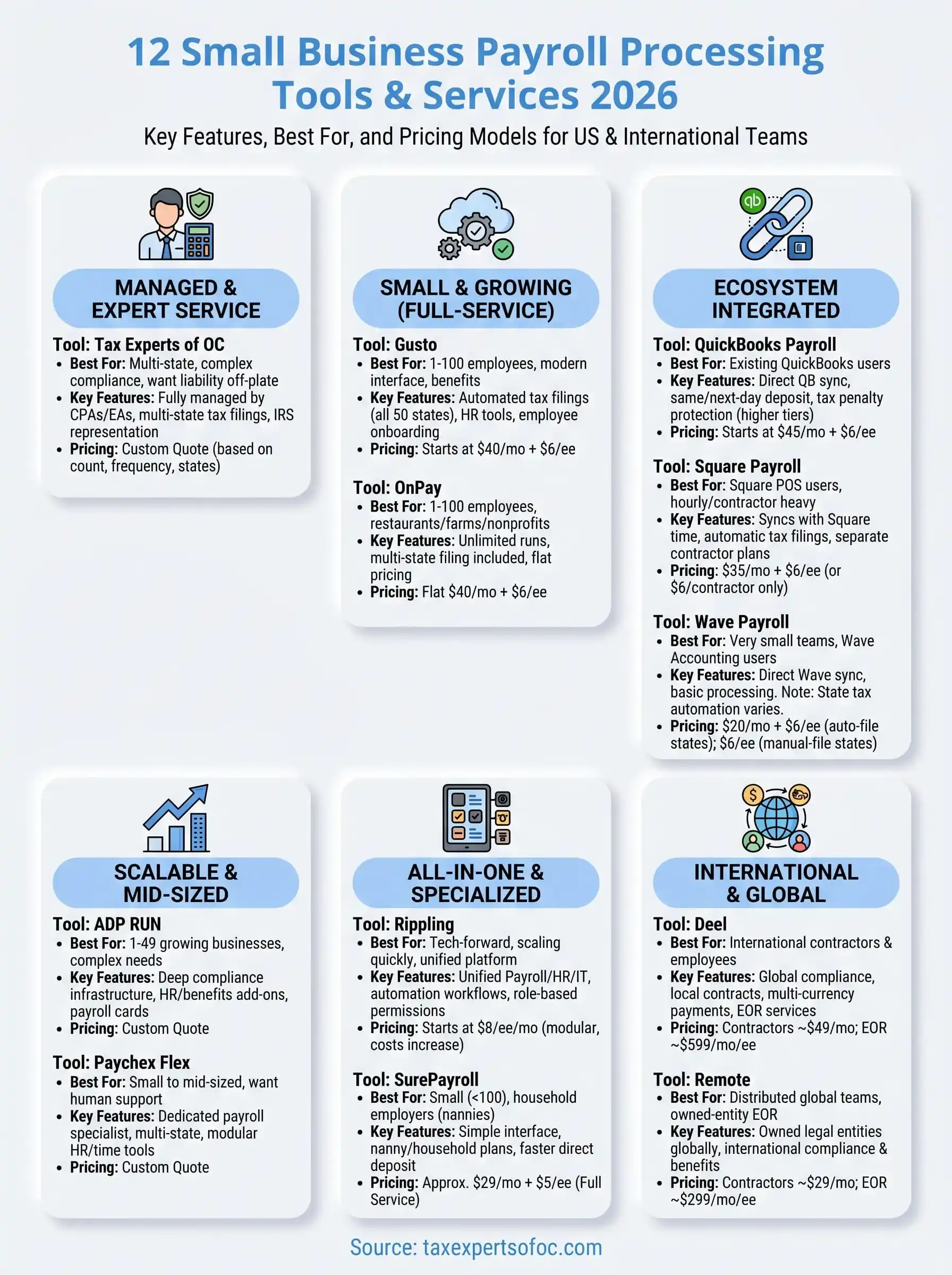
Tax Experts of OC is a CPA and Enrolled Agent firm based in Orange County, California, that manages payroll for small and mid-sized businesses across all 50 states. Unlike software platforms that hand you a dashboard and expect you to figure it out, this is a fully managed service where qualified professionals handle payroll on your behalf every pay period.
What You Get With a Managed Payroll Service
When you work with Tax Experts of OC, you're not logging into a platform to approve runs or troubleshoot errors yourself. A dedicated team processes your employee wages, contractor payments, and payroll tax deposits while you stay focused on operations. The firm's CPAs and Enrolled Agents bring tax expertise directly into the payroll process, which matters when your business has multi-state employees, irregular pay schedules, or compliance complexity that generic software often mishandles.
A managed payroll service removes the risk of costly errors by putting licensed professionals in charge of every calculation and filing, not just the software.
Who This Is Best for
Tax Experts of OC payroll services fit businesses that have moved past the point where a DIY platform is practical. If you're running payroll across multiple states, managing a mix of W-2 employees and 1099 contractors, or dealing with an IRS compliance issue alongside your regular payroll obligations, this service covers all of it under one roof. It also works well for business owners who simply want the liability off their plate and prefer direct access to a professional rather than a support ticket queue.
How Onboarding and Payroll Runs Work
Getting started involves a consultation where the team gathers your employee data, pay schedules, and any existing payroll history. From there, they configure your payroll structure and take over processing from the first run. You submit hours or salary changes through a simple communication process, and the team handles the calculations, direct deposits, and pay stub generation. You don't need to learn a new tool or maintain a subscription.
How Payroll Tax Filings and Compliance Get Handled
This is where the firm's tax background makes a real difference in small business payroll processing. Tax Experts of OC files your federal and state payroll tax returns, handles quarterly 941 filings, manages year-end W-2 and 1099 preparation, and stays current on deposit deadlines so you avoid IRS penalties. If you receive a payroll-related IRS notice, the same team that processes your payroll can respond on your behalf as your authorized representative.
Pricing and What Affects the Cost
Tax Experts of OC uses custom pricing based on your employee count, pay frequency, and the states where you operate. There are no published per-employee tiers on a pricing page because the scope of managed services varies. You can request a quote through a free 30-minute consultation, and the firm offers flexible payment options for businesses facing financial hardship. Transparent upfront pricing means you know what you're paying before any work begins.
2. Gusto
Gusto is a cloud-based payroll and HR platform built specifically for small and growing businesses. It handles payroll runs, automated tax filings, and basic HR administration through a single interface, making it one of the most recognized names in small business payroll processing.
What Gusto Does Best
Gusto excels at automating payroll tax calculations and filings at the federal, state, and local levels. Once you set up your employee data, the platform runs payroll in a few clicks and automatically files your quarterly and annual tax forms without requiring you to track deadlines manually.
Gusto's automatic tax filing covers all 50 states, which reduces the compliance burden significantly if you have employees working across multiple locations.
Who Gusto Is Best for
This platform works best for startups and small businesses with W-2 employees who want a clean, modern interface without heavy HR customization. It fits companies with roughly 1 to 100 employees that want payroll, benefits, and basic HR tools bundled into one subscription rather than juggling separate services.
Payroll and HR Features to Know
Beyond payroll, Gusto includes tools that cover a wider slice of your people operations:
- Employee onboarding with offer letters and e-signatures
- PTO tracking and time-off request management
- Benefits administration including health insurance and 401(k) enrollment
- Automatic new hire reporting to state agencies
Direct deposit and pay stub delivery are handled automatically each pay cycle.
Integrations and Add-ons That Impact Cost
Gusto connects with accounting software and time-tracking tools, so your labor data flows directly into your books without manual entry. However, advanced HR features and priority support are gated behind higher-tier plans, meaning your monthly bill can grow if your team's needs expand.
Pricing and Typical Monthly Structure
Gusto's Simple plan starts at $40 per month plus $6 per employee. The Plus plan costs $80 per month plus $12 per employee and adds next-day direct deposit and expanded HR tools. Premium pricing requires a custom quote for businesses needing dedicated support.
3. QuickBooks Payroll
QuickBooks Payroll is Intuit's built-in payroll solution, designed to work inside the broader QuickBooks ecosystem. It handles automated payroll runs, tax calculations, and compliance filings without requiring you to switch between separate platforms.
What QuickBooks Payroll Does Best
QuickBooks Payroll handles same-day and next-day direct deposit faster than most competitors in its price range. Its tight integration with QuickBooks accounting software means your payroll data posts directly to your books without any manual reconciliation on your end.
If you already use QuickBooks Online for accounting, adding payroll through the same platform eliminates a major source of data entry errors.
Who QuickBooks Payroll Is Best for
This tool fits existing QuickBooks users who want payroll without adopting a completely new platform. It works best for small businesses with straightforward payroll needs: a consistent employee count, standard pay schedules, and operations in one or two states.
Payroll, Tax Filing, and Compliance Features
QuickBooks Payroll covers the core requirements of small business payroll processing across all plan tiers:
- Automatic federal and state tax calculations and filings
- W-2 and 1099 preparation at year-end
- New hire reporting to state agencies
- Workers' compensation payment administration on higher-tier plans
The Core plan covers tax filings automatically, while the Elite plan adds a tax penalty protection guarantee up to $25,000 per year.
Integrations and Accounting Workflow Fit
QuickBooks Payroll connects directly with QuickBooks Online and syncs labor costs to your chart of accounts in real time. It also integrates with TSheets (now QuickBooks Time) for hourly employee time tracking. Outside the Intuit ecosystem, integration options are more limited compared to platforms like Gusto or Rippling.
Pricing and Common Plan Differences
QuickBooks Payroll offers three tiers: Core at $45 per month plus $6 per employee, Premium at $80 per month plus $8 per employee, and Elite at $125 per month plus $10 per employee. Higher tiers add same-day deposit speeds, HR support, and expert setup assistance.
4. ADP RUN
ADP RUN is ADP's payroll platform for small businesses with 1 to 49 employees, backed by one of the largest payroll processing companies in the world. It packages enterprise-grade compliance infrastructure into a product built for owners who don't have a dedicated HR department on staff.
What ADP RUN Does Best
ADP RUN handles automated payroll runs and multi-state tax filings with compliance depth that most small business platforms can't match. Its built-in background check integrations, new hire reporting, and state unemployment insurance management reduce the number of third-party services you need to coordinate.
ADP's regulatory update process reflects the company's scale, which means your tax tables and filing requirements stay current without any manual intervention on your part.
Who ADP RUN Is Best for
This platform fits small businesses growing quickly and expecting to add employees, states, or benefit programs in the near term. If your small business payroll processing needs are already moderately complex, or you want a provider with real support infrastructure rather than a chat queue, ADP RUN is worth a serious look.
Payroll Features and Compliance Support
ADP RUN covers the core compliance requirements your growing team needs without relying on outside tools:
- Automatic federal, state, and local tax calculations and filings
- Direct deposit and pay card options for employees
- W-2 and 1099 preparation at year-end
- Workers' compensation payment integration
- Garnishment payment services handled on your behalf
Add-on Modules and Service Tiers to Compare
The base payroll product is sold separately from additional HR modules layered on top. HR Pro and Complete tiers add an employee handbook builder, job posting tools, and training resources. Retirement plan administration and health benefits are available as separate add-ons, so your total monthly cost increases as your team grows and your requirements expand.
Pricing and How Quotes Typically Work
Standard pricing is not published publicly for ADP RUN. You request a custom quote based on employee count, pay frequency, and the modules you select. Promotional discounts are common for new accounts, but confirm what your rate becomes after the introductory period ends before you commit.
5. Paychex Flex
Paychex Flex is a payroll and HR platform built by Paychex, one of the largest providers serving small and mid-sized businesses in the United States. The platform pairs automated payroll tools with dedicated human support, giving you access to compliance expertise alongside the software layer that most self-service products rely on exclusively.
What Paychex Flex Does Best
Paychex Flex stands out for its dedicated payroll specialist model, where you work with a named point of contact rather than rotating through a generic support queue. This structure lets you get fast answers on compliance questions without re-explaining your business from scratch every time you reach out.
A dedicated specialist becomes familiar with your payroll setup over time, which reduces errors and speeds up resolution when something needs attention.
Who Paychex Flex Is Best for
This platform suits small to mid-sized businesses that want professional support built into their subscription rather than a fully self-service tool. If your small business payroll processing involves multi-state tax obligations or a combination of hourly and salaried employees, Paychex Flex handles that complexity without requiring you to manually adjust configurations each pay period. It also fits businesses that anticipate adding headcount or new states soon and want a provider that scales without forcing a platform switch.
Payroll, Tax, and HR Capabilities
Paychex Flex covers the core requirements across all plan tiers:
- Automatic federal, state, and local tax calculations and filings
- Direct deposit, pay cards, and paper check options
- W-2 and 1099 preparation at year-end
- New hire reporting and garnishment payment processing
- Time and attendance tracking on higher service tiers
Service Options to Compare Across Tiers
Paychex Flex offers three main tiers: Essentials, Select, and Pro. Each tier adds HR administration tools, including an employee handbook builder and access to a dedicated HR professional. Confirm exactly which features your selected tier includes before signing, since add-on costs can increase your monthly total faster than the base pricing suggests.
Pricing and What to Clarify in Your Quote
Paychex does not publish standard pricing on its website, so you request a quote based on employee count, pay frequency, and your selected tier. Before committing, ask specifically about your renewal rate after any introductory discount and confirm which compliance filings are included versus billed separately.
6. OnPay
OnPay is a cloud-based payroll platform that targets small businesses wanting straightforward pricing and reliable tax compliance without the complexity that comes with enterprise-focused tools. The platform has built a strong reputation for transparent flat-rate pricing and responsive customer support, which makes it a consistent contender for businesses evaluating their payroll options heading into 2026.
What OnPay Does Best
OnPay handles automated payroll tax filings at the federal, state, and local levels, covering all 50 states with no additional charge for multi-state coverage. The platform also stands out for including features like unlimited monthly payroll runs and garnishment processing in its base plan rather than gating them behind more expensive tiers.
Most payroll platforms charge extra for multi-state tax filings, so OnPay's all-inclusive model gives you real cost predictability as your team grows.
Who OnPay Is Best for
OnPay works well for small businesses with 1 to 100 employees that want a reliable, no-frills payroll solution without navigating complex pricing structures or paying for HR tools they won't use. It also fits restaurants, farms, and nonprofits specifically, as the platform supports the industry-specific payroll configurations those entities require for proper small business payroll processing.
Core Payroll Features and Tax Handling
OnPay covers the essential compliance requirements your business needs:
- Automatic federal, state, and local tax calculations and filings on every payroll run
- W-2 and 1099 preparation included at year-end
- Direct deposit, paper checks, and prepaid debit card options for employees
- New hire reporting filed automatically to state agencies
Integrations and Workflow Fit
OnPay connects with QuickBooks, Xero, and several time-tracking tools so your labor costs sync to your accounting software without manual data entry. The integration library is smaller than platforms like Rippling or Gusto, but covers the core tools most small teams actually rely on.
Pricing and What Is Included
OnPay charges a base fee of $40 per month plus $6 per employee, and that single tier includes every feature the platform offers. There are no add-on modules or hidden fees for additional states or payroll runs.
7. Rippling
Rippling is a workforce management platform that combines payroll, HR, and IT administration into a single system. It stands out from most payroll-focused tools because it treats employee data as a central record that powers everything from payroll runs to device provisioning.
What Rippling Does Best
Rippling excels at automating repetitive admin tasks that most small business owners handle manually. When you add a new employee, Rippling can trigger onboarding tasks, enroll them in benefits, set up their software accounts, and queue their first payroll entry without separate action in each system.
Rippling's automation engine lets you build custom workflows that execute across payroll, HR, and IT simultaneously, which cuts admin time more than any single-function payroll tool can.
Who Rippling Is Best for
This platform fits small businesses that are scaling quickly and already managing multiple software tools across their operations. If your team uses a combination of payroll, HR software, and IT management separately, Rippling's unified structure eliminates that redundancy. It works especially well for tech-forward companies that want granular control over permissions and automated policy enforcement.
Payroll Automation and Admin Controls
Rippling handles federal, state, and local payroll tax calculations and filings automatically across all 50 states, which matters for any business with remote employees spread across multiple locations. Role-based permissions let you control exactly who approves payroll runs and who sees compensation data, giving you tighter internal controls than most platforms built for small business payroll processing.
Integrations and Modular Add-ons
Rippling connects with over 500 third-party applications, including accounting software, time tracking tools, and expense management platforms. Because the platform is modular, you add only the components your business actually needs, though your total monthly cost increases with each module you activate.

Pricing and How Packaging Affects Cost
Rippling starts at $8 per employee per month for the core platform, but that base price covers only the foundation. Each additional module, such as benefits administration or learning management, is priced separately, so request a detailed quote that reflects your full list of requirements before committing.
8. Square Payroll
Square Payroll is a payroll processing tool built inside the Square ecosystem, designed for small businesses that already rely on Square's point-of-sale or payment infrastructure. It handles employee and contractor payments with a straightforward setup that prioritizes simplicity over feature depth.
What Square Payroll Does Best
Square Payroll makes it easy to run payroll for hourly workers and contractors without navigating a complex dashboard. The platform syncs employee hours directly from Square's time tracking tools, which removes manual data entry from your payroll workflow and reduces the chance of wage calculation errors.
If your team already clocks in and out through Square's POS system, payroll processing becomes a near-automatic step rather than a separate weekly task.
Who Square Payroll Is Best for
Square Payroll fits small retail businesses, restaurants, and service providers that use Square hardware and want payroll managed inside the same platform. It works particularly well for businesses with hourly employees and high contractor turnover, since the platform separates those two workforce types cleanly.
Contractor Payments, Hourly Payroll, and Tax Filing
Square Payroll handles automatic federal and state tax calculations for W-2 employees and generates 1099 forms for contractors at year-end. The platform files payroll taxes on your behalf, which covers the core compliance requirements most businesses need for small business payroll processing without requiring manual filing on your end.
- Automatic tax calculations and filings at the federal and state level
- 1099-NEC generation for contractor payments
- Direct deposit for both employees and contractors
Time Tracking and POS Ecosystem Considerations
Square Payroll pulls time card data directly from Square Team Management, so hours your employees log at the register flow into payroll without any intermediate step. Outside the Square ecosystem, this integration advantage disappears, so the platform becomes a weaker fit if you use separate scheduling or time tracking software.
Pricing and Plan Structure
Square Payroll charges $35 per month plus $6 per employee for plans that include W-2 employees. If you pay contractors only, the monthly base fee drops to $6 per contractor, with no flat monthly charge applied.
9. SurePayroll
SurePayroll is a cloud-based payroll platform owned by Paychex, built specifically for small teams that want automated payroll without the overhead of a complex enterprise product. It brings the core mechanics of small business payroll processing into a straightforward interface that most owners can navigate without dedicated HR staff.
What SurePayroll Does Best
SurePayroll handles automatic payroll calculations and direct deposit with a setup process faster than most competitors in its category. The platform is especially strong for businesses running consistent pay schedules that want to minimize time spent on routine payroll tasks each period without sacrificing compliance coverage.
SurePayroll's dedicated household payroll plan makes it one of the few platforms that addresses domestic employer tax obligations alongside standard small business accounts.
Who SurePayroll Is Best for
SurePayroll fits small businesses with fewer than 100 employees that want a lower-cost alternative to larger platforms. Beyond standard business payroll, it also works well for household employers paying nannies or caregivers, which most business payroll platforms simply don't support.
Payroll Features and Tax Filing Options
SurePayroll covers the compliance requirements your business needs to stay current with federal and state obligations:
- Automatic federal and state tax calculations and filings on every payroll run
- W-2 and 1099 preparation included at year-end
- New hire reporting filed to state agencies automatically
- Two-day direct deposit processing on standard plans
Setup, Support, and Admin Workload Expectations
Getting started involves a guided setup where you enter your employee data, pay schedules, and tax details before your first run. After configuration, the platform requires minimal input each period. Phone support is available if you run into a compliance question that needs a direct answer, which is a practical advantage over platforms that route everything through a help center.
Pricing and Plan Differences
SurePayroll offers two core plans. The No Tax Filing plan starts at approximately $20 per month plus $4 per employee. The Full Service plan, which includes automatic tax filings, starts at around $29 per month plus $5 per employee. Household payroll is billed at a separate flat monthly rate.
10. Wave Payroll
Wave Payroll is a payroll tool built by Wave, a company known primarily for its free accounting software aimed at small business owners. The payroll product follows a similar philosophy of keeping things simple and accessible for very small teams that operate with tight budgets and minimal administrative overhead.
What Wave Payroll Does Best
Wave Payroll handles basic payroll processing and direct deposit for small teams that don't need a deep feature set. Its main advantage is tight integration with Wave's free accounting software, so your payroll expenses post directly to your books without manual journal entries or a separate reconciliation step each pay period.
If you already use Wave for accounting, adding Wave Payroll keeps all your financial data in one place without paying for an additional accounting subscription.
Who Wave Payroll Is Best for
Wave Payroll suits very small businesses and sole proprietors with a handful of employees who want basic payroll coverage at a low monthly cost. It fits teams that already rely on Wave's accounting tools and want payroll connected to the same platform rather than managing a separate subscription alongside it.
Payroll Basics, Tax Filing Coverage, and Limitations
Wave Payroll covers federal and state tax calculations on every payroll run, but the level of automated filing depends on which state your business operates in. Tax filing is only fully automated in a subset of states, while other states require you to handle filings manually, which adds compliance risk for owners who assume full automation is included.
- Automatic federal tax filings included across all plans
- State tax filing automation varies by state, so confirm your state's coverage before signing up
- W-2 preparation included at year-end for all W-2 employees
Accounting and Reporting Fit for Small Teams
Wave Payroll syncs payroll data directly into Wave's accounting dashboard, which makes month-end reconciliation faster for small teams already inside that ecosystem. Reporting tools are basic compared to platforms like Gusto or QuickBooks Payroll, so if your small business payroll processing requires detailed labor cost breakdowns by department or location, you will hit limitations quickly.
Pricing and State-by-State Considerations
Wave Payroll charges $20 per month plus $6 per employee in states where it handles tax filings automatically. In states without automated filing, the price drops to $6 per employee per month with no base fee, but the compliance burden shifts back to you for state-level submissions.
11. Deel
Deel is a global workforce platform built for businesses that hire and pay workers across multiple countries. It combines contractor management, international payroll, and employer of record services into one system, which makes it a distinct option if your workforce extends beyond U.S. borders.
What Deel Does Best
Deel handles cross-border payments and compliance better than nearly any other platform in this category. The system automates local tax withholding, generates compliant contracts for each jurisdiction, and manages the filing requirements that come with international hiring, so you don't need a separate legal team to verify every country's rules.
Deel's contract generation system updates automatically as local labor laws change, which reduces the compliance risk that comes with hiring internationally.
Who Deel Is Best for
Deel suits small businesses and startups that hire contractors or full-time employees in multiple countries. If your entire workforce is domestic and your needs are standard small business payroll processing, Deel's feature set goes well beyond what you actually need. However, if you're building a remote-first team with workers in different countries, it covers the complexity that simpler platforms cannot.
Contractor Management, Payroll, and Compliance Support
Deel manages both independent contractors and full-time international employees through the same interface. For contractors, it generates locally compliant agreements and automates payment on your chosen schedule. For employees hired through Deel's employer of record structure, the platform handles local payroll tax obligations, benefits enrollment, and statutory filings on your behalf.
- Compliant contract generation for 150-plus countries
- Automated contractor and employee payments on a set schedule
- Local tax and benefits management for employer of record employees
Payments, Currencies, and Withdrawal Options
Deel supports payments in over 120 currencies, and workers can withdraw their earnings through bank transfer, PayPal, Coinbase, or Deel's own prepaid card. This flexibility matters for international contractors who need reliable access to their funds without high conversion fees eating into their pay.
Pricing and What Drives Total Cost
Deel charges $49 per contractor per month for contractor management and $599 per employee per month for employer of record services. Your total cost scales directly with headcount and the countries where you hire.
12. Remote
Remote is a global HR and payroll platform that helps businesses hire, pay, and manage employees and contractors across international borders. The platform combines payroll processing, employer of record services, and contractor management into a single system, giving you an alternative to assembling a patchwork of country-specific providers.
What Remote Does Best
Remote handles international employment compliance with a level of depth that most platforms built for standard small business payroll processing simply can't match. The platform maintains its own legal entities in the countries where it operates, which means you can hire full-time employees abroad without setting up a local subsidiary yourself.
Remote's owned-entity model means you work directly with Remote's legal infrastructure rather than third-party partners, which reduces the compliance gaps that often appear in employer of record arrangements built on subcontractors.
Who Remote Is Best for
Remote suits small businesses and startups hiring full-time employees or contractors in other countries. If your workforce is entirely domestic and your needs center around standard payroll runs, Remote's feature set exceeds what you actually require. However, if you are building a distributed international team and need compliant employment structures in multiple countries, Remote covers the operational and legal complexity that domestic-only platforms cannot address.
Global Payroll and Compliance Coverage
Remote supports payroll and compliance in over 180 countries, handling local tax calculations, statutory deductions, and mandatory filings for each jurisdiction. You submit payroll data through a single dashboard, and Remote's system distributes payments and manages local filing obligations without requiring you to engage separate legal counsel in each country.

EOR Services and When You Need Them
An employer of record arrangement becomes necessary when you want to hire a full-time employee in a country where your business has no legal entity. Remote acts as the legal employer in that country, handling local contracts, payroll tax deposits, and benefits enrollment while the worker performs their role for your business day to day.
Pricing and Cost Drivers
Remote charges $299 per employee per month for employer of record services and $29 per contractor per month for contractor management. Your total cost scales with headcount and the countries involved, since some markets carry additional fees tied to local compliance requirements.
What to Do Next
You now have a clear picture of what each small business payroll processing option offers, what it costs, and where it falls short. The right choice depends on your employee count, state footprint, and how much of the compliance work you want to handle yourself. Software platforms like Gusto, OnPay, and QuickBooks Payroll work well for businesses that want direct control. Platforms like Deel and Remote solve international hiring complexity that domestic tools simply cannot address.
If you want payroll handled entirely by licensed professionals who also manage your tax filings and can represent you if the IRS gets involved, a managed service is a stronger fit than any software subscription. Tax Experts of OC works with small and mid-sized businesses across all 50 states, covering payroll, tax compliance, and resolution under one roof. Schedule your free 30-minute consultation to get a quote built around your specific payroll setup.