
Filing your federal taxes electronically has become the standard way Americans handle their annual tax obligations. IRS e-file allows you to submit your return directly to the IRS through approved software or tax professionals, often with faster processing and quicker refunds than paper filing. Whether you're an individual looking for free filing options or a business owner navigating more complex requirements, understanding how e-file works can save you time and reduce costly errors.
At Tax Experts of OC, our CPAs and Enrolled Agents help clients across all 50 states prepare and file their taxes correctly, from straightforward individual returns to multi-state business filings. This guide covers everything you need to know about IRS e-file in 2026: free filing programs, authorized providers, step-by-step instructions, and when working with a tax professional makes more sense than going it alone.
What IRS e-file is and who can use it
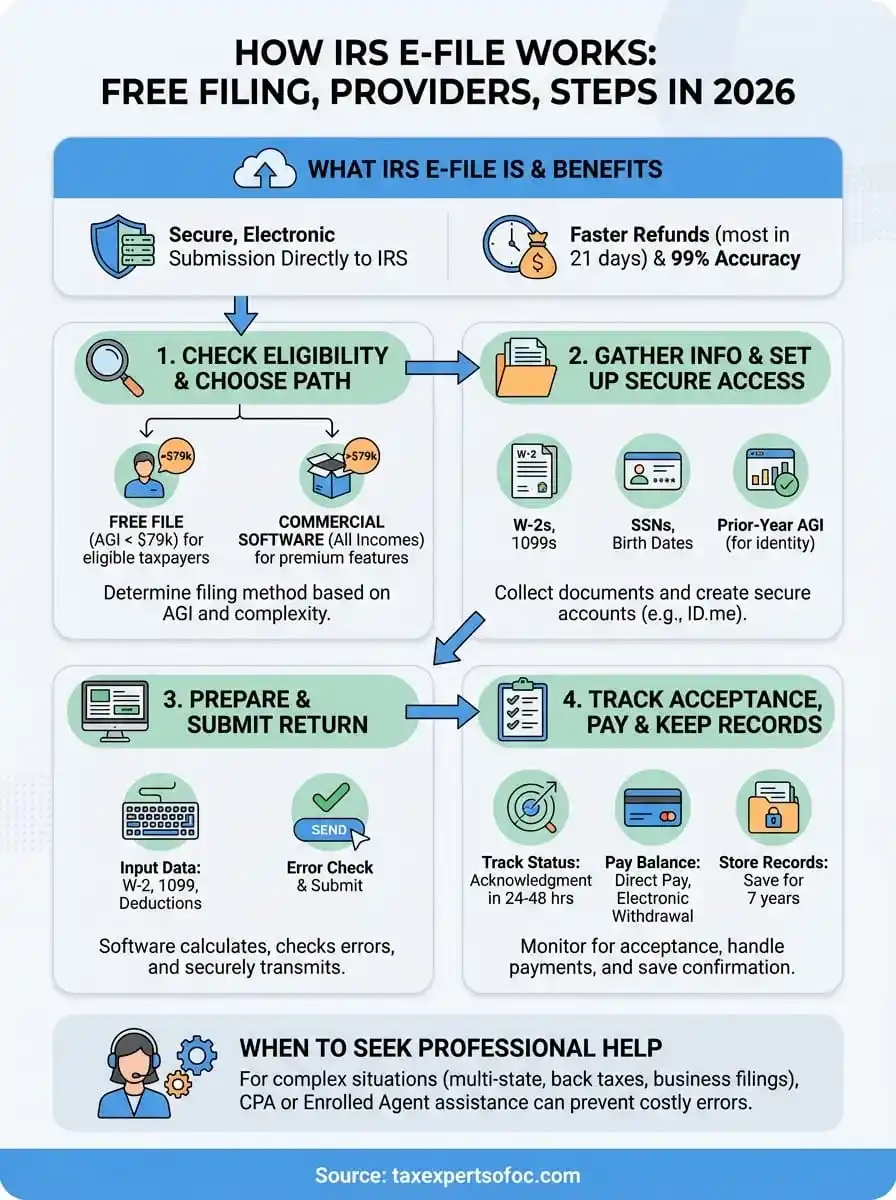
IRS e-file is the electronic system that lets you submit your federal tax return directly to the IRS through approved software or authorized tax professionals. Instead of mailing paper forms, you transmit your return data securely over the internet, where IRS systems receive, process, and verify your information within hours. The service handles individual returns, business filings, and amended returns, with most refunds issued within 21 days when you choose direct deposit.
You can access e-file through three main channels: commercial tax software like TurboTax or H&R Block, the IRS Free File program for eligible taxpayers, or through a credentialed tax professional who submits on your behalf. Each option encrypts your data during transmission and generates an electronic confirmation once the IRS accepts your return, giving you proof of filing that paper returns can't match.
The IRS reports that e-filed returns have a 99% accuracy rate compared to paper returns, which have error rates above 20%.
Who can file electronically
Individual taxpayers, self-employed workers, businesses, and tax-exempt organizations all qualify to use IRS e-file for their federal returns. If you're filing a Form 1040, 1040-SR, or any standard business return like 1120 or 1065, the system accepts your filing. Tax professionals with an Electronic Filing Identification Number (EFIN) can submit returns for unlimited clients, while individuals who prepare their own returns can file up to five returns per year using the same software account.
What returns qualify
The e-file system accepts most common tax forms, including individual income tax returns, corporate returns, partnership returns, and payroll tax filings. You can file current-year returns, prior-year returns going back several years, and amended returns using Form 1040-X electronically. Complex situations like multi-state filings, foreign income reporting, and specialized schedules all work through e-file, though some rare forms still require paper submission.
Step 1. Check eligibility and choose a filing path
Before you start your IRS e-file submission, you need to determine which filing method matches your tax situation and income level. Start by reviewing your adjusted gross income (AGI) from last year and assessing the complexity of your return. If your AGI falls below $79,000, you qualify for IRS Free File through partner software companies that provide free preparation and electronic filing. Taxpayers above this threshold can still use Free File Fillable Forms, which offer basic electronic submission without guided preparation.
Free File vs commercial software
Your income level determines whether you access free or paid filing options through the IRS e-file system. Free File partner programs provide full-service preparation with interview-style questions, calculations, and error checking for qualifying taxpayers. These programs typically include federal filing at no cost, though state returns may carry separate fees depending on the provider you select.
IRS Free File providers offer the same security and processing speed as paid commercial software, with refunds arriving just as quickly.
Commercial software like TurboTax, H&R Block, or TaxAct serves taxpayers at all income levels and offers premium features like live support, audit defense, and advanced tax situations. You pay fees ranging from $0 to $200 depending on complexity, but gain access to dedicated customer service and comprehensive review tools that catch errors before submission.
Step 2. Gather info and set up secure access
Once you've selected your filing method, you need to collect the tax documents and personal information required to complete your return. Most IRS e-file software asks for last year's AGI to verify your identity, along with Social Security numbers for everyone listed on your return. You'll also need W-2 forms from employers, 1099 forms for additional income, receipts for deductions, and records of estimated tax payments made throughout the year.

Required documents and personal details
Gather all income statements issued by employers, banks, investment firms, and clients if you're self-employed. You need your Social Security number, date of birth, and filing status ready before you start. If you're claiming dependents, collect their Social Security numbers and birth dates as well. Your prior-year tax return serves as an identity verification tool, so keep your 2025 AGI accessible when the system prompts you.
Most e-file software requires your prior-year AGI as a security measure, so keep last year's return within reach during setup.
Creating secure accounts
Many tax software providers require you to create an account with a verified email address and strong password before accessing their preparation tools. If you plan to use IRS online services like viewing transcripts or making payments, you'll need an IRS account authenticated through ID.me or Login.gov, which involves uploading identification documents and completing a video selfie verification process.
Step 3. Prepare and submit your return
You now enter your income information, deductions, and credits into your chosen tax software, following the interview-style prompts or filling forms directly depending on your filing method. Most IRS e-file platforms guide you through each section systematically, asking questions about employment income, investment earnings, business activity, and potential deductions like mortgage interest or education expenses. The software calculates your tax liability or refund automatically as you progress, flagging missing information or potential errors before you reach the submission stage.
Complete all required fields
Input your W-2 data exactly as it appears on your form, including employer identification numbers and state tax information if applicable. Enter 1099 forms for contract income, interest, dividends, and retirement distributions. Your software cross-references entries against IRS records in real time, alerting you when reported amounts don't match what the IRS expects based on third-party reporting.
The IRS matches your return against information reports from employers and financial institutions, so accuracy in data entry prevents processing delays.
Review and submit electronically
Run the built-in error check that scans for mathematical mistakes, missing signatures, or incomplete sections that would trigger IRS rejection. Review your refund amount or balance due one final time, then click the submit button to transmit your return. You'll receive an acknowledgment number within minutes confirming the IRS received your filing.
Step 4. Track acceptance, pay, and keep records
After submitting through IRS e-file, you receive an acknowledgment number confirming transmission, but the IRS still needs 24 to 48 hours to review your return for errors or data mismatches. Track your status through your software provider's dashboard or the IRS "Where's My Refund?" tool, which updates once daily with processing information.
Monitor your filing status
Check your software account regularly for acceptance confirmation or rejection notices that explain screening failures. If rejected, you typically have five days to correct errors and resubmit without penalties. Most rejections stem from incorrect prior-year AGI, mismatched Social Security numbers, or duplicate filings.
The IRS accepts 99% of e-filed returns on first submission, but you'll receive clear rejection codes if corrections are needed.
Pay any balance due
Schedule your tax payment through IRS Direct Pay, electronic funds withdrawal, or by mailing a check with Form 1040-V. Electronic options process immediately and generate confirmation numbers you should save. If you owe more than you can pay, set up payment plans online through the IRS website.
Store your confirmation
Save your acceptance confirmation, acknowledgment number, and a PDF copy of your return in a secure location for at least seven years. These documents prove filing dates if questioned and provide reference data for future returns.
Where to go from here
You now understand how IRS e-file works from selecting your filing method through tracking acceptance and maintaining records. The electronic system delivers faster refunds, fewer errors, and immediate confirmation compared to paper filing, with most returns processing within 24 hours of submission. Whether you qualify for Free File or choose commercial software for complex situations, electronic submission gives you control and transparency throughout the entire process.
Many taxpayers handle straightforward returns themselves without issue, but complicated tax situations often require professional expertise to avoid penalties. If you're dealing with back taxes, IRS notices, wage garnishments, multi-state filings, or business returns, working with a credentialed CPA or Enrolled Agent prevents costly mistakes that software alone can't catch. Our firm provides direct access to tax professionals, transparent pricing, and support for all 50 states through virtual consultations.
Contact Tax Experts of OC to speak with our team about your 2026 tax filing needs or any tax resolution issues you're currently facing.