
Running payroll for nonprofits looks nothing like running payroll for a regular business. You're juggling restricted grant funds, tracking time across multiple programs for cost allocation, and making sure your 990 filings line up with what payroll actually paid out. Pick the wrong system and you'll spend hours each month untangling fund coding instead of running your mission.
This guide compares the seven payroll platforms and services that actually handle nonprofit-specific needs well, from grant fund tracking to volunteer stipend management and multi-state compliance for remote staff. We looked at real pricing tiers, not marketing quotes, and weighed each option against what a small nonprofit with 10 to 50 employees actually needs versus what a larger organization with multiple funding sources requires.
You'll get a side-by-side breakdown of features, monthly costs, and who each platform fits best, whether you're a lean five-person team or a nonprofit managing grants across several states. We also flag where DIY payroll software falls short and when it makes more sense to bring in a CPA or Enrolled Agent who understands nonprofit accounting rules, unrelated business income tax, and the payroll tax pitfalls that trigger IRS notices down the road.
1. Tax Experts of OC nonprofit payroll and tax services
Most payroll platforms treat nonprofits like any other small business, which is exactly where things go wrong. Tax Experts of OC built its payroll service around organizations that need fund accounting, grant compliance, and direct access to a CPA or Enrolled Agent, not a call center rep reading from a script. If your nonprofit has ever gotten an IRS notice over misclassified stipends or mismatched 941 filings, you already know why generic software isn't enough.

Key features
The service wraps payroll processing into a broader accounting relationship, so payroll numbers actually match your books and your 990 come filing season. Here's what's included:
- Payroll runs coded to specific grants, programs, or restricted funds
- Multi-state tax compliance for remote and traveling staff
- Volunteer stipend and honorarium tracking that stays separate from W-2 wages
- Quarterly and annual payroll tax filings handled by an Enrolled Agent
- Direct coordination with your bookkeeping and CFO services, if you use them
- IRS notice response if a payroll tax issue ever surfaces
When payroll, bookkeeping, and tax filings come from the same team, fewer numbers fall through the cracks.
Pricing
Pricing runs on a custom quote model built around headcount, number of funding sources, and how many states you operate in, rather than a flat per-employee fee. That's a deliberate tradeoff: nonprofits with three grant streams and remote staff in five states don't fit neatly into a $40-plus-$6-per-head bracket anyway. Every engagement starts with a free 30-minute consultation, and pricing gets confirmed upfront before any work begins, so there's no surprise invoice later.
Best for
This option fits small to midsize nonprofits juggling multiple grants, restricted funds, or multi-state staff who need payroll tied directly into their accounting and tax compliance. It's also the right call for organizations that got burned by a DIY platform, received an IRS notice, or simply want a CPA reviewing payroll tax filings instead of hoping the software got it right. If your board asks pointed questions about fund allocation during an audit, having a tax professional already embedded in your payroll process saves a lot of scrambling.
2. Gusto for Nonprofits
Gusto has become a default choice for small nonprofits that want self-service payroll without hiring dedicated finance staff. It's built for general small business use, but its automation and integrations cover most of what a lean nonprofit needs, especially if you're not managing multiple grant funds yet.
Key features
Gusto handles the payroll basics well and adds a few extras nonprofits actually use, like PTO tracking for hourly and salaried staff and benefits administration for organizations offering health coverage. Key features include:
- Automatic payroll tax filings at federal, state, and local levels
- Employee self-onboarding and direct deposit
- Integration with QuickBooks and Xero for bookkeeping
- Health benefits and retirement plan administration
- Time tracking add-on for hourly program staff
Pricing
Gusto runs three tiers: Simple at $49 per month plus $6 per employee, Plus at $80 per month plus $12 per employee, and Premium with custom pricing for larger teams. Nonprofits get a 25% discount through Gusto's partnership program, which brings Simple down closer to $37 monthly. There's no dedicated tax professional included at any tier, so payroll tax filings run on autopilot without human review.
Automation handles the filing, but nobody at Gusto is checking whether your grant coding matches your 990.
Best for
Gusto suits small nonprofits with a single funding source, minimal fund accounting complexity, and staff comfortable managing HR tasks themselves without outside help.
3. OnPay for nonprofit payroll and HR
OnPay markets itself directly at nonprofits with a discounted nonprofit rate and a single flat price, which appeals to organizations tired of tiered upsells. It's a smaller player than Gusto or ADP, but its support team actually understands 501(c)(3) payroll quirks like tracking hours across grant-funded positions.
Key features
OnPay bundles HR tools and payroll into one price instead of charging extra for add-ons most competitors sell separately. Included features:
- Unlimited payroll runs with no per-run fees
- Multi-state tax filing built into the base price
- HR resource library and offer letter templates
- Workers' comp integration for program staff
- PTO tracking with custom accrual rules
Pricing
OnPay charges a flat $49 monthly base fee plus $6 per employee, with no separate tiers to navigate. Nonprofits qualify for a discount that knocks the base fee down to roughly $39.50 monthly, and that price includes HR features other platforms charge extra for. There's no dedicated tax advisor reviewing filings, but the flat structure makes budgeting predictable for boards approving annual line items.
One flat price with HR tools bundled in beats hunting for the right tier every renewal.
Best for
OnPay fits small nonprofits that want predictable pricing and don't need multiple tiers or complex grant fund coding. It works especially well for organizations with under 30 employees that want HR features bundled in without paying extra per module.
4. ADP nonprofit payroll and HR platform
ADP is the name most board members recognize, and that brand weight matters when a nonprofit needs a payroll vendor a grant auditor won't question. ADP built its nonprofit offering on top of its enterprise infrastructure, so you get compliance depth that smaller platforms can't match, though you'll pay for that scale.

Key features
ADP's nonprofit package leans on enterprise-grade compliance tools and HR support most small platforms don't offer at all. Included features:
- Multi-state and multi-jurisdiction tax filing with dedicated compliance staff
- HR advisory access for employee classification questions
- Time and attendance tracking across grant-funded programs
- Workers' comp and benefits administration bundled with payroll
- Dedicated support line separate from general customer service
Pricing
ADP doesn't publish flat rates. Every nonprofit quote comes through a sales consultation based on headcount, states, and which HR modules you add. Expect quotes to run higher than Gusto or OnPay for comparable headcount, often starting near $59 monthly plus per-employee fees once you add multi-state filing and HR advisory. Nonprofits with existing ADP relationships for other services sometimes get bundled discounts, so ask directly.
Bigger compliance infrastructure comes at a bigger price tag, and ADP makes you negotiate to find out how big.
Best for
ADP suits larger nonprofits with complex multi-state operations, dozens of employees, and budget room for enterprise-level HR support beyond basic payroll processing.
5. Paychex Flex for nonprofit payroll
Paychex Flex sits between OnPay's simplicity and ADP's enterprise scale, which makes it a common landing spot for nonprofits that outgrew a starter platform. Paychex built its nonprofit-friendly tools around retirement plan administration and HR support, useful for organizations trying to retain staff despite tighter nonprofit salary budgets.
Key features
Paychex packages payroll processing with HR and retirement tools that smaller platforms usually skip. Included features:
- Automated payroll tax filing across federal, state, and local jurisdictions
- 401(k) and retirement plan setup with employer match tracking
- HR support center with employee handbook templates
- Learning management system for staff training and certifications
- Mobile app for employee self-service and pay stub access
Pricing
Paychex doesn't post flat nonprofit rates online, so every quote comes from a sales call based on headcount and which modules you bundle in. Reported starting costs run near $39 monthly plus per-employee fees for basic payroll, climbing quickly once you add HR support or retirement administration. Nonprofits report mixed experiences with upsells during onboarding, so get every add-on price confirmed in writing before signing.
Retirement plan support sounds nice until the upsell calls start piling up after you sign.
Best for
Paychex fits midsize nonprofits that want retirement benefits administration bundled with payroll and are willing to negotiate pricing rather than accept a published rate. It works well for organizations focused on staff retention through benefits, provided someone on your team tracks the add-on costs closely.
6. QuickBooks Payroll for small nonprofits
QuickBooks Payroll fits nonprofits already running QuickBooks Online for bookkeeping, since payroll data flows straight into the ledger without manual entry. QuickBooks wasn't built for nonprofits specifically, but the accounting integration makes it a practical pick for lean teams that keep their books in-house rather than outsourcing to a CPA.
Key features
QuickBooks bundles payroll and bookkeeping together, which matters for small nonprofits without a dedicated finance staffer. Included features:
- Same-day or next-day direct deposit depending on plan
- Automatic payroll tax calculations and filings
- Direct sync with QuickBooks Online for fund-level reporting
- Health benefits and 401(k) plan access through partner providers
- Basic time tracking add-on for hourly program staff
Pricing
QuickBooks Payroll runs three tiers: Core at $50 monthly plus $6 per employee, Premium at $85 monthly plus $9 per employee, and Elite at $130 monthly plus $11 per employee. Nonprofits already on QuickBooks Online sometimes get bundled discounts through their accountant or a promotional rate, but there's no dedicated nonprofit pricing tier. Tax penalty protection only comes with Elite, which matters if you're worried about misfiled 941s.
Payroll that syncs straight into your existing books beats payroll that lives in a separate app you have to reconcile manually.
Best for
QuickBooks suits very small nonprofits, typically under 15 employees, already using QuickBooks Online for bookkeeping and comfortable managing payroll without grant fund coding built in.
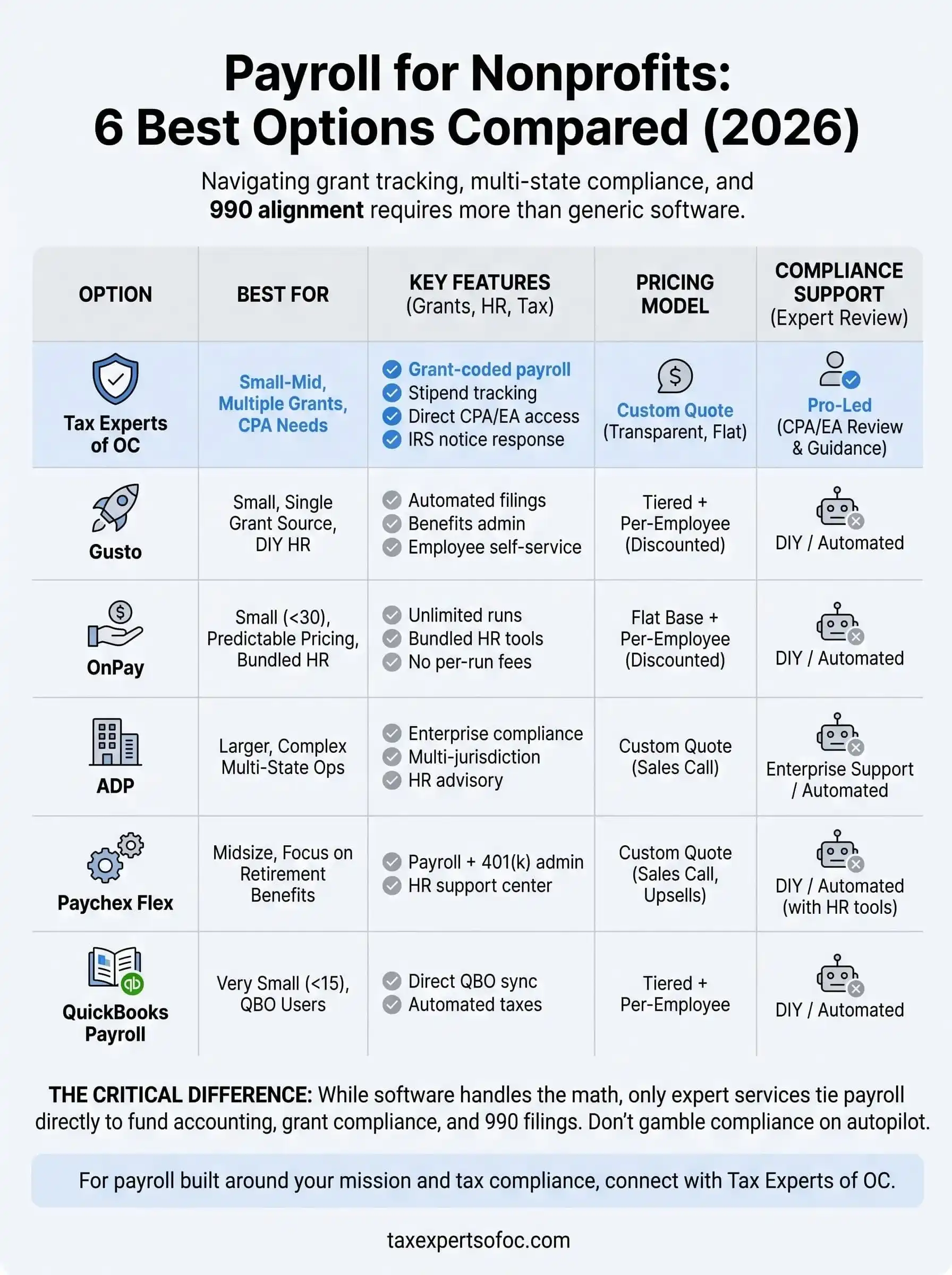
Finding the right payroll fit for your nonprofit
Six of these platforms handle payroll math correctly, but only one ties payroll for nonprofits directly to fund accounting, grant compliance, and a real tax professional who catches problems before the IRS does. If your organization runs a single grant with a small, stable staff, Gusto or OnPay will serve you fine. Larger operations with multi-state teams might lean toward ADP or Paychex despite the negotiation hassle.
Given all that, the real question isn't which software has the cleanest dashboard. It's whether your payroll data actually supports your 990, survives a grant audit, and gets flagged before a misclassified stipend turns into an IRS notice. Software alone can't answer that. A CPA or Enrolled Agent who already understands nonprofit accounting can.
If you'd rather not gamble your compliance on autopilot filings, schedule a free consultation with Tax Experts of OC and get a payroll setup built around how your nonprofit actually operates.