
Running payroll for restaurants is nothing like payroll for a normal office job. You're juggling tipped minimum wage, tip credits, overtime for line cooks who picked up a double shift, and a server roster that turns over every few months. Get any piece wrong and you're looking at IRS penalties or a wage claim from a former employee, on top of the labor cost tracking every owner already loses sleep over.
This guide compares the seven payroll platforms and services that actually handle restaurant complexity well, from tip pooling calculations to multi-location scheduling integrations. We looked at pricing, tip credit compliance, POS integrations, and how each option handles the seasonal hiring surges that hit this industry harder than most.
Whether you run one diner or a five-location group, you'll find a clear recommendation below based on your headcount and budget. And if you're already behind on payroll tax deposits or unsure whether your current setup is compliant, that's a separate problem worth fixing before you switch software, one our CPAs and Enrolled Agents at Tax Experts of OC handle for restaurant owners nationwide every day.
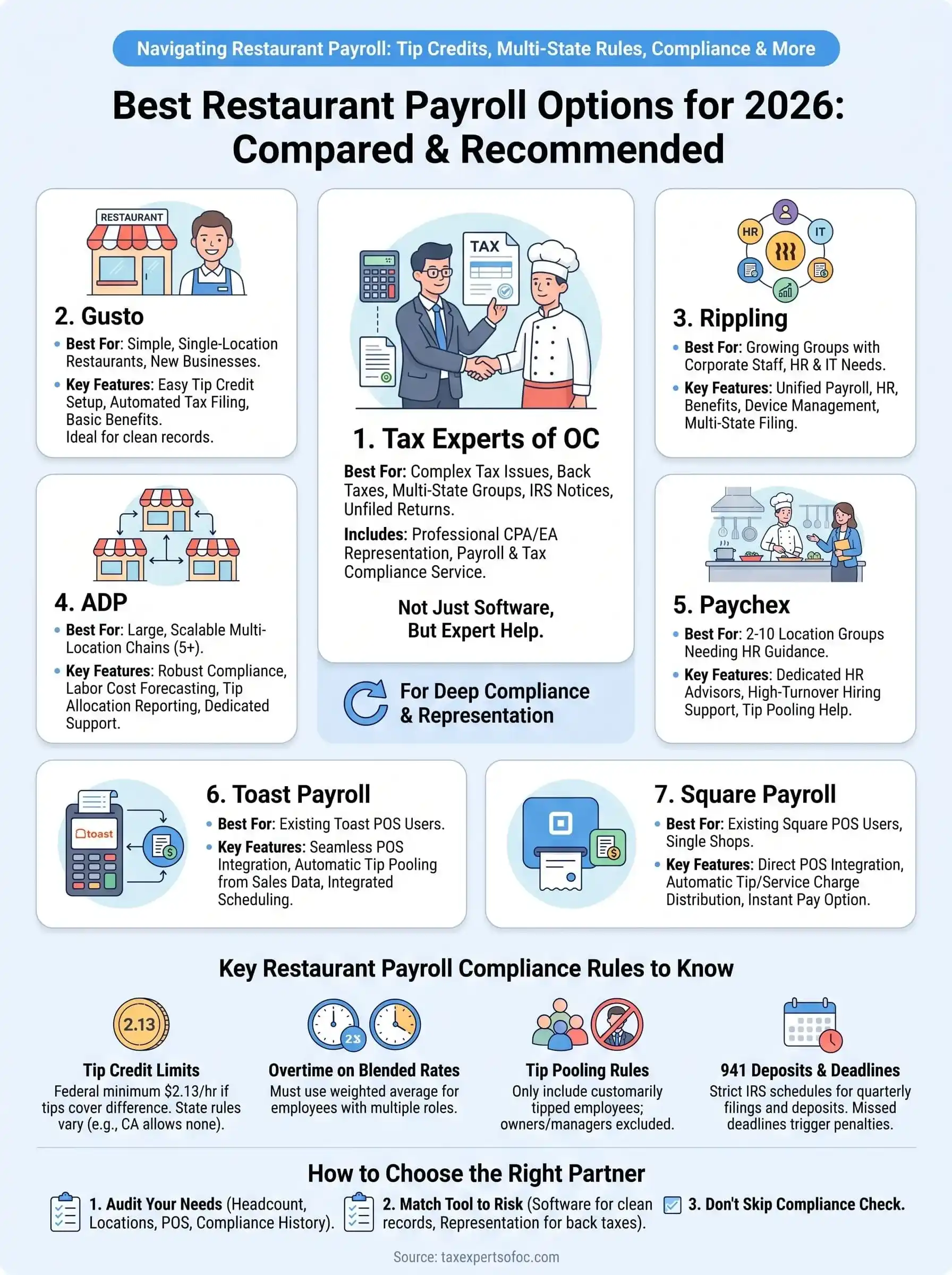
1. Tax Experts of OC payroll and tax compliance service
Most payroll platforms on this list process paychecks well. Very few of them will sit across from you when the IRS sends a notice about a missed 941 deposit or a mismatched W-2. Tax Experts of OC fills that gap for restaurant owners who need payroll for restaurants handled by an actual CPA or Enrolled Agent, not a support ticket queue, especially once the business has back taxes, prior payroll errors, or multi-state exposure to untangle.
How it works
You start with a free 30-minute consultation where a licensed professional reviews your current payroll setup, prior filings, and any open IRS correspondence. From there, the firm sets up or corrects your payroll tax deposits, quarterly 941 filings, W-2 and 1099 preparation, and state unemployment reporting, then keeps running it on a recurring schedule. Everything happens remotely by phone and secure document upload, so a restaurant group in Ohio gets the same direct access to a CPA as one down the street from the Orange County office.
Restaurant-specific features
This service is built around restaurant payroll compliance, not generic small-business bookkeeping bolted onto a payroll add-on. That distinction matters once tip income and multi-location filings enter the picture.
- Tip credit and tipped minimum wage calculations reviewed against IRS and state rules
- Multi-state and multi-location payroll tax filings for growing restaurant groups
- Back payroll tax resolution, including unfiled 941s and 940s from prior owners or bookkeepers
- IRS notice response and audit representation if payroll discrepancies trigger scrutiny
- Coordination with bookkeeping and CFO services so payroll costs tie directly into your P&L
If your payroll problem is really a tax problem, software won't fix it, representation will.
Pricing
Tax Experts of OC quotes pricing after the free consultation, based on employee count, filing complexity, and whether back tax issues need resolving alongside ongoing payroll. That's different from the flat per-employee pricing you'll see with the software platforms later in this list, but it reflects the reality that a restaurant with three years of unfiled quarterly returns needs more than a subscription. Flexible payment plans are available for owners facing financial hardship, and every quote is transparent before work begins.
Who it's best for
This fits restaurant owners who've received an IRS notice, have unfiled or amended returns in their history, or run multiple locations across state lines where a generic payroll app can't catch every jurisdiction's rules. If your only need is running clean, current payroll for a single location with no compliance baggage, one of the software options below may be a faster starting point, though many owners eventually pair both.
2. Gusto for simple restaurant payroll and benefits
Gusto is the platform most single-location restaurant owners land on first, and for good reason. It's built for small businesses that want clean payroll for restaurants without a steep learning curve, and it handles the basics of tipped wages competently enough for a diner or single café to run payroll in minutes each week.
How it works
You connect your bank account, add employees with their tip status and pay rate, and Gusto calculates gross pay, tax withholding, and net pay automatically each cycle. Time tracking syncs in through Gusto's own app or a handful of POS integrations, and the platform files your federal and state payroll taxes on autopilot once you've set up your tax accounts correctly.
Restaurant-specific features
Gusto supports tipped minimum wage calculations and tip credit setup per state, which covers most single-location needs.
- Automatic federal, state, and local tax filing
- Tip credit configuration by state
- Health benefits and 401(k) administration built in
- Basic time tracking with limited POS syncing
Gusto handles clean, single-location payroll well, but it wasn't built to untangle tip credit disputes across five states.
Pricing
Gusto starts around $49 a month plus $6 per employee on its Simple plan, with Plus and Premium tiers adding time tracking, HR support, and dedicated account management for roughly $80 to $180 a month plus per-employee fees.
Who it's best for
Gusto suits a single-location restaurant or small group with straightforward tip reporting and no history of payroll tax problems. Owners juggling multiple states or prior compliance gaps outgrow it fast.
3. Rippling for unified payroll, HR, and IT management
Rippling built its name automating IT provisioning for tech companies, but restaurant groups with corporate staff and multiple departments have started adopting it for a different reason: it merges payroll for restaurants with HR, benefits, and device management in one system. That combination suits a growing group with a back office, not a single counter-service shop.
How it works
Rippling runs on a modular structure where you activate only the pieces you need, starting with payroll and adding HR, benefits, or IT modules as the business grows. Employee data lives in one record, so a schedule change, address update, or new hire flows automatically into payroll, tax withholding, and benefits eligibility without re-entering anything. Time tracking integrates through Rippling's own app or third-party POS connections for hourly restaurant staff.
Restaurant-specific features
Rippling handles tipped wage calculations and multi-state tax filing, which matters for groups expanding across county or state lines.
- Automated multi-state payroll tax filing
- Tip credit configuration by jurisdiction
- Custom approval workflows for overtime and shift changes
- Device and software management for corporate or back-office staff
Rippling earns its price tag when your restaurant group has an office staff and IT footprint to manage, not just a kitchen crew.
Pricing
Rippling starts at $8 per employee per month for payroll alone, but the platform is built around add-on modules, so a full HR and IT setup typically runs $35 to $50 per employee monthly once you stack benefits administration and device management on top.
Who it's best for
Rippling fits multi-location restaurant groups with a corporate office, HR staff, and company-issued devices to track. A single café with no back-office headcount will pay for modules it never touches.
4. ADP for scalable multi-location restaurant payroll
ADP has run payroll for restaurant chains since long before software startups existed, and that legacy shows up in how deep its compliance engine goes. For a group with ten locations across three states, payroll for restaurants at this scale needs a system built for volume, not a small-business tool stretched thin.
How it works
You onboard through an ADP representative who configures your account structure by location, department, and job code, then employees clock in through ADP's time clocks, a POS integration, or a mobile app. Payroll runs on your chosen cycle, and ADP's back end handles tax jurisdiction assignment automatically, which matters when your line cooks and servers span multiple counties with different local tax rules.
Restaurant-specific features
ADP's restaurant clients get access to labor cost forecasting tools and tip allocation reporting built for chains, not single shops.
- Multi-jurisdiction tax filing across hundreds of local tax codes
- Tip credit and tip allocation reporting by location
- Labor cost and overtime forecasting dashboards
- New hire reporting automated across every state you operate in
ADP scales with a growing chain in a way lighter platforms simply can't once you cross five or six locations.
Pricing
ADP doesn't publish flat rates; pricing is quoted per business based on employee count, location count, and which HR modules you add, and most restaurant groups report costs starting around $10 to $20 per employee monthly once payroll and tax filing are bundled together.
Who it's best for
ADP suits restaurant groups with five or more locations, especially those crossing state lines, where dedicated support and jurisdiction-level tax accuracy outweigh the higher cost and setup time compared to smaller platforms.
5. Paychex for restaurant-focused HR and payroll support
Paychex sits between Gusto's simplicity and ADP's enterprise scale, and it's built a genuine niche serving restaurant owners who want payroll for restaurants paired with dedicated HR guidance rather than a self-service dashboard. Its restaurant-specific consulting team is the real differentiator here, not just the software itself.
How it works
Onboarding starts with a Paychex representative mapping your locations, job codes, and tip policies into the system, then employees clock in through Paychex Flex, a POS integration, or a mobile app. Payroll runs on your set schedule, and a dedicated HR consultant is available by phone for questions on tip pooling disputes, termination paperwork, or state-specific wage notices, which matters more for restaurants than for most small businesses.
Restaurant-specific features
Paychex built dedicated tools for tipped industries after years of serving hospitality clients directly.
- Tip credit setup and tip allocation reporting by location
- Access to HR advisors familiar with restaurant labor law
- Background check and applicant tracking for high-turnover hiring
- 24/7 employee self-service portal for pay stubs and W-2s
Paychex earns its cost through HR support most software platforms simply don't offer, not through flashier payroll features.
Pricing
Paychex Flex starts around $39 a month plus $5 per employee for its base plan, with higher tiers adding HR support, background checks, and dedicated specialists for roughly $80 to $160 monthly plus per-employee fees, depending on which HR services you bundle in.
Who it's best for
Paychex suits restaurant owners with two to ten locations who want more hands-on HR support than Gusto offers but don't need ADP's full enterprise infrastructure. Owners dealing with frequent turnover and staffing disputes benefit most from the included HR consulting.
6. Toast Payroll for POS-integrated restaurant teams
Toast built its reputation on point-of-sale hardware for restaurants, and its payroll product grew directly out of that system rather than as a bolted-on afterthought. If your restaurant already runs on Toast's POS, payroll for restaurants through Toast Payroll removes the manual step of exporting sales and labor data into a separate payroll tool every pay period.
How it works
Employee hours, tips, and sales data flow straight from the Toast POS into Toast Payroll without a separate time clock or export file. You approve hours, review tip distributions, and run payroll from the same dashboard you already use for orders and scheduling. Direct deposit and tax filing happen automatically once you've confirmed the numbers each cycle.
Restaurant-specific features
Toast designed this system around restaurant floor operations first, which shows in the tip and shift tools baked into the base product.
- Automatic tip pooling and tip-out calculations tied to POS sales data
- Shift-based labor cost reporting by role and daypost
- Tip credit configuration by state
- Integrated scheduling that flags overtime risk before it happens
Toast Payroll saves the most time for restaurants that already run their front and back of house on Toast hardware.
Pricing
Toast Payroll runs separately from POS fees, typically starting around $35 to $50 a month plus $4 to $9 per employee, though exact pricing depends on which Toast hardware and software modules you already have under contract.
Who it's best for
This fits restaurants already invested in Toast's POS ecosystem who want payroll and labor data in one place without juggling logins. Restaurants using a different POS system gain little from Toast Payroll's core advantage and should look elsewhere.
7. Square Payroll for restaurants already using Square
Square built its business on countertop card readers, and its payroll product follows the same philosophy as Toast's: keep everything in one login. If your restaurant already runs Square for point-of-sale, payroll for restaurants through Square Payroll pulls sales and tip data straight into paychecks without a separate export step.
How it works
Employees clock in through Square's POS or the Square Team app, and their hours and tips flow directly into Square Payroll. You review the numbers, approve the run, and Square handles direct deposit along with federal and state tax filings on your behalf. Setup takes less time than most competitors here since Square already has your business and employee records from the POS side.
Restaurant-specific features
Square designed its payroll tools around the same tip and shift data its POS already tracks, which keeps reporting consistent across both systems.
- Automatic tip and service charge distribution from POS sales
- Tip credit setup by state
- Instant pay option for employees between pay cycles
- Basic time tracking synced with Square scheduling
Square Payroll's real value is skipping the export step, not offering deeper compliance tools than its rivals.
Pricing
Square Payroll costs $35 a month plus $6 per employee for full-service payroll, or a contractor-only plan at $6 per person paid with no base fee, which suits restaurants that rely heavily on 1099 workers for catering or events.
Who it's best for
This fits single-location restaurants and small groups already using Square for POS who want the lowest-friction payroll setup available. Owners running multi-state operations or needing dedicated HR support should look toward Paychex or ADP instead, since Square's compliance tools stay fairly basic outside tip and wage calculations.
8. How to choose the right payroll partner for your restaurant
Picking between these seven options comes down to three questions: how many locations you run, whether you have compliance baggage from prior years, and how deeply your point-of-sale system needs to talk to payroll. A single diner with clean records has very different needs than a five-location group that inherited unfiled 941s from a previous owner. Matching the tool to your actual situation, not the flashiest feature list, is what makes payroll for restaurants manageable instead of another Sunday-night chore.

Start by auditing where you stand today before comparing software.
- Headcount and location count: single shops fit Gusto or Square; groups of five-plus locations need ADP or Paychex
- POS ecosystem: already on Toast or Square hardware? Their payroll products save real setup time
- Compliance history: unfiled returns, IRS notices, or back taxes mean you need representation, not just software
- HR support needs: high turnover kitchens benefit from Paychex's dedicated consultants over a self-service dashboard
- Multi-state exposure: filings across state lines demand a platform with jurisdiction-level tax accuracy built in
Honesty about that last category matters most. Software handles calculations well, but it can't respond to an IRS letter or negotiate a payment plan on unfiled quarterly returns.
The right payroll partner matches your compliance risk, not just your headcount.
Owners who skip this step often pick a platform based on price alone, then discover six months later that the tool never flagged a tip credit miscalculation or a missed state filing. Weigh your compliance exposure first, then let headcount and POS integration narrow the remaining choices.
9. Key restaurant payroll compliance rules to know
Every platform on this list can calculate a paycheck. Fewer of them explain the actual rules you're on the hook for as an employer, and that gap is where most payroll for restaurants mistakes happen. Knowing these rules yourself, even if software handles the math, keeps you from signing off on a run that's quietly wrong.
Tip credit limits
Federal law lets you pay tipped employees as little as $2.13 an hour if tips bring them up to the full minimum wage, but the U.S. Department of Labor requires you to make up the difference on any shift where tips fall short. Several states, including California, don't allow a tip credit at all, so your software needs the correct state setting, not just a federal default.
Overtime on blended rates
When a tipped employee works two roles at different pay rates in one week, overtime has to be calculated on a weighted average, not a single rate. Miss this and you underpay overtime every week without noticing.
Tip pooling rules
Mandatory tip pools can only include employees who customarily receive tips, and owners, managers, and supervisors are barred from taking a share under current DOL guidance.
941 deposits and reporting deadlines
Quarterly 941 filings and payroll tax deposits run on strict IRS deadlines, and missed deposits trigger penalties that compound fast.
Tip credit and overtime errors rarely show up until an employee complains or an auditor asks.
- Verify your state allows a tip credit before configuring it
- Recalculate overtime using blended rates for multi-role employees
- Exclude managers and owners from tip pools
- Track 941 deposit deadlines separately from payroll run dates
Finding the right payroll fit for your restaurant
Seven options, one decision: match the tool to your actual risk, not the slickest dashboard demo. Payroll for restaurants works best when you're honest about where you stand today. A clean single-location shop can run Gusto or Square Payroll without much friction. A five-location group with prior tax problems needs something software alone can't provide.
Before you sign up for another subscription, ask whether your real problem is a tool gap or a compliance gap. Plenty of owners buy new payroll software only to discover months later that it never caught a misapplied tip credit or a missed 941 deposit from before they switched. That's not a software failure, it's a representation gap.
If you're carrying unfiled returns, IRS notices, or multi-state exposure alongside your payroll headaches, start with a conversation instead of another signup form. Book your free consultation with Tax Experts of OC and get a CPA or Enrolled Agent looking at your actual numbers.