
Running payroll yourself eats up hours every week, hours you could spend growing your business. Between calculating wages, withholding the right taxes, and filing on time with state and federal agencies, payroll processing services exist to take that burden off your plate. But choosing the wrong provider can create bigger headaches than doing it manually, from missed tax deadlines to compliance penalties that hit your bottom line.
At Tax Experts of OC, we handle payroll for small businesses across all 50 states, so we know firsthand what separates a reliable payroll provider from one that causes problems. Our CPAs and Enrolled Agents work directly with business owners on employee compensation, tax withholding, and filing accuracy, which gives us a sharp perspective on what actually matters when evaluating these services.
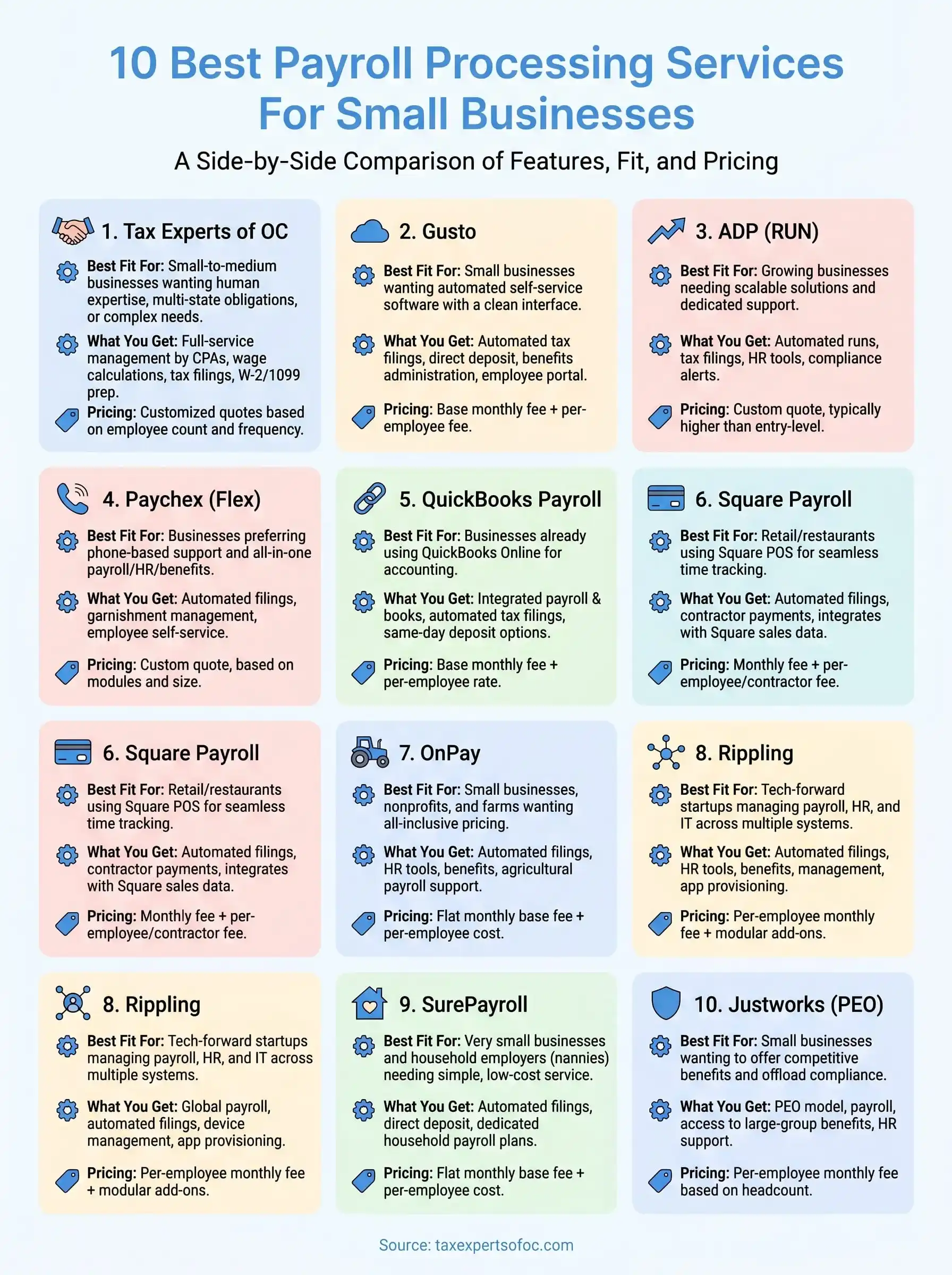
We put together this list of the 10 best payroll processing services for small businesses to help you compare your options side by side. Whether you need basic pay runs or full-service tax compliance, this guide breaks down pricing, features, and who each provider works best for so you can make a confident decision.
1. Tax Experts of OC
Tax Experts of OC is a CPA and Enrolled Agent-led firm based in Orange County, California, that delivers full-service payroll processing services to small businesses in all 50 states. Unlike software-only platforms, you work directly with licensed professionals who handle your payroll and take responsibility for every filing they submit on your behalf.
.webp)
Best fit for
This service fits small to medium-sized businesses that want a human expert managing payroll rather than navigating a dashboard on their own. It works especially well for business owners dealing with multi-state payroll obligations, prior IRS issues, or complex compensation structures that generic software handles poorly.
What you get
Tax Experts of OC manages employee wage calculations, tax withholding, and payroll tax deposits at the federal, state, and local level. You also get W-2 and 1099 preparation, quarterly payroll tax filings, and optional coordination with bookkeeping and accounting services if your books need to stay in sync with your payroll records.
How onboarding and ongoing payroll works
Onboarding starts with a free 30-minute consultation where the team collects your employee data, pay schedule, and tax registration details. A CPA or Enrolled Agent then builds your payroll structure and runs each pay period from there. You submit hours or compensation changes directly to your assigned professional, who reviews everything before any deposits or filings go out.
Having a licensed professional review each pay run before submission means errors get caught early, before they turn into IRS notices.
Pricing approach and what affects cost
Pricing is customized based on your employee count, pay frequency, and state filing requirements. Tax Experts of OC provides transparent upfront quotes so you know your costs before you commit. Flexible payment options are available for businesses in tighter cash flow situations, and there are no hidden fees added on for standard quarterly or annual filings.
What to ask before you sign
Before you move forward, get clear answers on the following:
- Who specifically manages your payroll account day to day?
- How do you confirm that tax deposits were made on time?
- What is the process if a filing error occurs?
- Can the team handle employees working across multiple states?
- How do you submit payroll changes each pay period?
2. Gusto
Gusto is a cloud-based payroll platform built with small business owners in mind. It handles automated payroll runs, tax filings, and employee self-service through a clean interface that requires no accounting background to use.
Best fit for
This platform works best for small businesses with W-2 employees in straightforward payroll situations. It suits companies that want to manage payroll processing services themselves through software rather than delegating to a professional.
What you get
You get automatic federal, state, and local tax filings, direct deposit, W-2 and 1099 preparation, and basic benefits administration including health insurance and retirement plan integrations. Higher-tier plans add time tracking and HR tools for businesses that want more in one place.
How onboarding and ongoing payroll works
Setup walks you through a step-by-step process where you enter company and employee details, connect your bank account, and set your pay schedule. After setup, you run payroll by logging in and confirming hours or salaries each period, and the system handles tax deposits and filings automatically.
Automated filings reduce manual errors, but you are still responsible for reviewing the numbers Gusto submits on your behalf.
Pricing approach and what affects cost
Gusto charges a base monthly fee plus a per-employee fee. The Simple plan starts around $40 per month plus $6 per employee. Costs increase as you move to higher tiers that bundle in HR features and priority support.
What to ask before you sign
Before you commit, get clear answers on these questions:
- Does the plan you need cover multi-state payroll?
- What support options are available if a filing gets rejected?
- How does Gusto handle businesses that use only contractors?
3. ADP
ADP is one of the largest payroll processing services providers in the country, with products that scale from small startups to enterprise-level companies. Their small business product, RUN Powered by ADP, is built specifically for teams under 49 employees and handles both payroll and basic HR administration.
Best fit for
ADP fits small businesses that expect to grow and want a provider that can scale with them without requiring a platform switch. It also works well for companies that need dedicated customer support rather than relying on help documentation to solve problems.
What you get
You get automated payroll runs, federal and state tax filings, direct deposit, and W-2 preparation built into every plan. Higher-tier packages add HR features including employee handbooks, background checks, and workers compensation payment services.
ADP's compliance tools flag potential issues before you run payroll, which can help you avoid costly filing corrections later.
Pricing approach and what affects cost
ADP does not publish its pricing publicly. You need to contact their sales team for a custom quote, which varies based on employee count, plan tier, and add-ons. Most small businesses report paying more than entry-level platforms like Gusto, so factor that into your comparison.
What to ask before you sign
Before you commit to ADP, get answers to these questions:
- What is the total monthly cost including all fees?
- Does your plan include multi-state filing coverage?
- What support channels are available outside of business hours?
- How does the contract term and cancellation policy work?
4. Paychex
Paychex is a long-standing provider of payroll processing services that serves businesses of all sizes, with a small business product called Paychex Flex. The platform combines automated payroll with HR tools, time tracking, and compliance support in one place.
Best fit for
This platform works best for small to mid-sized businesses that want a single vendor covering payroll, HR, and benefits without juggling separate tools. It also suits owners who prefer phone-based support over chat or email-only help desks.
What you get
You get automated payroll runs, direct deposit, federal and state tax filings, and W-2 and 1099 preparation across most plans. The platform also includes new hire reporting, garnishment management, and an employee self-service portal where workers can access their pay stubs and tax documents directly.
Paychex handles garnishment payments on your behalf, which removes a common compliance burden for employers managing court-ordered deductions.
How onboarding and ongoing payroll works
Setup involves working with a dedicated Paychex representative who walks you through entering company details, employee records, and pay schedules. Once live, you run payroll through the Paychex Flex dashboard or mobile app, and the system automatically calculates taxes and submits deposits on your selected timeline.
Pricing approach and what affects cost
Paychex does not list pricing publicly. You need to request a quote directly, and costs vary based on employee count, plan tier, and any add-on modules you select. Expect to pay more than entry-level platforms.
What to ask before you sign
Before you commit, get clear answers to these questions, especially around contract terms and multi-state coverage:
- What is the full monthly cost including all per-employee fees?
- Does your plan cover payroll in multiple states?
- How are errors handled if a tax deposit is missed?
- What are the contract length and cancellation terms?
5. QuickBooks Payroll
QuickBooks Payroll is built into the Intuit ecosystem, making it a practical choice for businesses that already manage their books in QuickBooks Online. The platform combines automated payroll, tax filings, and direct deposit in the same environment as your accounting, so your financial records stay aligned without manual reconciliation.
Best fit for
QuickBooks Payroll works best for small businesses already using QuickBooks Online for their accounting. Connecting payroll inside the same platform eliminates double entry and keeps your payroll data and general ledger synced automatically. It is less compelling if you do not already use QuickBooks, since standalone competitors often offer comparable features at a lower price point.
What you get
You get automated federal and state tax filings, direct deposit, and W-2 preparation on every plan tier. Higher plans add same-day direct deposit, tax penalty protection, HR advisory access, and contractor 1099 filing. All tiers include an employee self-service portal for pay stubs and tax documents.
How onboarding and ongoing payroll works
Setup walks you through entering company details, employee records, and pay schedules inside your existing QuickBooks account. Once live, you confirm compensation each period and the system handles tax calculations and deposits automatically on your chosen schedule.
If your books are already in QuickBooks, adding payroll cuts setup time significantly compared to switching to a separate platform.
Pricing approach and what affects cost
QuickBooks Payroll charges a base monthly fee plus a per-employee rate. Entry-level plans start around $45 per month plus $6 per employee. Premium tiers add same-day deposit and tax penalty coverage at higher monthly rates.
What to ask before you sign
Before you commit, get clear answers to these questions:
- Does your plan include multi-state payroll processing services?
- What happens when a tax deposit is rejected or late?
- How do you reach support outside standard business hours?
6. Square Payroll
Square Payroll is a lightweight payroll processing services option built specifically for businesses already using Square for point-of-sale and payment processing. It handles automated pay runs, tax filings, and direct deposit without requiring any payroll experience to operate.
Best fit for
Square Payroll works best for retail, restaurant, and service businesses that already run transactions through Square. The tight integration between your sales data and payroll saves time, particularly for businesses with hourly workers whose hours feed directly from Square's scheduling tools.
What you get
You get automated federal and state tax filings, direct deposit, and W-2 and 1099 preparation on every plan. The platform also supports paying both employees and contractors in the same account, which helps if your workforce mixes both arrangements.
Square Payroll's contractor-only plan lets you pay 1099 workers without a monthly base fee, which makes it one of the more affordable options for freelancer-heavy businesses.
How onboarding and ongoing payroll works
Setup connects your existing Square account to payroll, then walks you through entering employee details and pay schedules. Approved hours from Square's timekeeping tools pull directly into each pay run, reducing manual data entry during each payroll cycle.
Pricing approach and what affects cost
Square Payroll charges $35 per month plus $6 per employee for full-service payroll. The contractor-only plan costs $6 per contractor per month with no base fee.
What to ask before you sign
- Does your state require any filings Square does not currently support?
- How do you handle payroll if you stop using Square for payments?
- What support options are available if a tax deposit fails?
7. OnPay
OnPay is a cloud-based payroll platform that targets small businesses, nonprofits, and agricultural employers who need full-service payroll without paying enterprise-level prices. The platform handles tax filings, direct deposit, and HR tools in a single straightforward interface that does not require an accounting background to operate.
Best fit for
This platform works best for small businesses, farms, and nonprofits that need compliant payroll across industries where most platforms fall short. It also suits owners who want all-inclusive pricing without add-on fees stacking up each month.
What you get
You get automated federal, state, and local tax filings, direct deposit, W-2 and 1099 preparation, and benefits administration including health insurance and retirement integrations. OnPay also bundles HR tools and an employee self-service portal into every plan rather than locking them behind premium tiers.
OnPay covers agricultural payroll, which most competitors skip entirely, making it a practical option for farm and ranch operations that need compliant payroll processing services.
How onboarding and ongoing payroll works
Setup involves entering company information, employee records, and pay schedules through a guided process. OnPay's support team assists with migrating data from a previous provider if you are switching mid-year, which reduces the risk of losing prior payroll records during the transition.
Pricing approach and what affects cost
OnPay charges a flat monthly base fee of $40 plus $6 per employee. That single rate covers all features, so your total cost scales predictably as you add employees without unlocking new pricing tiers.
What to ask before you sign
- Does OnPay support payroll in every state where your employees work?
- How does the platform handle mid-year data migrations from a previous provider?
- What support channels are available if a tax filing deadline is missed?
8. Rippling
Rippling is a workforce management platform that combines payroll, HR, IT, and benefits into one connected system. It stands out from most other payroll processing services because it treats employee data as a central record that syncs across every tool your business uses, removing the manual updates that come with juggling separate platforms.
Best fit for
Rippling works best for tech-forward small businesses and fast-growing startups that manage employees across multiple systems and want those systems to communicate automatically. It also suits companies that hire internationally, since Rippling supports global payroll in addition to domestic runs.
What you get
You get automated payroll runs, tax filings, direct deposit, and W-2 preparation alongside deep integrations with hundreds of third-party apps. The platform also handles benefits administration, device management, and app provisioning, so onboarding a new employee updates payroll, IT access, and benefits at the same time without separate logins or manual data entry.
Because Rippling connects payroll to your HR and IT systems, a single employee record change pushes updates across every connected tool automatically.
How onboarding and ongoing payroll works
Setup requires connecting your existing HR data and business systems to Rippling's platform. Once live, payroll runs on your chosen schedule with taxes calculated and filed automatically based on each employee's location.
Pricing approach and what affects cost
Rippling charges a per-employee monthly fee starting around $8, but your total cost depends on which modules you add. Each feature set is priced separately, so your final bill reflects exactly what you activate.
What to ask before you sign
Before committing, clarify the total monthly cost since the modular pricing model makes it easy for your bill to grow as you add features.
- Which modules are included versus separately billed?
- How does Rippling handle multi-state tax filings?
- What support is available if a payroll run fails?
9. SurePayroll
SurePayroll is a Paychex-owned payroll platform designed specifically for small business owners who want a simple, low-cost way to run payroll without learning a complex system. It covers tax filings, direct deposit, and basic HR tools through a straightforward online interface.
Best fit for
SurePayroll works best for very small businesses and household employers, including families that pay nannies or caregivers. It also suits solo operators and micro-businesses looking for affordable payroll processing services without the feature overhead of enterprise platforms.
What you get
You get automated federal and state tax filings, direct deposit, and W-2 preparation on every plan. SurePayroll also offers a nanny payroll option that handles household employer tax obligations separately from standard business payroll, which most competitors do not break out as a dedicated plan.
The nanny payroll plan covers Schedule H filings, which household employers must submit annually as part of their personal tax return.
How onboarding and ongoing payroll works
Setup walks you through entering company details, employee records, and pay schedules online. Once configured, you log in each pay period to confirm hours or salaries, and the platform processes deposits and submits tax filings automatically on your behalf.
Pricing approach and what affects cost
SurePayroll charges a flat monthly base fee plus a per-employee cost. Exact rates require a direct quote, but pricing generally sits below mid-market competitors like ADP and Paychex.
What to ask before you sign
- Does your plan cover multi-state tax filings?
- How does SurePayroll handle a missed deposit?
- What support options are available on nights and weekends?
10. Justworks
Justworks is a Professional Employer Organization (PEO) that bundles payroll, benefits, compliance, and HR support into a single platform. Rather than acting as standalone payroll software, Justworks co-employs your workers, which gives your small business access to large-group benefits and compliance infrastructure that would otherwise be out of reach.
Best fit for
Justworks works best for small businesses that want to offer competitive benefits alongside payroll without managing multiple vendors. It suits founders who want payroll processing services and HR administration handled together under one predictable monthly cost.
What you get
You get automated payroll runs, tax filings, direct deposit, and W-2 preparation alongside access to health insurance, dental, vision, and 401(k) plans at group rates. Justworks also handles workers compensation and compliance support as part of its standard offering.
Because Justworks operates as a PEO, your employees gain access to benefits typically reserved for much larger companies, which can help you compete for talent without building an in-house HR team.
How onboarding and ongoing payroll works
Setup involves entering employee records and compensation details through the Justworks platform. Once live, payroll runs on your selected schedule with taxes filed automatically at the federal and state level.
Pricing approach and what affects cost
Justworks charges a per-employee monthly fee that varies based on your headcount and the benefits package you select. Larger teams pay a lower per-employee rate as their employee count grows.
What to ask before you sign
- Does the plan cover multi-state payroll for remote employees?
- What benefits options are available in your specific state?
- How does Justworks handle payroll corrections after a run is processed?
How payroll processing services work
Payroll processing services collect your employee compensation data, calculate the correct deductions, distribute funds to workers, and submit the required tax payments and filings to government agencies on your schedule. The specifics vary by provider, but the underlying flow stays consistent across platforms and professional services alike.

How you submit payroll data
You provide your provider with employee hours, salaries, and any compensation changes before each pay period closes. Software platforms typically let you enter this through a dashboard or import it from a time tracking tool. Professional services usually have you submit directly to an assigned contact, who reviews the figures before anything goes out.
Submitting payroll data through a human reviewer adds a check that automated platforms skip, which reduces the chance of errors reaching your employees or the IRS.
What happens with taxes and filings
Once your compensation data is confirmed, the provider calculates federal, state, and local tax withholdings for each employee and determines what your business owes as the employer. Funds move from your business bank account to cover both employee net pay and tax deposits, which go to the appropriate agencies by their required deadlines. At the end of the year, the provider prepares W-2s for employees and 1099s for contractors, then submits the corresponding annual filings. If your business operates across multiple states, the provider tracks each state's deposit schedules and filing rules separately, since missing a state deadline carries the same penalty risk as missing a federal one.
What to look for before you choose a provider
Not every payroll processing services provider covers the same filing requirements, and choosing based on price alone can leave gaps that cost you more later. Before you sign with anyone, evaluate a few specific factors that separate providers who can handle your payroll reliably from those who only handle the easy parts.
Tax compliance and filing coverage
Your provider needs to cover every state where your employees work, not just your home state. Multi-state filing rules vary significantly, and a provider that misses a state deposit deadline exposes you to penalties your business owes regardless of who made the mistake. Confirm that your plan includes automatic tax deposits and annual filings at the federal, state, and local level before you commit.
If your provider misses a tax deposit, the IRS holds your business liable, not the payroll company.
Here are the coverage questions worth asking every provider you consider:
- Does your plan include all states where current employees work?
- Are W-2s, 1099s, and quarterly filings included, or billed separately?
- How do you handle new state registrations when you hire in a new location?
Support and error resolution
Find out exactly how your provider handles errors and rejected filings before one actually happens. Some software platforms offer limited support outside business hours, which means a payroll problem that surfaces on a Friday can sit unresolved through the weekend. Ask whether you have a dedicated point of contact or a general support queue, and confirm the answer in writing so you know what to expect when something goes wrong.
Average costs and common payroll pricing models
Understanding what payroll processing services actually cost helps you budget accurately and avoid surprises once you are locked into a contract. Most providers use one of a few standard pricing structures, and knowing the differences helps you compare quotes on an equal footing.

Per-employee plus base fee model
This is the most common structure across software-based payroll platforms. You pay a fixed monthly base fee plus an additional charge for each active employee on your payroll. Entry-level plans typically start between $35 and $50 per month as a base, with per-employee rates ranging from $5 to $12 depending on the plan tier and features included.
As your headcount grows, the per-employee cost adds up quickly, so run the math on your actual team size before committing to any plan.
Flat-rate and PEO pricing
Some providers, particularly Professional Employer Organizations like Justworks, charge a single per-employee monthly rate that covers payroll, benefits access, and compliance support together. These rates typically range from $49 to $150 per employee per month, depending on the benefits package your business selects. This model costs more upfront but bundles services that would otherwise require separate vendors.
What drives your total cost up
Several factors push your monthly payroll bill higher than the advertised base price. Multi-state filing requirements, off-cycle payroll runs, contractor 1099 preparation, and year-end W-2 printing often carry additional per-transaction or annual fees that providers do not always highlight prominently during the sales process. Always request an itemized cost breakdown before signing.
Payroll tax and compliance pitfalls to avoid
Even with a reliable payroll processing services provider handling your filings, your business stays legally responsible for the accuracy and timeliness of every submission. Knowing where payroll mistakes most commonly happen helps you catch problems before the IRS does.

Missing deposit deadlines
Federal payroll tax deposits follow a schedule tied to your total tax liability, which the IRS determines based on your prior lookback period. Most small businesses fall into either the monthly or semi-weekly deposit schedule, and depositing even one day late triggers penalties that start at 2% and climb to 15% depending on how overdue the payment is. Confirm that your provider sends deposits on the correct date, not just the due date.
The IRS does not reduce or waive late deposit penalties simply because a payroll provider made the error on your behalf.
Common deposit mistakes to watch for include:
- Assuming your provider auto-enrolled your business in the correct schedule
- Missing a schedule change after your tax liability crosses a new threshold
- Overlooking state deposit deadlines, which often differ from federal ones
Misclassifying workers
Treating an employee as an independent contractor to avoid payroll taxes is one of the most common and costly mistakes small business owners make. The IRS uses a multi-factor test to determine worker status, and getting it wrong exposes you to back taxes, interest, and penalties on every misclassified paycheck. If workers follow your schedule, use your equipment, and perform work central to your business, they likely qualify as employees. Review the IRS worker classification guidance before setting up any contractor arrangement.
Payroll processing services FAQs
These are the questions small business owners ask most often before choosing a provider. The answers below cover the situations that catch people off guard after they have already signed up.
What do payroll processing services actually cost for a small business?
Most software-based payroll processing services charge a base fee between $35 and $50 per month, plus $5 to $12 per employee. Professional and PEO services charge more but bundle compliance support and benefits access into that rate. Always request an itemized quote, since add-on fees for multi-state filing or year-end forms can push your actual bill well above the advertised price.
Can I switch payroll providers mid-year?
Yes, and many businesses do it without major issues. You need complete payroll records from your previous provider, including year-to-date wages and tax deposits, so your new provider can file accurate quarterly and annual returns. Mid-year switches work best when you time them to the start of a new quarter, which simplifies the records handoff.
Confirm your new provider accepts prior-period data before you cancel your existing service.
Am I liable if my payroll provider makes a filing error?
Your business remains legally responsible for every tax deposit and filing, regardless of who submitted it. The IRS and state agencies hold you accountable for errors made by your provider. Choose a service where a licensed professional reviews filings before submission, and keep copies of every confirmation you receive.
Do I need a payroll service if I only have one employee?
Yes. Even a single employee triggers federal and state payroll tax obligations, including deposit schedules, quarterly filings, and year-end W-2 preparation. Managing those requirements manually increases your risk of missing a deadline, and the penalties apply at any headcount.
Your next step
You now have a clear picture of what each payroll processing services provider offers, where they fall short, and which situations they fit best. The right choice depends on your employee count, how many states you operate in, and whether you want software you manage yourself or a licensed professional handling every filing on your behalf.
If your payroll involves multi-state employees, a mix of W-2 workers and contractors, or any prior IRS issues, a human expert reviewing each run before it goes out is worth more than the cheapest subscription plan. Errors in payroll tax filings follow your business, not the provider, so the quality of oversight matters.
Tax Experts of OC offers a free 30-minute consultation with a CPA or Enrolled Agent who can assess your current setup and tell you exactly what needs to change. Schedule your free consultation and get a straight answer before your next pay period.