
Tax deadline is closing in and your missing W-2 is nowhere to be found. Maybe your employer never sent it, maybe it got lost in the mail, or maybe the company closed down and no one is answering the phone. Whatever the reason, you still have a filing obligation, and the IRS doesn't extend deadlines just because paperwork went missing.
You can absolutely file your taxes without a W-2 in hand, and this guide walks you through exactly how. We cover the specific steps to take with your employer first, when and how to loop in the IRS directly, and what to do if the form still doesn't show up before the deadline. You'll also learn how Form 4852 works as a substitute and how to estimate your wages and withholding accurately enough to avoid problems later.
We've helped plenty of clients at Tax Experts of OC navigate this exact situation, often right before a filing deadline. Getting it right the first time matters, because guessing wrong on income or withholding can trigger an audit or delay your refund. Read on for the practical steps that keep you compliant and moving forward.
What to know before chasing down your missing W-2
Before you start dialing phone numbers, get clear on a few facts that shape everything else in this process. The IRS requires every employer to send W-2 forms by January 31 each year, whether by mail, email, or through a payroll portal. If it's early February and nothing has shown up, you're not jumping the gun by taking action. You're right on schedule.
The January 31 deadline and why it matters
Employers must furnish W-2s to employees and file copies with the Social Security Administration by January 31, per IRS guidelines on employer reporting requirements. Mailed forms can take a week or two to arrive after that, so a slight delay in early February isn't unusual. What is unusual, and worth acting on, is silence that stretches past the middle of the month. Keep in mind that a missing W-2 doesn't excuse you from the April filing deadline. The IRS expects your return on time regardless of whether your paperwork cooperated.
Common reasons your W-2 never arrived
A handful of scenarios account for most missing W-2 cases, and knowing which one applies to you determines your next move.
- Wrong address on file: You moved and never updated HR, so the mailed copy went to your old apartment.
- Employer went out of business: The company closed, got acquired, or simply stopped operating, leaving no one to issue final paperwork.
- Payroll processing delay: Small employers sometimes run behind, especially if they switched payroll providers mid-year.
- Portal access lost: You left the job and can no longer log into the employee self-service system where your W-2 lives digitally.
- Multiple employers: You changed jobs during the year and one employer's W-2 is missing while the others arrived fine.
What you'll need on hand before you start
Gathering a few documents up front saves you from repeating steps later, especially if you end up calling the IRS or filing Form 4852. Have these ready:
| Item | Why you need it |
|---|---|
| Last pay stub of the year | Shows year-to-date wages and withholding for estimation |
| Employer's legal name and EIN | Required for IRS calls and Form 4852 |
| Your Social Security number | Needed for every step in this process |
| Dates of employment | Helps confirm which tax year and employer the missing form covers |
| Prior year's W-2 (if same employer) | Useful for cross-checking typical withholding patterns |
A missing W-2 is an inconvenience, not an excuse. Your filing deadline stays exactly where it is.
Set a realistic timeline for yourself
Don't wait until April 10th to start chasing this down. Give yourself at least six weeks of runway before the filing deadline, since contacting your employer, waiting on a response, and potentially calling the IRS directly all take time. If you're reading this in February, you're in good shape. If it's already late March, move faster through the steps ahead and consider filing an extension with Form 4868 while you sort out the wage details, since an extension buys you time to file but not to pay any tax owed.
Once you understand the deadline, the likely cause of the delay, and what documents you'll need, you're ready to start working the problem methodically. The steps that follow move from the simplest fix (checking your inbox) to the more involved backup options (estimating wages and filing substitute forms), so work through them in order rather than skipping ahead.
Step 1. Check your email and employer portal
Before you pick up the phone or panic about your missing W-2, spend fifteen minutes checking the digital channels first. Most employers now deliver W-2s electronically, and a surprising number of "missing" forms turn out to be sitting in a spam folder or an unused portal login. This step costs you nothing and often solves the problem outright.

Search your inbox thoroughly
Start with your primary email, but don't stop there. Payroll notifications often land from third-party providers like ADP, Paychex, or Gusto, using addresses you might not recognize at a glance. Search your inbox for terms like "W-2," "tax form," or the name of your payroll provider rather than just scanning your recent messages.
- Check your spam and junk folders, since automated payroll emails get filtered out more often than you'd expect.
- Search any secondary or work email accounts you used during that employment period.
- Look for messages from the actual payroll vendor name, not just your employer's name.
- Check archived or promotional tabs if you use Gmail's inbox categorization.
Half of all "lost" W-2s are really just unopened emails sitting in a spam folder.
Log into your employer's payroll portal
If your employer uses a self-service system such as ADP, Workday, or a similar HR platform, your W-2 is likely posted there even if no email ever went out. Try logging in with your usual credentials first. If you've forgotten your password, most portals offer a self-service reset using your Social Security number and date of birth, so you may not need to involve HR at all.
If you left the job and lost portal access, this step gets trickier but isn't a dead end. Many payroll platforms let former employees request temporary access specifically to retrieve tax documents. Look for a "former employee login" or "terminated employee access" option on the platform's login page before assuming you're locked out entirely.
When this step comes up empty
If you've searched every inbox and tried every portal login without luck, don't keep spinning your wheels here. Give yourself a firm time limit, no more than a day, before moving to direct contact with your employer. A thorough digital search rules out the easiest explanation, but it shouldn't delay the rest of your timeline. Once you've confirmed the W-2 genuinely isn't sitting somewhere accessible online, it's time to get a real person at your former or current employer on the phone.
Step 2. Contact your employer's payroll department
Once your digital search comes up empty, it's time to talk to an actual person. Reach out to whoever handles payroll or HR at your employer, not your direct manager, since managers rarely have visibility into tax document processing. A quick, polite request usually gets resolved faster than you'd expect, especially if the delay was just an oversight or an address mismatch.
Who to call and what to say
Skip the general company line if you can find a direct extension for payroll or HR. Explain the situation plainly: you haven't received your W-2 and need either a reissued copy or confirmation of when it was sent. Ask specifically whether it was mailed, emailed, or posted to a portal, and confirm the address or email on file is current.
Subject: W-2 Not Received - [Your Name], [Employee ID if known]

Hi [Payroll Contact],

I haven't received my W-2 for [tax year] and wanted to check in before the filing deadline. Could you confirm whether it was mailed or issued electronically, and to which address or portal? If it hasn't gone out yet, I'd appreciate a reissued copy as soon as possible.

Thanks,
[Your Name]
[Phone number]
Sending this in writing, even as a follow-up to a phone call, gives you a paper trail. If the IRS ends up involved later, proof that you contacted your employer directly strengthens your case.
Always follow up a payroll phone call with an email. A written record protects you if the IRS gets involved later.
What if the employer is unresponsive or out of business
Sometimes payroll just doesn't answer, or the company has closed entirely. If you're dealing with a former employer that's gone dark, try these before escalating:
- Check the company's last known address on the Secretary of State's business registry for the state it operated in.
- Search for a successor company if the business was acquired, since payroll records sometimes transfer.
- Contact the payroll provider directly (ADP, Paychex, Gusto) if you know which one they used, since these companies sometimes retain records independent of the employer.
- Ask coworkers from the same employer whether they've received their W-2, which helps you determine if this is a company-wide delay or an issue specific to your file.
Give it a reasonable window before escalating
Give your employer about a week to respond before pushing further. If February 14th passes with no W-2 and no response from payroll, you've done your due diligence on this front. That's your cue to bring the IRS into the picture, which is exactly what the next step covers.
Step 3. Call the IRS if February ends with no W-2
If the calendar flips to March and you still don't have a W-2, stop waiting on your employer and get the IRS directly involved. The agency has a specific process for exactly this situation, and starting it early gives you the most breathing room before the filing deadline. Waiting past this point just eats into time you'll need for the estimation and paperwork steps ahead.

When to make the call
The IRS recommends contacting them if you haven't received your W-2 by February 14th. That date isn't arbitrary. It accounts for the January 31 employer deadline plus a reasonable mailing window, so by mid-February there's no good reason for the form to still be missing. Call the IRS at 800-829-1040, and expect to spend some time on hold, especially during peak filing season in March and April.
Mid-February is the line in the sand. Past that date, stop waiting and start calling.
What you'll need for the call
Have your information organized before you dial, since the representative will ask for all of it upfront. Missing a detail means starting the call over or getting transferred.
- Your name, address, Social Security number, and phone number
- Your employer's name, address, and EIN if you know it (check a prior pay stub or last year's W-2)
- Dates of employment for the tax year in question
- An estimate of wages earned and federal income tax withheld, pulled from your last pay stub
What happens after you call
Once the IRS has your information, they'll reach out to your employer directly, formally requesting the missing W-2. This carries more weight than a personal phone call, since employers face penalties for failing to comply with federal reporting requirements, as outlined in the IRS instructions for Form W-2. You should also request that the IRS mail you Form 4852, the substitute for a missing W-2, in case your actual form still doesn't arrive before the deadline.
The IRS won't resolve this instantly, so don't expect your W-2 to show up the next day. What this call does accomplish is creating an official record that you tried to obtain your W-2 through proper channels, and that record matters if you end up filing with estimated figures. It also puts pressure on your employer that a friendly reminder email rarely does. With that call made, you're ready to move to the next practical step: figuring out your actual numbers from your last pay stub.
Step 4. Estimate your wages from your last pay stub
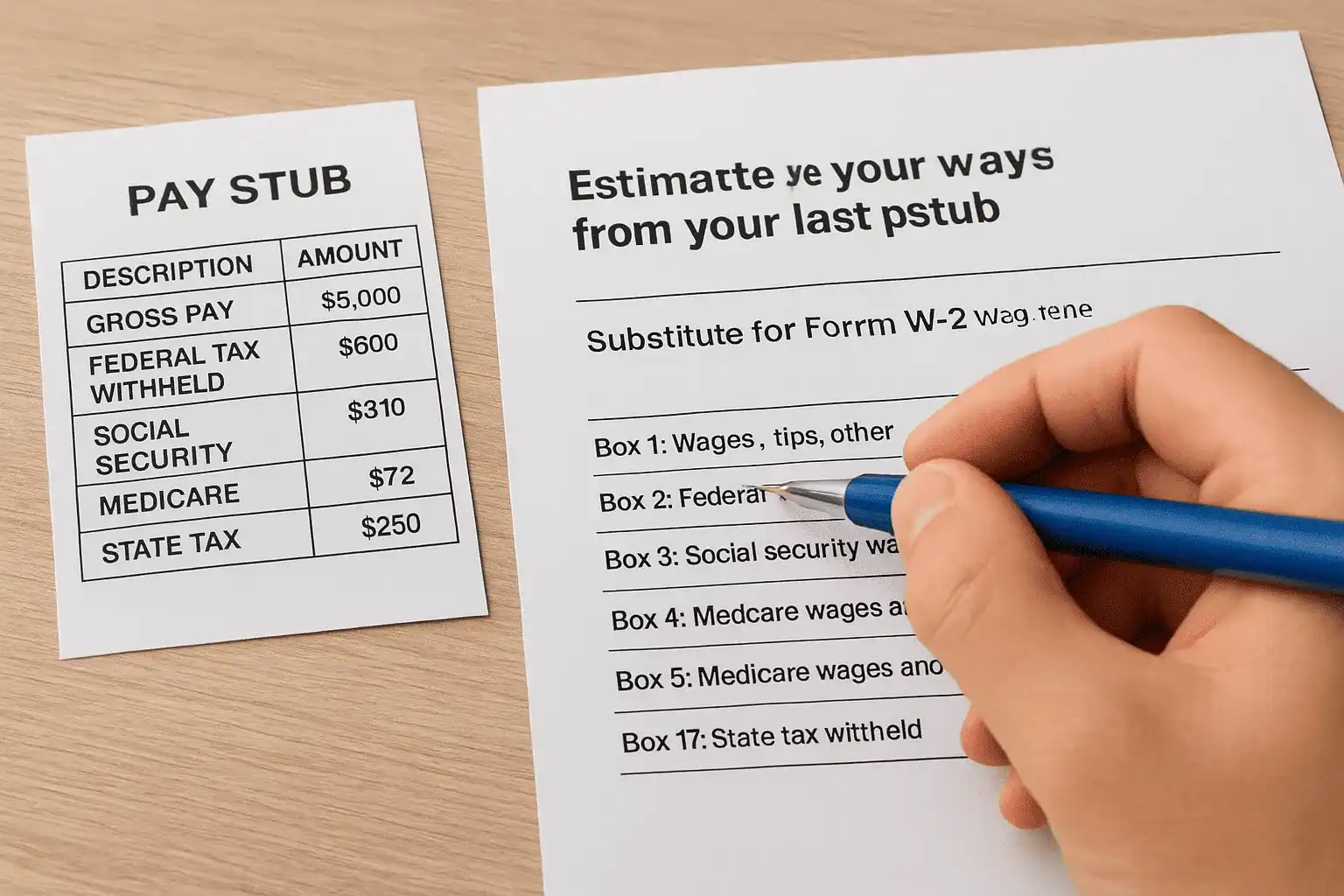
With the IRS notified and a paper trail established, turn your attention to the actual numbers you'll need. Your last pay stub of the year holds nearly everything required to reconstruct a W-2, provided you know where to look. Most stubs show year-to-date totals for gross wages, federal income tax withheld, Social Security tax, Medicare tax, and often state withholding too. Pull the final stub from December, not an earlier one, since only the last paycheck reflects the full year's cumulative totals.
Match pay stub fields to W-2 boxes
The hardest part of this step is translating pay stub language into the boxes Form 4852 expects. Use this table as a rough guide:
| Pay stub field | Corresponds to W-2 box |
|---|---|
| YTD Gross Pay (minus pre-tax deductions) | Box 1: Wages, tips, other compensation |
| YTD Federal Tax Withheld | Box 2: Federal income tax withheld |
| YTD Social Security Wages | Box 3: Social security wages |
| YTD Social Security Tax Withheld | Box 4: Social security tax withheld |
| YTD Medicare Wages | Box 5: Medicare wages and tips |
| YTD Medicare Tax Withheld | Box 6: Medicare tax withheld |
| YTD State Tax Withheld | Box 17: State income tax |
Your last pay stub of the year is the closest thing you have to an unofficial W-2.
Adjust for pre-tax deductions
Gross pay on a stub usually isn't the same figure that belongs in Box 1. Pre-tax deductions like 401(k) contributions, health insurance premiums, and HSA contributions reduce your taxable wages, so subtract those from gross pay before entering a number. If your stub already shows a separate "taxable wages" line, use that instead of doing the math yourself. Missing this adjustment is the single most common mistake people make when estimating from a stub, and it can inflate your reported income significantly.
Handle mid-year bonuses and irregular pay
If you received a bonus, commission, or any irregular payment during the year, make sure the December stub's year-to-date totals actually captured it. Occasionally, payroll systems post adjustments after the final regular paycheck, which won't show up on the stub you're working from. Cross-check against your own records, bank deposits work well for this, to confirm nothing got left out. Once you're confident these figures reflect a full, accurate year, you're ready to plug them into the substitute form that replaces your missing W-2 entirely.
Step 5. File Form 4852 with your tax return
Now that you have solid wage and withholding numbers from your last pay stub, it's time to put them on paper officially. Form 4852 is the IRS's designated substitute for a missing W-2, and it lets you file your return on time even without the original document in hand. You attach it directly to your Form 1040 in place of the W-2, using the same figures you calculated in the previous step.
What Form 4852 actually is
Officially titled "Substitute for Form W-2, Wage and Tax Statement," this form asks you to report the same information your employer would have provided: wages, federal withholding, Social Security and Medicare figures, and your employer's identifying details. According to the IRS instructions for Form 4852, you should only use it after you've made a genuine effort to obtain the W-2 first, which is exactly why the earlier steps in this guide matter. Filing it prematurely, before contacting your employer or the IRS, can slow down processing if the agency wants to see evidence of that effort.
Form 4852 isn't a shortcut around your employer. It's the backup plan for when they don't come through in time.
Filling it out step by step
Work through the form methodically, since accuracy here matters as much as it would on an actual W-2.
- Enter your identifying information at the top: name, address, Social Security number, and the tax year.
- List your employer's name, address, and EIN, pulling the EIN from a prior W-2 or pay stub if you have it.
- Report estimated wages and withholding in the boxes that mirror a standard W-2, using the figures you translated from your last pay stub.
- Explain how you calculated these amounts in the space provided, referencing your final pay stub specifically.
- Describe your efforts to obtain the W-2, including dates you contacted your employer and the IRS.
Attaching it to your return
Once completed, attach Form 4852 to your Form 1040 just as you would a W-2, then file by mail or through tax software that supports substitute forms. Not every e-filing platform handles Form 4852 smoothly, so check compatibility before you start entering data, or plan to paper-file if needed. Submitting a complete, well-documented form now keeps your return moving instead of stuck in review, and it sets you up cleanly for the next step: pulling an official wage transcript from the IRS to double-check your numbers against what your employer actually reported.
Step 6. Request a wage and income transcript
Before you finalize the numbers on Form 4852, cross-check them against what the IRS already has on file. A wage and income transcript pulls together every W-2, 1099, and other information return that's been reported to the IRS under your Social Security number, even if you personally never received a copy. This step catches discrepancies before they become problems, and it's free.
How to request your transcript
Getting the transcript takes minutes if you use the online tool, or a couple of weeks if you go by mail. Head to the IRS Get Transcript service and choose "Get Transcript Online" for instant access, or "Get Transcript by Mail" if you'd rather not create an account. You'll need to verify your identity with a Social Security number, date of birth, filing status, and mailing address from a prior return.
- Select "Wage and Income Transcript" specifically, not the tax return transcript, which shows different information.
- Choose the correct tax year, since transcripts are organized by year and pulling the wrong one wastes the trip.
- Download or save a PDF copy immediately if requesting online, since access can time out.
A wage and income transcript is the IRS showing its cards. Use it to confirm your estimate before you file.
Reading what the transcript tells you
Once you have it, look specifically for a W-2 entry from the employer in question. If it's there, compare the wage and withholding figures against what you calculated from your pay stub. Small differences are normal and usually don't matter much, but a significant gap means your employer reported something different than what showed up on your final paycheck, possibly due to a late bonus, a correction, or a payroll error you weren't aware of.
What a missing transcript entry means
Sometimes the transcript comes back with nothing from that employer at all, which usually means they haven't filed their copy with the Social Security Administration yet. This is common if you're checking early in the season, since employers have until January 31 to file but processing and posting to your transcript can lag by several weeks. Don't take this as a green light to skip Form 4852. File on time using your own calculations regardless, and treat the transcript as a confirmation tool rather than a prerequisite. If the transcript later shows different numbers than what you filed, that's exactly the scenario the next step addresses.
Step 7. Amend your return if the numbers change later
Filing with estimated figures from Form 4852 gets you compliant on time, but it's not always the end of the story. If your actual W-2 finally arrives, or the wage and income transcript you pulled shows different numbers than what you reported, you may need to correct your return. This isn't a sign you did anything wrong. It's simply part of the process when you file with a missing W-2 and fill in the gaps yourself.
When an amendment is actually necessary
Small discrepancies rarely justify the paperwork. A difference of a few dollars in withholding or wages typically falls within normal rounding and won't change your tax outcome. File an amended return only when the gap is substantial enough to affect your refund or amount owed. Common triggers include:
- Your actual W-2 shows wages that differ from your estimate by more than a couple hundred dollars.
- Federal withholding on the real form is meaningfully higher or lower than what you calculated from your pay stub.
- A late bonus or correction appears on the official W-2 that your December pay stub never captured.
- The wage and income transcript reveals a second W-2 from the same employer that you didn't know existed.
Small rounding differences don't need an amendment. A changed tax outcome does.
How to file Form 1040-X
Correcting a return means filing Form 1040-X, Amended U.S. Individual Income Tax Return. According to the IRS instructions for Form 1040-X, you'll need your original return, the corrected W-2, and a clear explanation of what changed. Walk through it like this:
- Pull your originally filed return so you can see exactly what figures need correcting.
- Enter the corrected wage and withholding amounts from the actual W-2 in the appropriate columns.
- Explain the change in Part III, noting that you originally filed with Form 4852 estimates and are now updating with the official W-2.
- Attach the actual W-2 to the amended return as supporting documentation.
- Submit electronically or by mail, depending on which tax years the IRS currently accepts for e-filed amendments.
Timing matters less than you'd think
Generally, you have three years from your original filing date to amend a return, so there's no need to rush this the moment your W-2 shows up. Processing an amendment takes the IRS several months, longer during peak season, so submit it once you're confident the corrected numbers are final rather than amending twice for the same tax year.
What to do if your W-2 was stolen or misused
Sometimes a missing W-2 isn't just a delay, it's a red flag that someone else got their hands on it first. If you suspect identity theft, whether because a scammer intercepted your mail or a data breach exposed your employer's records, the steps above still apply, but you need to layer in fraud protection immediately. Acting fast here limits the damage far more than acting fast on a routine missing form.

Warning signs your W-2 was misused
Watch for these red flags that suggest someone filed a return or claimed wages using your identity:
- The IRS rejects your e-filed return because a return already exists under your Social Security number.
- You receive an IRS notice about wages from an employer you've never worked for.
- Your wage and income transcript shows a W-2 you don't recognize.
- You get a notice about a refund you never requested or received.
If the IRS rejects your return as a duplicate, treat that instantly as an identity theft red flag, not a technical glitch.
Report it and lock down your identity
Contact the IRS Identity Protection Specialized Unit right away and file Form 14039, the Identity Theft Affidavit, which the IRS identity theft resource page walks through in detail. This form formally alerts the agency that someone used your information fraudulently, and it triggers extra verification on any future returns filed under your name. Simultaneously, place a fraud alert or credit freeze with the three major credit bureaus, since a stolen W-2 often means your Social Security number is circulating well beyond just tax season.
File your return anyway
Even with identity theft in play, your filing obligation doesn't pause. Use Form 4852 with your best available figures, exactly as described earlier, and paper-file if the electronic system keeps rejecting your submission. Attach a copy of Form 14039 to make the connection clear to whoever processes your paper return. Expect a longer processing window since fraud cases get manually reviewed, sometimes taking several months longer than a standard return.
Request an Identity Protection PIN
Going forward, ask the IRS for an Identity Protection PIN, a six-digit number that must accompany any future return filed under your Social Security number. This single step blocks most repeat fraud attempts, since anyone filing without your PIN gets automatically rejected. Once you're enrolled, the IRS issues a new PIN each year, and you'll need it every filing season regardless of whether your W-2 troubles ever recur.
Getting your taxes filed without the wait
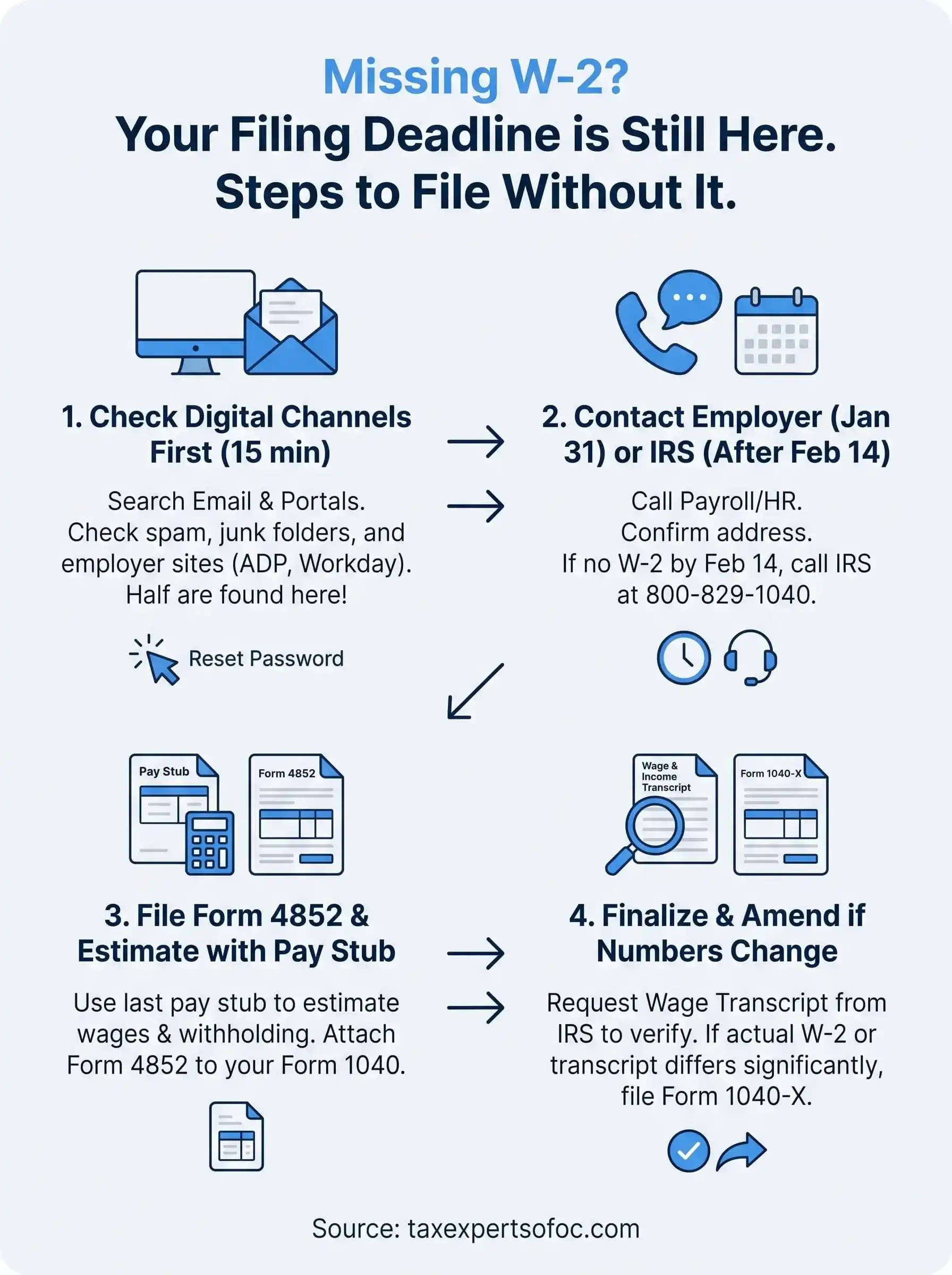
A missing W-2 feels like a roadblock, but it's really just a detour. Check your email and portal, call payroll, loop in the IRS directly if February 14th passes with nothing, then estimate your wages and file Form 4852 so you stay compliant on time. Pull a wage and income transcript to verify your numbers, and amend later only if the real figures come in meaningfully different. None of these steps require you to miss your deadline or guess blindly.
Still, estimating wages and filling out substitute forms correctly takes attention to detail, and one wrong box can trigger a notice or delay your refund. If you'd rather have a CPA or Enrolled Agent handle the calculations, the IRS calls, and the paperwork while you focus on everything else, schedule a free consultation with Tax Experts of OC and get your return filed correctly, without the wait.