
Running payroll for small business operations gets messy fast. One missed deposit deadline or misclassified employee, and you're looking at IRS penalties that eat into cash flow you don't have to spare. If you're comparing options right now, you already know the stakes: pick the wrong system and you spend more time fixing errors than running your company.
This guide breaks down the 7 best payroll options for 2026, from self-serve software to full-service providers that handle tax filings for you. We look at pricing, tax compliance features, and how well each option scales as you add employees across multiple states, so you can match a solution to your actual business size and complexity instead of guessing.
We put together this comparison from the vantage point of a CPA and Enrolled Agent firm that cleans up payroll tax problems every week. That experience shapes what we flag as red flags versus genuine value. By the end, you'll know which option fits your headcount, budget, and risk tolerance, and when it makes more sense to hand payroll off to a professional bookkeeping team instead of managing it yourself.
1. Tax Experts of OC for full-service payroll and tax compliance
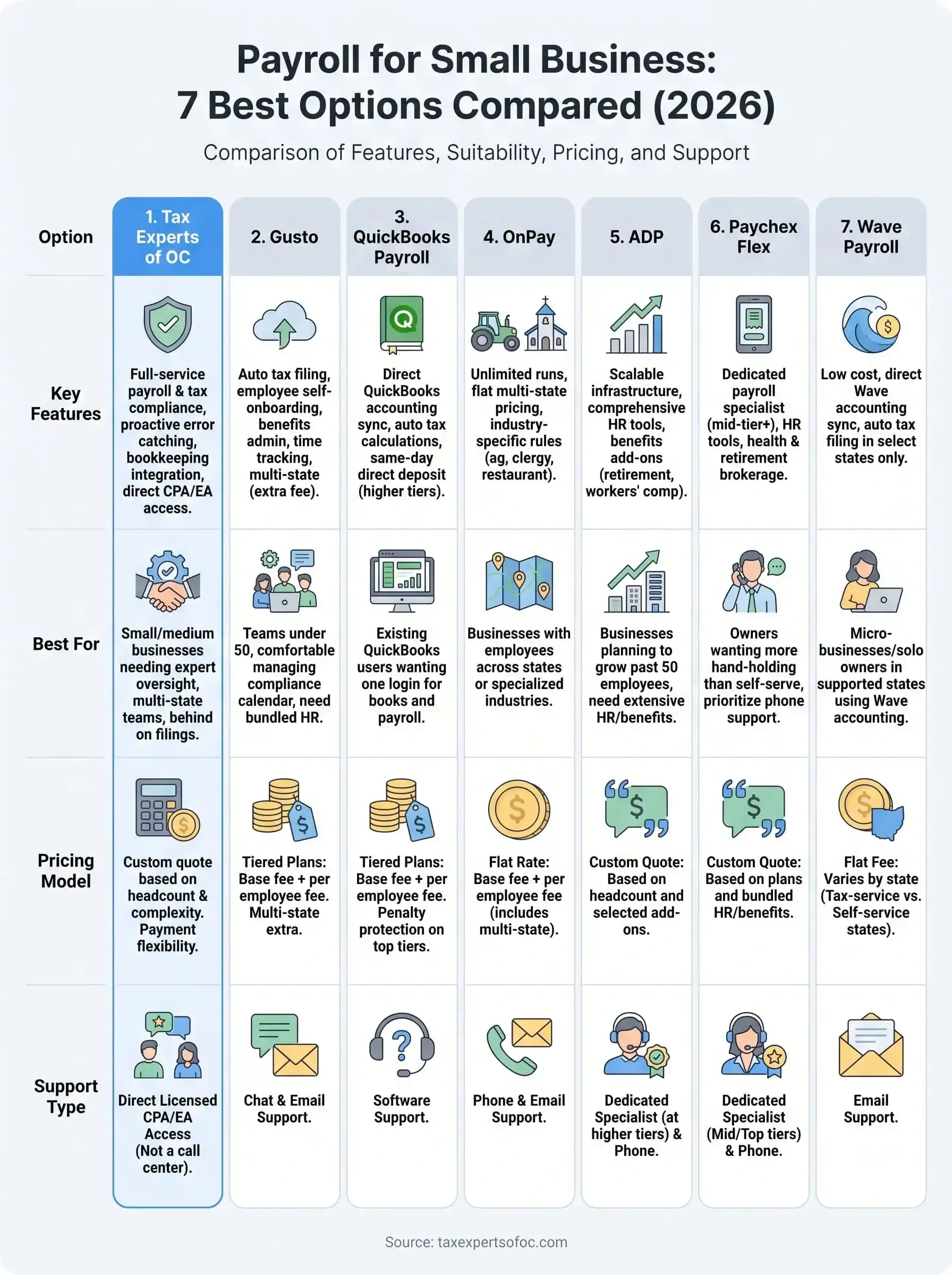
Most payroll platforms hand you software and leave you to figure out the tax side alone. Tax Experts of OC flips that model. You get a licensed CPA or Enrolled Agent managing your payroll for small business operations directly, not a support ticket queue. That matters most when you're already behind on filings or juggling multi-state employees, because the person running your payroll is the same person who can represent you if the IRS or a state agency comes knocking.

What it offers
The firm handles the full payroll cycle: employee pay runs, tax withholding calculations, quarterly filings, W-2 and 1099 preparation, and year-end reconciliation. It also folds payroll into your broader financial picture rather than treating it as an isolated task. Because the same team can manage your bookkeeping and tax planning, discrepancies between payroll records and your books get caught before they become IRS problems.
- Payroll processing and direct deposit setup
- Payroll tax deposits and quarterly/annual filings (941, 940, state equivalents)
- W-2 and 1099 issuance
- Multi-state payroll compliance for remote or distributed teams
- Integration with bookkeeping and tax planning services
- Direct access to a CPA or Enrolled Agent for questions, not a call center
When the same expert handles your payroll and your tax filings, small errors get caught before they turn into IRS notices.
Who it's best for
This option suits small and medium business owners who want payroll bundled with real accounting oversight, not a standalone app. It's a strong fit if you've already had a payroll tax scare, if you're managing employees across state lines, or if you simply don't have the bandwidth to babysit software updates and compliance deadlines yourself. New business founders setting up their first payroll system also benefit, since the firm can structure withholding and filings correctly from day one instead of fixing mistakes later.
Pricing
Tax Experts of OC offers a 30-minute free consultation to assess your payroll needs before any commitment. Pricing is transparent and quoted upfront based on your headcount, filing frequency, and whether you need multi-state support, rather than tiered software subscriptions that charge per employee regardless of complexity. Flexible payment arrangements are available for business owners dealing with existing tax debt or cash flow strain, which is rare among the software-only competitors on this list.
| Factor | Details |
|---|---|
| Consultation | Free, 30 minutes |
| Pricing model | Custom quote based on headcount and complexity |
| Payment flexibility | Available for financial hardship cases |
| Support | Direct CPA/EA access, not tiered support |
2. Gusto
Gusto built its reputation as the self-service software most small business owners try first, and it earns that spot with a clean interface and automatic tax filing. It's a solid option if you want payroll for small business operations handled through software rather than a live advisor, though you're still the one responsible for catching errors before they ship.
What it offers
Gusto automates payroll runs, calculates and files federal and state payroll taxes, and generates W-2s and 1099s at year-end. It also bundles basic HR tools like onboarding checklists, offer letters, and benefits administration, which most pure payroll platforms skip. The platform supports multi-state payroll, though you'll pay extra per state, and it integrates with popular accounting software like QuickBooks and Xero.
- Automatic federal, state, and local tax filing
- Employee self-onboarding and direct deposit
- Benefits administration (health insurance, 401(k))
- Time tracking and PTO management
- Multi-state payroll support (additional fee per state)
Software handles the calculations, but you still own the responsibility for verifying the output before it reaches the IRS.
Who it's best for
Gusto suits business owners comfortable managing their own compliance calendar and who want HR features bundled in without paying for a separate system. It works well for teams under 50 employees who operate mostly in one or two states and don't need dedicated tax representation if something goes wrong.
Pricing
Gusto's Simple plan runs about $49 per month plus $6 per employee, while the Plus plan adds time tracking and more HR tools for roughly $80 per month plus $12 per employee. Multi-state filing and premium HR features push costs higher, and support is limited to chat and email rather than a licensed tax professional.
3. QuickBooks Payroll
QuickBooks Payroll appeals to anyone already running QuickBooks for bookkeeping, since it slots directly into the accounting software you're probably using. For payroll for small business owners who want one login for books and payroll, that integration alone saves hours every pay period compared to exporting data between separate systems.
What it offers
QuickBooks Payroll runs automatic pay calculations, handles direct deposit, and files federal and state payroll taxes on your behalf at the higher plan tiers. It syncs payroll entries straight into your general ledger, so you're not manually reconciling wage expenses against your books each month. Higher tiers add same-day direct deposit, a tax penalty protection guarantee, and access to HR support resources.
- Automatic payroll tax calculations and e-filing
- Same-day direct deposit on Premium and Elite plans
- Direct sync with QuickBooks Online accounting
- Health benefits and workers' comp administration
- Tax penalty protection guarantee on top-tier plans
Payroll that already lives inside your accounting software cuts out the reconciliation errors that come from juggling separate platforms.
Who it's best for
This option fits businesses already committed to QuickBooks for their books and looking to avoid a second vendor relationship. It's a reasonable choice for owners who want automated tax filing without paying for a full-service provider, though you're still on your own if the IRS questions a filing since support is software-based, not a licensed tax professional.
Pricing
QuickBooks Payroll's Core plan starts around $50 per month plus $6 per employee, Premium runs about $85 plus $9 per employee, and Elite reaches roughly $130 plus $11 per employee. The tax penalty guarantee only applies at higher tiers, so budget plans leave you exposed if the software miscalculates.
4. OnPay
OnPay markets itself as the payroll provider for businesses with complicated setups that bigger platforms charge extra to handle, like farms, churches, and restaurants with tip credits. For payroll for small business owners in a niche industry, that specialization often means fewer manual workarounds than you'd hit on a generic platform.

What it offers
OnPay runs unlimited payroll cycles, files federal and state payroll taxes automatically, and handles multi-state payroll at no extra per-state charge, which sets it apart from Gusto and QuickBooks Payroll. It includes built-in support for industry-specific pay rules, such as agricultural wage reporting and clergy housing allowances, along with standard HR tools like offer letters and PTO tracking.
- Unlimited payroll runs with automatic tax filing
- Multi-state payroll included at no added fee
- Industry-specific pay rules (agriculture, restaurants, nonprofits)
- New-hire reporting and onboarding tools
- Integrates with QuickBooks, Xero, and several benefits providers
Paying a flat rate for multi-state payroll beats getting nickel-and-dimed per state as your team grows.
Who it's best for
OnPay suits small businesses with employees spread across several states, since the flat pricing avoids the per-state surcharges that eat into savings elsewhere. It also fits owners in specialized industries who need pay rules baked into the software rather than configured manually, and teams under 30 people who don't need dedicated tax representation but want dependable automated filing.
Pricing
OnPay's pricing runs a flat $40 per month plus $6 per employee, with no separate tiers to upgrade into for multi-state support or basic HR tools. That flat structure makes budgeting predictable, but you still won't get a licensed CPA or Enrolled Agent reviewing filings if a state agency flags an error.
5. ADP
ADP built its name on serving large enterprises, but its RUN by ADP product scales the same infrastructure down for small business owners who want a provider with decades of payroll history behind it. If you're comparing payroll for small business options and want a name that banks and lenders already recognize, ADP carries that weight, though you'll pay for the brand and the bundled extras.
What it offers
RUN by ADP handles automatic payroll runs, federal and state tax filing, and new-hire reporting, plus optional add-ons like workers' comp, retirement plans, and background checks. ADP layers in HR compliance tools, including labor law posters and employee handbook templates, which smaller platforms typically skip. The platform also offers a dedicated setup specialist during onboarding, something most self-serve tools don't provide.
- Automatic payroll processing and tax filing
- New-hire reporting and garnishment payments
- HR compliance tools (labor law posters, handbook builder)
- Add-on workers' comp and retirement plan administration
- Dedicated onboarding specialist
A bigger name doesn't guarantee better tax accuracy, it mostly buys you more add-ons and a longer support menu.
Who it's best for
ADP suits owners who want a well-known provider with a long track record and who plan to add HR services like retirement plans or workers' comp down the road. It fits businesses that expect to grow past 50 employees soon, since ADP's infrastructure scales without switching providers, but it's overbuilt for a five-person shop that just needs clean pay runs.
Pricing
ADP doesn't publish flat pricing online. You get a custom quote based on headcount and selected add-ons, and costs commonly land higher than Gusto or OnPay once HR extras get bundled in. Expect a sales call before you see a real number, and budget for add-on fees that stack quickly.
6. Paychex Flex
Paychex Flex targets the same small business market as Gusto and OnPay, but leans harder on human support layered over the software, positioning itself between self-serve tools and a full-service accountant. If you're weighing payroll for small business options and want a phone number you can call rather than a chat window, Paychex fills that gap, though the extra support shows up in the price.
What it offers
Paychex Flex runs automatic payroll calculations, files federal and state payroll taxes, and offers a dedicated payroll specialist on its mid and top tiers rather than routing you through a general queue. It bundles HR tools like employee handbooks, learning management, and health insurance brokerage, plus a mobile app for running payroll from a phone. Multi-state payroll is supported, and the platform integrates with major accounting software.
- Automatic tax calculations, filing, and payment
- Dedicated payroll specialist on higher tiers
- HR tools including handbooks and learning management
- Health insurance and retirement plan brokerage
- Mobile app for on-the-go payroll runs
Paying for a dedicated specialist only helps if that person can actually represent you when a tax agency raises a question, not just walk you through the software.
Who it's best for
Paychex Flex suits owners who want more hand-holding than a pure self-serve tool offers but aren't ready to hire a full accounting firm. It fits businesses planning to add HR services like retirement plans or health benefits soon, and teams that value phone support over email tickets when payroll runs into a snag.
Pricing
Paychex doesn't post flat rates publicly. Plans typically start around $39 per month plus $5 per employee for basic processing, climbing past $100 monthly once you add HR services, benefits administration, or a dedicated specialist. Get a custom quote directly, since bundled add-ons change the total fast.
7. Wave Payroll
Wave built its name on free accounting software for freelancers and micro-businesses, and its payroll add-on follows the same budget-first philosophy. If you're running payroll for small business operations with a headcount under 10 and already use Wave for invoicing or bookkeeping, this is the cheapest way to add payroll without switching platforms entirely.
What it offers
Wave Payroll runs pay calculations, direct deposit, and W-2/1099 generation, but automatic tax filing only exists in a handful of states, currently Arizona, California, Florida, Georgia, Illinois, Indiana, New York, North Carolina, Texas, Virginia, Washington, and Wisconsin. Outside those states, you calculate and remit payroll taxes yourself, which is a real gap most competitors on this list don't have. It syncs directly with Wave's free accounting software, so pay runs post to your books automatically.
- Direct deposit and pay stub generation
- Automatic tax filing in select states only
- W-2 and 1099 preparation
- Free integration with Wave accounting software
- No dedicated HR tools or benefits administration
Cheap payroll software still leaves you exposed if you're one of the states where you're filing taxes manually.
Who it's best for
Wave Payroll suits solo owners and very small teams in one of its supported tax-filing states who want the lowest possible software cost and already live inside Wave's ecosystem. It's a poor fit if you operate in a non-supported state, plan to hire across state lines, or need any HR features beyond basic pay runs, since Wave doesn't offer them.
Pricing
Wave Payroll costs $40 per month plus $6 per employee in tax-service states, and $20 per month plus $6 per employee in self-service states where you handle filings yourself. There's no free tier for payroll itself, and no path to licensed tax representation if a filing goes wrong.
Choosing the right payroll partner for your business
Software works fine until it doesn't. Gusto, QuickBooks Payroll, OnPay, ADP, Paychex, and Wave all handle the mechanics of payroll for small business operations well enough, but every one of them leaves you holding the bag if a filing gets flagged or an employee gets misclassified. That's the gap between a platform and a professional.
Tax Experts of OC closes that gap by putting a licensed CPA or Enrolled Agent on your payroll, not a support queue. You get someone who can represent you directly if the IRS or a state agency comes calling, and who ties your payroll into your broader books instead of leaving reconciliation to you.
If you've had a payroll scare already, or you're tired of guessing whether your software caught an error, stop guessing. Book your free 30-minute consultation and get a real answer about your payroll setup.