
If you pay 1099 workers, you already know payroll for contractors doesn't work like a normal payroll run. There's no withholding, no employer tax match, and the whole job hinges on getting a correct 1099-NEC out the door by January 31. Get it wrong and you're looking at IRS penalties, misclassification headaches, or a contractor chasing you down in February for a corrected form.
This article answers the question you're actually asking: which platform handles contractor payments and 1099 filing well, and which one fits your budget. We compared seven providers on cost per contractor, filing automation, multi-state support, and how fast you can actually get paid or get someone paid, since that's what matters when you're running a lean business or managing contractor payroll for clients.
We built this list from the perspective of people who deal with IRS compliance every day, not just software reviewers. You'll see where each option shines, where it falls short, and which pricing tiers make sense depending on how many contractors you manage. If your contractor setup has already triggered an IRS notice or a classification question, that's a separate problem worth solving directly, but for choosing the right payroll tool, start here.
1. Tax Experts of OC for full-service contractor payroll
Most contractor payroll tools hand you software and leave you to figure out the tax rules yourself. Tax Experts of OC takes the opposite approach: you get a CPA or Enrolled Agent who runs your contractor payments, files your 1099-NEC forms, and stands behind the numbers if the IRS ever asks questions. This matters most when you're not just processing payroll but also trying to stay compliant across multiple states, structure a new LLC, or clean up a bookkeeping mess that's been neglected for a year.

How it works
You start with a free 30-minute consultation where the firm reviews how many contractors you pay, in which states, and what your current bookkeeping looks like. From there, they set up recurring contractor payment processing, track payments against the $600 reporting threshold, and prepare W-9 collection so you're not scrambling in January. Everything runs through direct access to a licensed professional, not a support ticket queue, so when a contractor's classification looks shaky or a state has unusual withholding rules, you're talking to someone who can actually answer that on the spot.
A tax pro who files your 1099s and defends them if questioned beats a dashboard that only prints the form.
Key features
The service goes well beyond issuing payments, which is where it separates itself from software-only providers:
- 1099-NEC preparation and e-filing with the IRS and applicable states
- Multi-state contractor compliance, including states with their own 1099 filing requirements
- Bookkeeping and reconciliation so contractor payments match your books, not just a payroll export
- Outsourced CFO support for businesses scaling their contractor workforce
- Audit and IRS notice representation if a contractor payment or classification gets flagged
- Virtual delivery by phone and email, available to clients in all 50 states
Pricing
Tax Experts of OC uses transparent, upfront pricing built around your actual contractor volume and bookkeeping complexity rather than a flat per-contractor fee. That means a business paying five contractors gets a different quote than one paying fifty, and the firm discusses cost during your free consultation before any work begins. For clients facing financial hardship, flexible payment options are available, which most software vendors simply don't offer since they bill you the same whether you're thriving or behind on taxes.
Who it's for
This option fits small and medium business owners who want contractor payroll handled by someone who also understands their broader tax picture, not just a payment rail. It's the right call if you're already dealing with back taxes, an IRS notice, or multi-state filing complexity, or if you'd rather pay a professional once than pay a software subscription and still hire an accountant later to fix mistakes. If your only need is cutting a check to two contractors with no compliance concerns, a lighter tool further down this list may be enough.
2. QuickBooks Payroll for small business bookkeeping
If you already run your books in QuickBooks, adding payroll for contractors inside the same platform cuts out a lot of duplicate data entry. Intuit built this as an add-on to QuickBooks Online, so your contractor payments, expense categories, and 1099 totals all live in one ledger instead of getting synced between two systems.
How it works
QuickBooks Payroll lets you add contractors as vendors, collect their W-9 through a self-service portal, and pay them by direct deposit on a schedule you set. At year-end, the platform pulls payment totals straight from your books to generate 1099-NEC forms, which it e-files with the IRS and mails to contractors automatically.
Payroll built into your bookkeeping software saves time, but it still won't catch a misclassified worker before the IRS does.
Key features
- Automatic 1099 e-filing for federal forms, included on Contractor Payments and higher plans
- Same-day or next-day direct deposit, depending on plan tier
- Contractor self-onboarding, including W-9 collection and tax ID verification
- Built-in integration with QuickBooks Online accounting and invoicing
Pricing
QuickBooks offers a standalone Contractor Payments plan for around $15 per month plus $2 per contractor paid, which works if you don't need full bookkeeping. Bundled plans that combine accounting and payroll run higher, generally $35 to $130 per month depending on features and employee count. Multi-state filing support and priority phone help are reserved for higher tiers, so check the fine print before assuming everything's included.
Who it's for
QuickBooks Payroll suits small business owners who already do their bookkeeping in QuickBooks and want contractor payments to flow into the same system without exporting spreadsheets. It's less useful if you need someone to catch classification risk or handle an IRS notice, since support here is software help, not tax representation.
3. Square Payroll for simple, low-cost contractor pay
Square Payroll strips contractor pay down to the basics, which is exactly the point if you're already using Square for point-of-sale or invoicing. There's no bundled accounting suite here, just a straightforward way to pay 1099 workers and file their forms without learning a new system.
How it works
You add contractors through Square's dashboard, they fill out their own W-9 through a self-service link, and you run payments whenever you need to, whether that's a one-off gig or a recurring weekly rate. Square deposits funds directly to the contractor's bank account, usually within one to two business days, and tracks every payment toward the 1099-NEC threshold automatically.
Key features
- Contractor-only plan with no monthly base fee if you only pay contractors, not employees
- Automatic 1099-NEC filing with the IRS at year-end, included at no extra charge
- Same-day or next-day deposits for contractor payments
- Square ecosystem integration, useful if you already process sales or invoices through Square
If you only need to pay contractors and file their 1099s, Square does that job without charging you for features you'll never touch.
Pricing
Square's Contractor Only plan costs $6 per contractor paid per month, with no base subscription fee, making it one of the cheapest options on this list for businesses with a handful of 1099 workers. Add employees later and you'll shift to Square's employee payroll pricing, which starts around $35 per month plus $6 per person.
Who it's for
Square Payroll works best for freelancer-heavy small businesses, retail shops, or service providers already inside the Square ecosystem who pay a small, predictable number of contractors. It's not built for multi-state compliance questions or IRS representation, so once your contractor payroll for compliance needs grows past simple payments, you'll want a provider or firm that covers that gap.
4. Rippling for all-in-one HR and global payroll
Rippling built its name on combining HR, IT, and payroll into a single system, and contractor payments are just one module inside that larger machine. If your business already juggles employees, contractors, and software licenses across departments, Rippling consolidates all of it instead of forcing you to stitch together three separate tools.

How it works
You onboard contractors through the same dashboard used for employees, collecting W-9 or W-8BEN forms automatically depending on whether the worker is domestic or international. Rippling then runs payments on your schedule, converts currency for overseas contractors, and generates 1099-NEC or the appropriate international tax documents at year-end without you touching a spreadsheet.
Key features
- Global contractor payments in over 100 countries with local currency conversion
- Unified HR and IT platform, so payroll, device management, and app provisioning share one login
- Automated 1099-NEC and international tax form generation
- Custom approval workflows for larger teams managing contractor spend
Rippling makes sense once your contractor payroll problem is really an HR and IT problem wearing a payroll mask.
Pricing
Rippling doesn't publish flat pricing. Contractor-only plans generally start around $8 per contractor per month, but full platform pricing depends on which modules you add, and you'll need to talk to sales for a quote. That opacity is a real drawback if you just want a number to compare against Square or QuickBooks before committing.
Who it's for
Rippling suits growing companies that already manage a mix of employees and contractors, especially ones paying international freelancers alongside domestic staff. It's overkill if you only pay a few U.S.-based 1099 workers, since you'll pay for HR and IT features you don't need just to access contractor payments.
5. Paychex Flex for compliance-heavy industries
Paychex has been running payroll for decades, and Paychex Flex is the platform version of that experience, built for businesses that mix contractors with employees across industries like construction, healthcare, and staffing where compliance mistakes carry real penalties. If you need someone to answer for state-specific rules on top of federal 1099 filing, Paychex leans on human support more than most software-first competitors.
How it works
You set up contractors inside Paychex Flex alongside your employee payroll, and the system collects W-9s, tracks payments toward the $600 threshold, and runs direct deposits on your schedule. What sets Paychex apart is the option to pair the software with a dedicated payroll specialist, someone you can call when a state adds a new contractor reporting rule mid-year.
Key features
- Combined employee and contractor payroll in one dashboard
- Dedicated support specialist available on higher-tier plans
- Automated 1099-NEC and W-2 filing, federal and state
- HR compliance tools, including labor law updates relevant to regulated industries
Paychex charges more than bare-bones contractor tools, but you're paying for a human backstop when state rules shift.
Pricing
Paychex doesn't post flat rates online. Expect a base monthly fee plus a per-person charge, with contractor-only plans typically running higher than Square or QuickBooks once you factor in setup and support tiers. Quotes vary by industry and headcount, so you'll need a sales call to get real numbers, and that lack of transparency is worth weighing against the support you're actually getting.
Who it's for
Paychex Flex fits businesses in regulated or multi-state industries that already have employees and want contractor payments handled by the same provider, with a live person to call when compliance questions get complicated. It's not the cheapest option here, so skip it if you only pay a couple of contractors and don't need the extra hand-holding.
6. SurePayroll for budget-friendly contractor-only payroll
SurePayroll has served small businesses since the late 1990s, and its contractor-only plan strips out everything a solo operation or small shop doesn't need. If you're tired of paying for HR modules and time-tracking tools bundled into bigger platforms, this one keeps the focus on paying 1099 workers and filing their forms.
How it works
SurePayroll walks you through adding contractors, collecting their W-9 forms electronically, and scheduling payments by direct deposit. The platform tracks each contractor's total pay against the $600 IRS threshold automatically, then generates and files 1099-NEC forms for you at year-end, both federal and applicable state copies.
Key features
- Contractor-only plan with no employee payroll features bundled in
- Automatic 1099-NEC filing, federal and state, included in the base plan
- Two-day direct deposit as standard, with faster options on some tiers
- U.S.-based customer support by phone, which matters when a filing question comes up close to the deadline
Pricing
SurePayroll's contractor-only plan runs around $20 per month plus $6 per contractor paid, which lands in the middle between Square's rock-bottom rate and QuickBooks' bundled pricing. There's no long-term contract requirement, and the company occasionally runs discounted rates for the first few months, so it's worth asking before you sign up.
A contractor-only plan without employee features attached keeps your monthly bill matched to what you actually use.
Who it's for
SurePayroll suits small business owners who pay a modest number of contractors and want phone support without paying for an HR suite they'll never open. It works well for solo consultants hiring subcontractors or small agencies with a handful of 1099 workers, but it won't help you with multi-state compliance nuance or represent you if the IRS flags a contractor payment, so budget for outside help if that risk applies to you.
7. Wise BatchTransfer for international contractor payments
If every contractor on your list lives outside the U.S., you don't need payroll software at all. You need a fast, cheap way to move money across borders, and Wise BatchTransfer does exactly that without pretending to be a full payroll platform. It's built for businesses paying dozens of freelancers in different countries who care more about exchange rates than 1099 forms, since most of these payments fall outside U.S. reporting rules anyway.
How it works
You upload a spreadsheet listing each contractor's name, bank details, and payment amount, and Wise processes the whole batch in one transfer using the mid-market exchange rate. Contractors receive funds in their local currency, usually within one to two business days, and you can save recipient details for repeat monthly runs without re-entering information each time.
When your contractors are overseas, moving money cheaply at a fair exchange rate matters more than 1099 automation.
Key features
- Batch payments to hundreds of contractors in one upload
- Mid-market exchange rates with no hidden markup, a real advantage over traditional bank wires
- Multi-currency account to hold and pay from balances in different currencies
- Payment tracking so you can confirm funds landed without chasing contractors for confirmation
Pricing
Wise charges a transparent transfer fee based on the currency pair and amount, typically a fraction of what banks charge for international wires, often under 1%. There's no monthly subscription for the batch payment feature itself, though holding a multi-currency business account carries its own separate fee structure worth checking on Wise's site before you commit.
Who it's for
Wise BatchTransfer fits businesses paying international freelancers who don't need U.S. 1099 filing for those workers and just want low-cost, fast transfers. It's the wrong tool if you also pay U.S.-based 1099 contractors, since you'll still need separate software or a firm like Tax Experts of OC to handle domestic filing and compliance.
Which contractor payroll option fits your business
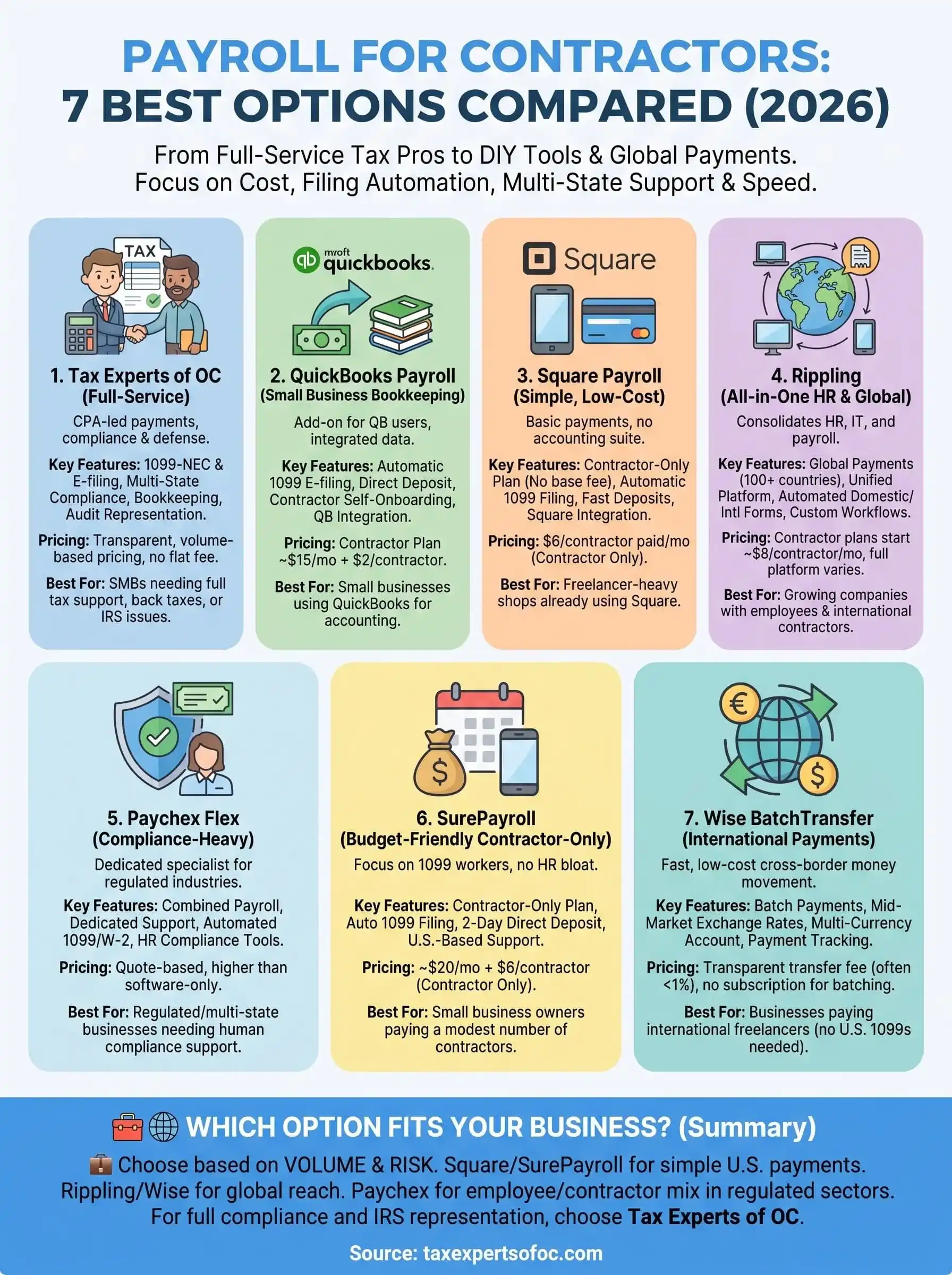
Picking the right payroll for contractors setup comes down to two questions: how many 1099 workers you pay, and how much risk you're carrying if the filing goes wrong. Square and SurePayroll handle a handful of domestic contractors cheaply. Rippling and Paychex make sense once employees and contractors mix across states or countries. Wise BatchTransfer solves a narrow problem well if your whole roster lives overseas.
None of those tools stand behind you if a contractor gets misclassified or a state flags your filing. That's the gap Tax Experts of OC fills: a CPA or Enrolled Agent running your contractor payments, filing your 1099s correctly, and representing you if the IRS comes asking questions. Software can print a form. It can't argue your case.
If your contractor payroll touches back taxes, multi-state filings, or an IRS notice you're avoiding, stop guessing and book your free 30-minute consultation before the next filing deadline catches up with you.