
Picking the right small business taxes software can save you hours every month and keep you out of trouble with the IRS. But with dozens of platforms promising to simplify filing, it's easy to pick a tool that's either too basic for your LLC's needs or so bloated with features you never use that it becomes its own headache.
If you're comparing options right now, you want a straight answer: which platforms actually handle your entity type, your state filings, and your growth stage without forcing you into an upgrade trap. Below, we break down the 7 best software for small business taxes in 2026, covering pricing, ease of use, and which one fits sole proprietors versus S-corps or partnerships. We also flag where corporate tax filing software starts to fall short for more complicated situations.
As a firm that files returns and untangles IRS notices for business owners across the country, we've seen firsthand where these tools shine and where they leave gaps. This list reflects that experience, so you can choose software with confidence, and know when it's time to bring in a CPA or Enrolled Agent instead.
1. TurboTax Business
TurboTax Business is Intuit's dedicated product for corporations, partnerships, multi-member LLCs, and trusts, separate from the consumer-facing TurboTax Self-Employed you'd use as a sole proprietor. It's built for entities that file their own business return, like Form 1120 for C-corps or Form 1065 for partnerships, rather than reporting business income on a personal Schedule C.

How it works
You answer a guided interview about your entity structure, income, and expenses, and the software generates the appropriate federal forms based on your answers. TurboTax Business imports prior-year data if you used the platform before, and it can generate Schedule K-1s for each partner or shareholder automatically once you've entered ownership splits. State business returns are sold separately for most states, and the software flags which filings your entity likely needs based on where you're registered.
If your business has more than one owner or files a separate corporate return, TurboTax Business handles the K-1 math that simpler software skips entirely.
Best for
This product suits multi-member LLCs, S-corps, C-corps, and partnerships that need to file a standalone business return and distribute K-1s to owners. It's a poor fit for single-member LLCs or sole proprietors, since Intuit routes those filers to the personal TurboTax product instead. Business owners who already trust Intuit's ecosystem, especially those using QuickBooks for bookkeeping, will find the data transfer between platforms smoother than switching to a competitor's tax software for small business filers.
Pricing
TurboTax Business typically runs in the $170 to $200 range for the federal desktop product, with each state return adding roughly $50 more. Intuit changes exact pricing each tax season, so confirm current rates directly on their site before you commit. Support is mostly self-service through help articles and a community forum, with live CPA assistance available at an added cost through TurboTax Live for Business.
| Feature | Details |
|---|---|
| Entity types supported | Partnerships, S-corps, C-corps, multi-member LLCs, trusts |
| K-1 generation | Yes, automatic based on ownership percentages |
| State returns | Sold separately, roughly $50 each |
| Live expert help | Available as paid add-on (TurboTax Live) |
| Best fit | Multi-owner entities filing a separate business return |
Watch out for scope creep here: if your K-1s trigger a complicated personal return with multiple income sources, you'll likely need the personal TurboTax product too, which adds another cost on top of the business edition.
2. H&R Block Self-Employed
H&R Block Self-Employed targets sole proprietors, freelancers, and single-member LLCs who report business income on Schedule C rather than filing a separate corporate return. It sits a notch below TurboTax Business in complexity, but that's exactly the point: most solo operators don't need K-1s or entity-level filings, they need a fast, accurate way to claim deductions and file their 1040.
How it works
The interview walks you through business income, home office deductions, vehicle expenses, and quarterly estimated tax calculations, then builds your Schedule C alongside your personal return. H&R Block Self-Employed includes a built-in mileage tracker and lets you import expenses from linked bank accounts, which cuts down on manual data entry during tax season. If the IRS sends a notice later, the software includes free audit assistance where a representative explains the notice, though they won't negotiate with the IRS on your behalf.
For a solo freelancer with straightforward Schedule C income, this software gets you filed without paying for features built for corporations.
Best for
This product suits freelancers, independent contractors, and single-member LLCs with one clear income stream and no employees. It's not built for partnerships or S-corps that need separate business returns.
Pricing
Expect to pay around $85 to $115 for the federal filing, with state returns adding roughly $45 each. You can also visit a physical H&R Block office if you want in-person support, something most competitors on this list don't offer.
3. TaxAct Business
TaxAct Business fills a similar niche to TurboTax Business, handling corporations, partnerships, and multi-member LLCs that need to file Form 1120, 1120-S, or 1065 rather than a Schedule C. It's positioned as the budget alternative for owners who want guided software without paying premium pricing for a name brand.
How it works
You work through a question-and-answer interview that builds your federal business return, and TaxAct Business generates K-1s for each partner or shareholder once you enter ownership details. The software includes a deduction finder that flags commonly missed business expenses, plus a prior-year import tool if you're switching from another platform. Unlike some competitors, TaxAct bundles a Schedule K-1 review step that checks your allocations before you file, which catches math errors before the IRS does.
TaxAct Business delivers the same core K-1 and entity filing capability as pricier software, just at a lower price point.
Best for
This product suits small S-corps, partnerships, and multi-member LLCs that want dependable software for small business taxes without the highest price tag on the market. It works well for owners comfortable navigating a slightly less polished interface than TurboTax in exchange for savings.
Pricing
Federal filing for TaxAct Business typically runs $130 to $150, with state returns priced around $50 each. That's noticeably less than TurboTax Business for comparable entity coverage. Support leans on phone and email rather than live video chat, so factor that into your decision if you want real-time help during a filing crunch.
4. FreeTaxUSA Self-Employed
FreeTaxUSA Self-Employed is the budget pick for sole proprietors and single-member LLCs who need Schedule C support without paying premium prices for guided software. It skips the flashy interface and marketing extras that drive up cost elsewhere, focusing instead on accurate forms at a fraction of what competitors charge.
How it works
You answer a straightforward interview covering business income, expenses, and deductions, and FreeTaxUSA builds your Schedule C alongside your personal Form 1040. The software handles home office deductions, vehicle mileage, and quarterly estimated payments, though it lacks the built-in mileage tracker you'd get with H&R Block Self-Employed. Import options are limited, so you'll likely enter more data by hand than you would with pricier platforms.
FreeTaxUSA proves you don't need to overpay for solid Schedule C filing when your business income is straightforward.
Best for
This product suits cost-conscious freelancers, gig workers, and single-member LLCs who don't need bank import features or live CPA access. It's a weak fit if you value phone support or want software that double-checks entries against IRS red flags the way some competitors do.
Pricing
Federal filing is free for all filers, including self-employed income, which sets FreeTaxUSA apart from every other option on this list. State returns cost around $15 each, and a Deluxe upgrade with live chat support and audit assistance runs about $8 more.
5. TaxSlayer Self-Employed
TaxSlayer Self-Employed rounds out the budget tier, competing directly with FreeTaxUSA on price while adding a few extras aimed at freelancers who want more guidance than a bare-bones interview. It's built for Schedule C filers, not entities that need a separate corporate return, so keep that in mind if you've incorporated.
How it works
Questions walk you through business income, deductions, and self-employment tax calculations, and TaxSlayer Self-Employed builds your Schedule C alongside your Form 1040. The platform includes access to tax professionals for questions during the filing process, plus a library of self-employed tax guides covering topics like quarterly estimates and deductible expenses. Import options remain limited compared to TurboTax or H&R Block, so you're mostly typing in numbers yourself rather than pulling them from linked accounts.
TaxSlayer earns its place by pairing low-cost filing with actual human support, something rare at this price point.
Best for
This product suits freelancers and single-member LLC owners who want occasional access to a tax professional without paying for premium software for small business taxes. It's less useful if you need K-1 generation or multi-state complexity, since those features sit outside its scope entirely.
Pricing
Federal filing runs around $53, with state returns adding roughly $45 each. That undercuts H&R Block Self-Employed while still including professional support, making it a reasonable middle ground between FreeTaxUSA's free tier and pricier guided platforms.
6. QuickBooks Online with Tax
QuickBooks Online with Tax isn't a standalone filing product like the others on this list, it's a bookkeeping platform that connects directly to TurboTax or a network of QuickBooks Live tax experts so your books flow straight into your return. Owners who already track income and expenses in QuickBooks Online get the biggest payoff here, since the accounting data doesn't need re-entry when tax season arrives.

How it works
Throughout the year, you categorize transactions, run payroll, and reconcile accounts inside QuickBooks Online, then at filing time the platform pushes that data into TurboTax Business or hands it to a QuickBooks Live tax pro for review. QuickBooks Online with Tax also tracks estimated quarterly payments automatically for Schedule C filers, calculating what you owe based on year-to-date profit. Bookkeeping errors caught mid-year rarely turn into filing surprises in April.
Clean books all year make tax season faster, and that's the real value QuickBooks Online delivers over software you only open once a year.
Best for
This setup suits small business owners who want ongoing bookkeeping and tax prep bundled together, especially LLCs and S-corps juggling payroll, invoicing, and expense tracking simultaneously. It's overkill if you just need a once-a-year Schedule C filed cheaply.
Pricing
QuickBooks Online plans start around $35 monthly and climb past $100 for Advanced tiers with payroll included. Adding a Live tax expert or bundling TurboTax Business typically costs several hundred dollars more at filing time, so budget accordingly beyond the base subscription.
7. Drake Tax
Drake Tax breaks the pattern of every other entry on this list: it's professional preparer software, not a consumer product you buy for your own business. Accountants and Enrolled Agents use it to prepare returns for dozens or hundreds of clients, which means you'd only encounter it directly if you're hiring a preparer who runs it, or if you're a bookkeeper preparing returns for multiple entities yourself.
How it works
Preparers enter data return by return, and Drake Tax supports every entity type you'd need, including 1040, 1120, 1120-S, 1065, and 990 filings for non-profits. The software handles multi-state returns and K-1 distribution at scale, with tools built for reviewing dozens of client files at once rather than a single guided interview. It lacks the plain-language question format that consumer software uses, so it assumes the person entering data already understands tax law.
Drake Tax exists for the preparer's desk, not the business owner's laptop, and that distinction matters more than price.
Best for
This platform suits CPAs, Enrolled Agents, and tax preparation firms managing a book of business clients across multiple entity types and states. It's the wrong choice if you're a business owner looking to self-file, since there's no consumer-friendly interview and no direct-to-taxpayer support.
Pricing
Drake Tax runs on an annual license, typically $1,000 to $2,000 depending on the package and number of returns included, well beyond what a single business owner would ever justify paying.
Choosing the right option for your business
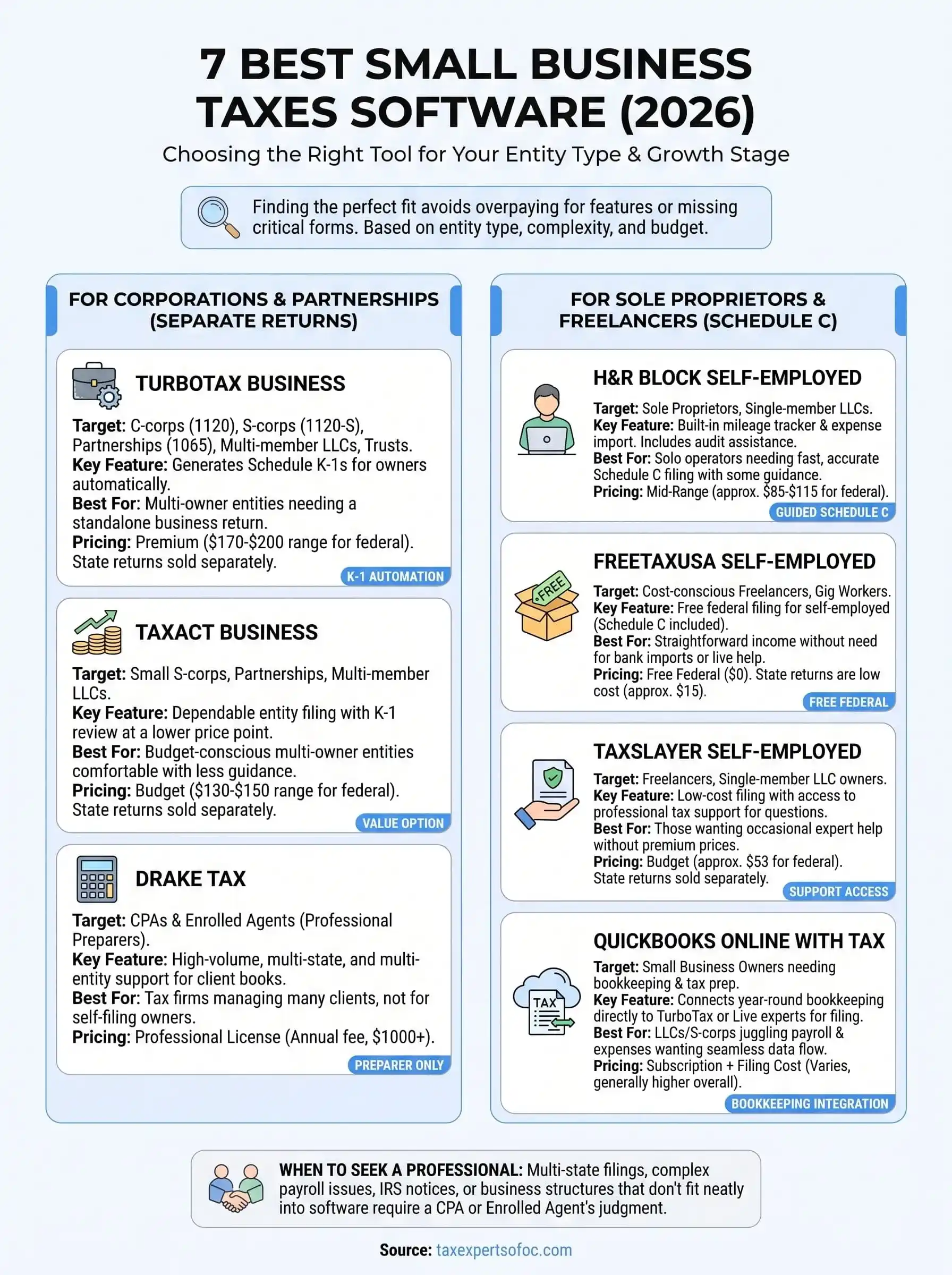
Matching software to your entity type solves most of the guesswork here. A sole proprietor with one income stream does fine with FreeTaxUSA or TaxSlayer, while a multi-member LLC or S-corp needs the K-1 handling built into TurboTax Business or TaxAct Business. QuickBooks Online with Tax pays off if you want bookkeeping and filing connected year-round instead of scrambling every April.
Software works until it doesn't. Once you're facing multi-state filings, a payroll mess, an IRS notice, or a business structure that doesn't fit neatly into a Schedule C, small business taxes software stops being enough. That's the point where guided interviews can't replace judgment, and a wrong answer on a form becomes a real liability instead of a typo.
If your situation has outgrown what software can safely handle, or you'd rather have a professional double-check your filing before it reaches the IRS, schedule a free consultation with Tax Experts of OC.