
If you're researching tax planning pro software before you commit, you've probably hit a wall of vague marketing pages and no real pricing. That's frustrating when you're trying to decide whether an automated tool can actually handle your quarterly tax strategy or if you need a licensed professional looking at your numbers instead. This review breaks down what Tax Planner Pro actually does, what it costs, and where it falls short, so you're not guessing.
Short answer: Tax Planner Pro works well for basic tax planning throughout the year and bookkeeping automation, but it's built around software workflows, not personalized strategy from a CPA or Enrolled Agent. If your situation involves back taxes, IRS notices, or multi-state filings, a platform alone won't cut it. You need someone who can interpret the data and act on it, which is where human expertise still matters.
Below, we cover Tax Planner Pro's core features, pricing tiers, real user feedback, and how it stacks up against working directly with a tax resolution firm. We'll also point to alternatives, including working with a dedicated CPA and when a CPA makes more sense than DIY, so you can match the right solution to your actual tax situation instead of settling for generic software.
1. Tax Experts of OC: personalized tax planning and resolution
Before you compare software tools, consider what a licensed professional actually adds that automation can't. Tax Experts of OC is an Orange County based firm that pairs CPAs and Enrolled Agents directly with clients, whether you're dealing with a clean return or a stack of IRS notices you've been avoiding. Unlike a tax planning pro app that flags deductions based on stored data, this firm reviews your actual financial picture and builds a strategy around it, then represents you if the IRS gets involved.
Key features
The firm's tax resolution services cover back taxes, audits, unfiled returns, and wage garnishment cases, alongside standard prep work for individuals, LLCs, corporations, partnerships, and non-profits. They also run strategic tax planning sessions aimed at cutting liability before year-end, plus bookkeeping, payroll, business incorporation, and outsourced CFO support for growing companies. Everything can be handled remotely through phone and email consultations, so location never limits access to the right expert.
Who it's for
This fits distressed taxpayers facing collections or garnishments, small business owners who need ongoing bookkeeping and payroll oversight, and new founders sorting out entity structure. It also suits people juggling multi-state filings or non-profit accounting who've outgrown what a self-service app can responsibly handle.
Software can flag a deduction, but only a licensed professional can defend it to the IRS.
Pricing
The firm offers a free 30-minute consultation and transparent upfront pricing instead of vague quotes. Flexible payment plans are available for clients facing financial hardship, which matters if you're already behind on back taxes and can't front a large retainer.
Pros and cons
- Pro: Direct access to a CPA or Enrolled Agent, not a call center
- Pro: Handles both proactive planning and active IRS disputes
- Pro: Nationwide remote service with flexible payment options
- Con: No self-serve software dashboard for DIY filers
- Con: Costs more upfront than a flat-fee app subscription, though it pays off when real representation is needed
2. Tax Planner Pro
Tax Planner Pro is a subscription platform built for accountants and small business owners who want automated tax strategy suggestions without hiring a full-time advisor. It pulls data from connected accounting software, most often QuickBooks, and generates a running list of deduction opportunities and entity-structure recommendations throughout the year.
Key features
The platform centers on year-round tax planning dashboards that flag missed deductions, project quarterly liability, and suggest retirement contribution strategies based on your bookkeeping data. It also includes a library of tax-saving strategies accountants can present to clients, plus reporting tools meant to make advisory conversations easier to document.
Who it's for
This tool suits accountants who already manage multiple clients and want a repeatable process for advisory upsells, along with small business owners comfortable interpreting software output themselves. It's less useful if you need someone to actually negotiate with the IRS or untangle unfiled returns, which is what tax resolution actually involves.
A dashboard can suggest a strategy, but it can't sit across from an IRS agent and argue for you.
Pricing
Pricing runs on an annual subscription model aimed at firms, typically requiring a QuickBooks connection to function properly, so standalone users without that setup may find onboarding clunky.
Pros and cons
- Pro: Automates recurring deduction tracking without manual spreadsheets
- Pro: Built for accountants managing several clients at once
- Con: Requires QuickBooks integration to get full value
- Con: No one to handle IRS audits and notices if the IRS actually contacts you
3. Holistiplan
Holistiplan built its reputation on tax return scanning, not year-round bookkeeping automation. Upload a client's PDF tax return and the software extracts the data automatically, then generates a client-friendly one-page summary highlighting planning opportunities. It's a tool financial advisors lean on heavily, especially those who don't prepare returns themselves but need to talk taxes credibly with clients.
Key features
Holistiplan's core strength is its document scanning engine, which reads a prior-year tax return and flags things like Roth conversion windows, capital gains harvesting opportunities, and bracket management strategies. It also includes scenario modeling for tax law changes and a proposal generator that advisors can hand directly to clients during review meetings.
Who it's for
This fits financial advisors and wealth managers who want to add tax insight to client conversations without becoming tax preparers themselves. It's not built for people who need actual return filing, IRS representation, or bookkeeping support.
Reading a past return well is useful, but it won't fix a return that's already wrong or overdue.
Pricing
Holistiplan sells per-advisor licensing, typically billed annually, with pricing scaling based on firm size and the modules an advisor adds beyond basic scanning.
Pros and cons
- Pro: Fast, accurate scanning of existing tax returns
- Pro: Strong client-facing reports built for advisor meetings
- Con: Doesn't prepare or file returns
- Con: No path to resolving back taxes or IRS notices
4. Corvee
Corvee takes a different approach than Holistiplan or Tax Planner Pro by building its platform around multi-entity tax planning for firms serving business owners with complex structures. Rather than scanning a single return, it runs projections across S-corps, partnerships, and individual returns simultaneously, then compares hundreds of strategy combinations to find the lowest legal tax liability for a given client.
Key features
Corvee's calculation engine models over 1,500 potential tax strategies, ranking them by projected savings so a preparer can walk a client through the top options with dollar figures attached. It also bundles a tax planning software module with a CRM-style client portal, making it easier for firms to track which strategies were implemented and follow up each quarter.
Who it's for
This fits tax firms and CPAs managing business clients with multiple entities, especially those who want to sell proactive business tax planning as a standalone service rather than a free add-on to compliance work. Solo filers or individuals without a business structure won't get much use from it.
A strategy engine can rank a thousand options, but someone still has to implement and defend the one you pick.
Pricing
Corvee prices its software on a firm-wide subscription, with tiers based on the number of users and whether tax preparation modules are bundled in.
Pros and cons
- Pro: Deep strategy library built for complex business structures
- Pro: Built-in client tracking and follow-up tools
- Con: Overkill for simple individual returns
- Con: Requires a trained preparer to interpret and apply results correctly
5. RightCapital
RightCapital started as a financial planning platform and later added tax planning as a core module rather than a bolt-on. Advisors use it to build retirement projections, cash-flow forecasts, and Roth conversion scenarios in one place, so tax strategy sits alongside the broader financial plan instead of living in a separate app.
Key features
The platform's tax planning module projects multi-year tax brackets, models the impact of Roth conversions and capital gains timing, and layers Social Security claiming strategies on top. It also generates client-facing reports that visualize how a proposed strategy changes lifetime tax liability, which advisors use during annual review meetings.
Who it's for
This fits financial planners who already use RightCapital for retirement and cash-flow planning and want tax projections built into the same client file. It's a poor fit for anyone needing return preparation, bookkeeping, or IRS representation, since those functions sit outside the platform entirely.
A retirement projection means little if the tax bill behind it was never checked against reality.
Pricing
RightCapital charges advisors a per-user subscription fee, billed annually, with the tax module often included in higher-tier plans rather than sold separately.
Pros and cons
- Pro: Combines retirement and tax projections in a single client file
- Pro: Strong visualizations for client review meetings
- Con: Built for advisors, not individuals filing on their own
- Con: No support for back taxes, audits, or unfiled returns
6. Bloomberg Tax Income Tax Planner
Bloomberg Tax Income Tax Planner takes a calculation-first approach built for professionals who need precise, multi-year projections rather than client-facing dashboards. It's the kind of tool CPAs reach for when they're modeling a complex scenario, like a business sale or a large Roth conversion, and need confidence the numbers hold up under IRS scrutiny.
Key features
The software runs detailed multi-year projections covering federal and state liability, alternative minimum tax exposure, and net investment income tax, all cross-referenced against current tax code. It also supports side-by-side scenario comparisons, so a preparer can show a client exactly how selling an asset this year versus next changes the outcome, backed by Bloomberg's tax research library.
Who it's for
This fits CPAs and enrolled agents who need heavyweight calculation accuracy for high net worth tax planning or business owners facing a major financial event. It's not built for casual users or advisors who just want a quick client summary, since the interface prioritizes precision over polish.
A projection is only as good as the tax code it's built on, and that's where research-grade tools earn their keep.
Pricing
Bloomberg Tax prices the planner as part of a broader professional subscription bundle, with cost scaling based on which research modules a firm adds alongside it.
Pros and cons
- Pro: Research-backed accuracy trusted by tax professionals
- Pro: Strong scenario comparison for major financial events
- Con: Steep learning curve for non-specialists
- Con: No IRS representation or bookkeeping support included
7. Covisum Tax Clarity
Covisum Tax Clarity zeroes in on a narrower question than the other tools on this list: how much of a client's retirement income sits inside the tax torpedo zone, where Social Security benefits get taxed at unexpectedly high marginal rates. Instead of covering every planning scenario, it builds its whole interface around visualizing that one problem clearly enough that a client understands it in a single meeting.
Key features
The software's marginal rate visualization shows clients exactly where a Roth conversion or extra withdrawal pushes them into a higher effective bracket because of Social Security taxation, using color-coded charts rather than raw tables. It also models Social Security claiming strategies alongside withdrawal sequencing, a core piece of cutting taxes on retirement income, so an advisor can test whether delaying benefits or drawing down a taxable account first reduces lifetime tax exposure.
Who it's for
This fits retirement-focused advisors who work with clients approaching or already in retirement, especially those juggling Social Security timing decisions and required minimum distributions. It won't help business owners, self-employed filers, or anyone needing return preparation, since Covisum stays narrowly focused on retirement income tax mechanics.
A chart that shows the tax torpedo coming is only useful if someone acts on it before the withdrawal happens.
Pricing
Covisum sells Tax Clarity through an annual advisor subscription, often bundled with its other retirement-income tools at a discount compared to buying each module separately.
Pros and cons
- Pro: Clear visuals for explaining Social Security tax traps to clients
- Pro: Strong fit for retirement income sequencing decisions
- Con: Narrow scope compared to full tax planning platforms
- Con: No support for business returns or IRS issues
Finding the right tax planning fit
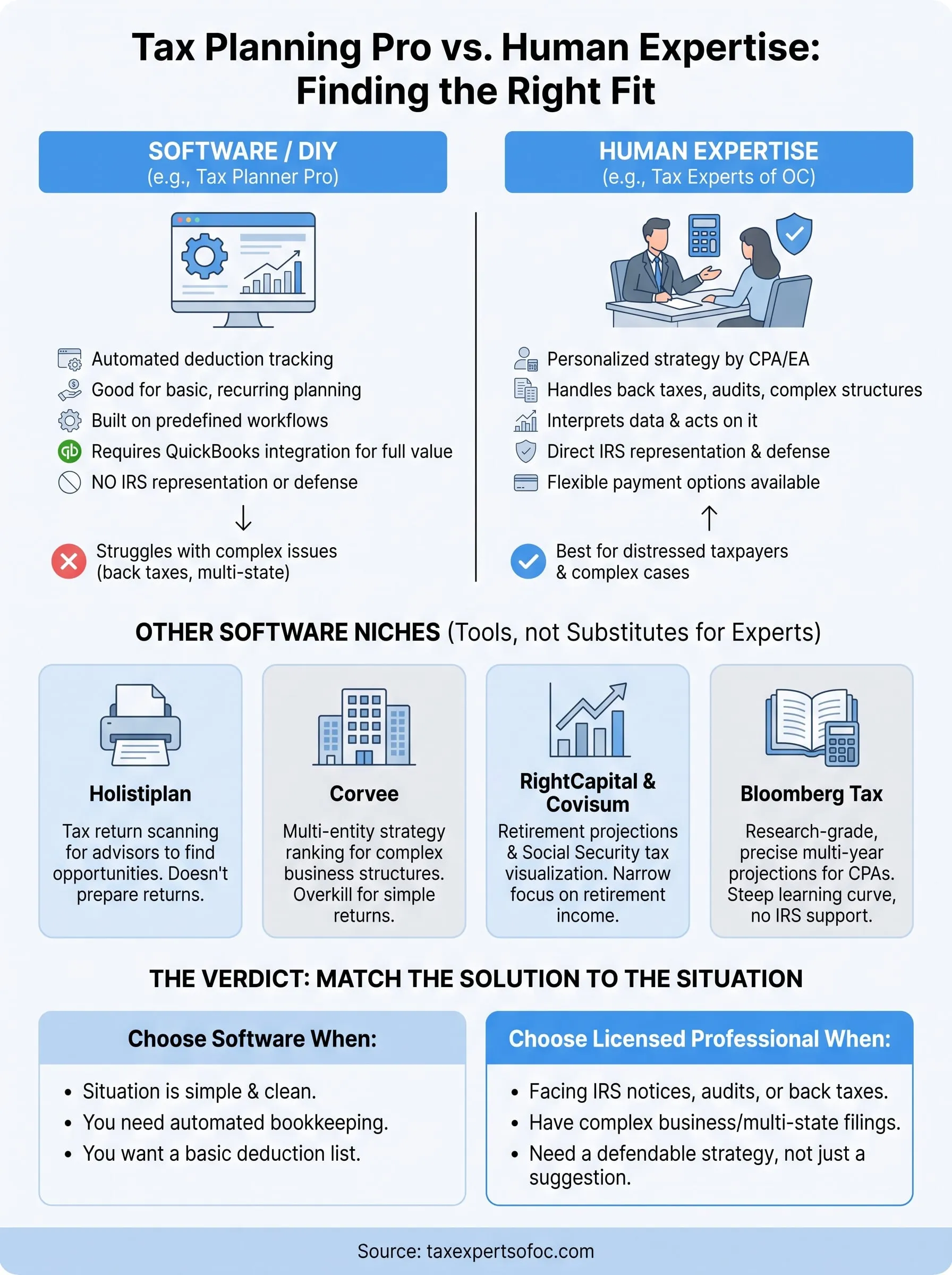
Every tool on this list solves a narrow problem well. Holistiplan scans returns fast, Corvee ranks strategies for complex entities, RightCapital and Covisum handle retirement projections, and Bloomberg Tax delivers research-grade calculations. Tax Planner Pro fits neatly into that group too, automating deduction tracking for accountants who already run QuickBooks. But none of them sit across from an IRS agent, defend a strategy under audit, or untangle a stack of unfiled returns. That gap is exactly where software stops being enough and a licensed professional becomes necessary.
If your situation involves more than a dashboard suggestion, back taxes, wage garnishment, multi-state filings, or a business structure that needs real oversight, software alone won't close the case. You need someone who can act on the numbers, not just display them. Schedule a free consultation for tax planning services in Orange County and talk to a CPA or Enrolled Agent who'll actually build the strategy with you.