
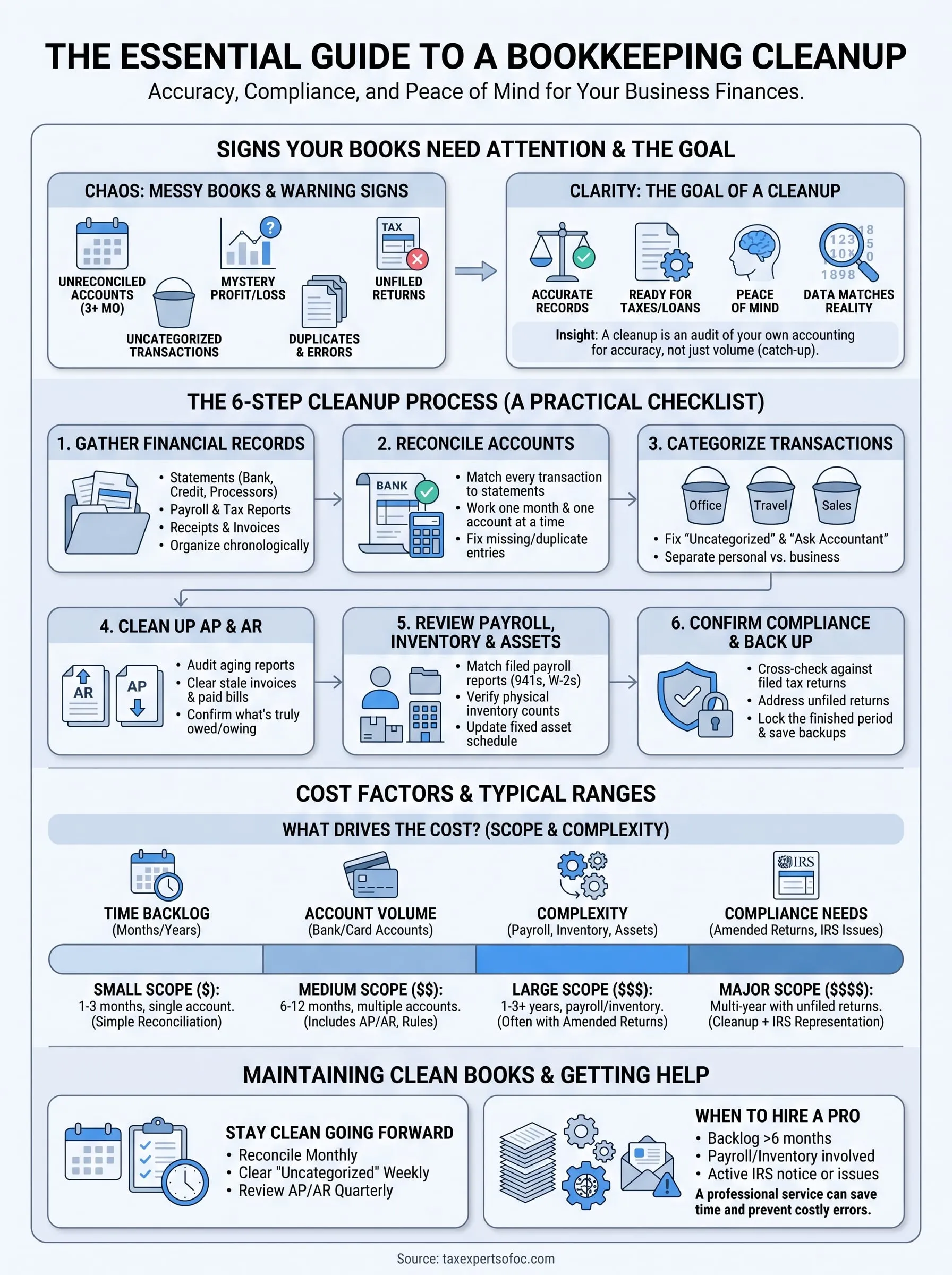
If your books are a mess of duplicate entries, uncategorized transactions, and bank accounts that haven't been reconciled in months, you're not alone. A bookkeeping cleanup is the process of going back through your financial records to fix errors, close gaps, and get everything ready for taxes, a loan application, or just your own peace of mind. Most business owners put it off because it sounds overwhelming, but the longer you wait, the more expensive and painful the fix becomes.
This guide gives you the exact steps to clean up your books yourself, or to know what you're paying for if you hire a pro. You'll get a practical checklist you can follow account by account, plus realistic cost ranges based on how many months (or years) of records need attention.
We'll walk through gathering your source documents, reconciling bank and credit card statements, fixing miscategorized expenses, and catching up on unfiled or inconsistent reports. Whether you're a small business owner behind on QuickBooks or an individual trying to untangle finances before tax season, you'll leave with a clear plan and a solid sense of what a professional cleanup service typically costs when the job is bigger than you can handle alone.
What is a bookkeeping cleanup, and do you need one?
A bookkeeping cleanup is a focused review of your existing financial records where you correct mistakes, fill in missing transactions, and reconcile every account so your books actually match reality. This is different from doing your regular monthly bookkeeping. Instead, you're going backward through weeks, months, or sometimes years of data to fix what went wrong. Think of it as an audit of your own accounting, not to satisfy the IRS, but to make sure the numbers you're looking at are actually true.
Signs your books need attention
Most business owners don't wake up one day and decide to clean up their books for fun. Something usually forces the issue: a lender asks for financials, a tax deadline looms, or an accountant flags a problem during tax preparation. Here are the warning signs that tell you it's time:
- Your bank and credit card accounts haven't been reconciled in three months or more
- You have transactions sitting in an "Uncategorized" or "Ask My Accountant" bucket
- Your profit and loss statement shows numbers that don't match your gut sense of how the business is doing
- You've got duplicate vendors, duplicate customers, or duplicate transactions from a bank feed import gone wrong
- You can't tell if an invoice was actually paid or if a bill is still outstanding
- You haven't filed a tax return in over a year because your records aren't ready
If even two of these apply, you're looking at a cleanup, not a quick fix.
Messy books don't just cost you time, they cost you money every time you make a decision based on bad numbers.
Cleanup vs. catch-up bookkeeping
People often use "cleanup" and "catch-up" interchangeably, but they solve different problems. A catch-up bookkeeping project is about volume: you're behind on entering transactions and need catch-up bookkeeping services to bring records current. A cleanup is about accuracy: the data exists, but it's wrong, duplicated, or miscategorized. Many messy-books situations need both at once, especially if you haven't touched your books since last tax season.
| Situation | Catch-up bookkeeping | Bookkeeping cleanup |
|---|---|---|
| Nothing entered for 6+ months | Yes | Sometimes |
| Transactions entered but miscategorized | No | Yes |
| Bank feeds never reconciled | Sometimes | Yes |
| Duplicate entries or vendors | No | Yes |
| Need to file back tax returns | Yes | Sometimes |
Who actually needs a professional cleanup
Not everyone needs to hire a CPA or Enrolled Agent for this. If you're a sole proprietor with a handful of transactions a month and decent record-keeping habits, you can likely work through the checklist in this guide on your own weekend. But if you're running a small business with employees, multiple bank accounts, inventory, or a backlog of unfiled returns, the stakes go up fast. Bad books can trigger IRS notices, delay loan approvals, and make it impossible to know your actual tax liability until it's too late to plan around it.
Business owners facing an active IRS collection issue, a wage garnishment, or an audit almost always need professional help, because the cleanup has to hold up under scrutiny, not just look tidy. That's the point where a firm offering both bookkeeping and accounting services and direct IRS representation for tax debt and collections earns its fee. The rest of this guide walks through the process step by step so you know exactly what a thorough cleanup involves, whether you're doing it yourself or checking the work of whoever you hire.
Step 1. Gather your financial records
Before you fix a single transaction, you need every source document that proves what actually happened in your accounts. Skipping this step is the number one reason DIY cleanups fall apart halfway through: you get three months in and realize you're missing a bank statement or a merchant processor report, and the whole reconciliation stalls. Pull everything up front so you're not stopping and starting every time you hit a gap.
What to collect before you touch your books
Start with a full document sweep covering the entire period you're cleaning up, whether that's one quarter or three years. Most banks and card issuers only keep online statements available for 12 to 24 months, so if you're behind further than that, request archived statements now, since they can take a few days to arrive.
- Bank statements for every business checking and savings account
- Credit card and business line of credit statements
- Payment processor reports (Stripe, Square, PayPal, Shopify)
- Payroll reports and W-2/1099 filings if you have employees or contractors
- Loan statements and lease agreements
- Prior year tax returns and any notices from the IRS or state agencies
- Accounts payable and receivable aging reports if your software generates them
- Any spreadsheets, receipts, or paper records you've been keeping outside your accounting software
Organize by month, not by category
After you've collected everything, sort it chronologically month by month rather than by expense type. This matches how reconciliation actually works: you compare one bank statement to one month of transactions at a time, so having October's records mixed in with a folder of "office supplies" receipts just slows you down. A simple folder structure, digital or physical, labeled by year and month keeps you moving, and the same logic applies when you build a receipt organization system for taxes.
A cleanup only goes as fast as your slowest missing document, so gather everything before you start fixing anything.
Confirm your accounting software access
Log into your accounting software (QuickBooks, Xero, or whatever you use) and confirm you actually have full admin access, not a locked-out or view-only login left over from a previous bookkeeper. This trips people up more than you'd expect: business owners inherit a QuickBooks file from a departed employee or accountant and can't get past a paywall or password screen. Sort this out before you start, because you'll need to add accounts, edit categories, and pull reports throughout the process. If your bookkeeping cleanup involves multiple entities or years of unfiled returns, this is also the point where a professional bookkeeping cleanup service can save you real time, since they typically have direct lines to request missing statements from banks and processors on your behalf.
Step 2. Reconcile your bank and credit card statements
Once every statement is in hand, reconciliation is where you actually start finding the damage. This step means matching every transaction in your accounting software against the corresponding bank or credit card statement, line by line, until the ending balance in your books matches the ending balance on the statement. It sounds tedious because it is, but it's also the fastest way to surface duplicate entries, missing deposits, and transactions that never made it into your books at all.

Work one account and one month at a time
Open the reconciliation tool in your accounting software (QuickBooks and Xero both have a built-in feature for this) and start with your oldest unreconciled month. Trying to reconcile six months at once almost always leads to mistakes, because errors compound: a missed transaction in March throws off your April balance, and by June you're chasing a discrepancy that started three months earlier. Clear each month completely before moving to the next.
- Match every deposit and withdrawal in your books to a line on the statement
- Flag any transaction on the statement that's missing from your books and add it
- Flag any transaction in your books that doesn't appear on the statement, since it's likely a duplicate or a data entry error
- Confirm the reconciled ending balance matches the statement exactly, down to the cent
If your reconciled balance doesn't match the statement to the penny, you haven't finished, you've just stopped looking.
Common reconciliation problems and how to fix them
A handful of issues show up in almost every messy set of books, and knowing what causes them saves you hours of guessing.
| Problem | Likely cause | Fix |
|---|---|---|
| Duplicate transactions | Bank feed imported the same entry twice | Delete the duplicate, keep the one matched to the statement |
| Missing deposits | Cash or check payments never entered | Add manually using the deposit slip or bank record |
| Balance never matches | Opening balance was wrong from the start | Trace back to the first reconciled statement and correct it |
| Transactions in the wrong account | Bank feed rule misfired | Move to the correct account and adjust the rule |
If you hit a wall where the discrepancy won't resolve no matter how many times you recheck, stop and note the exact month and dollar amount before moving on. This is one of the most common reasons business owners bring in outside bookkeeping help for a bank reconciliation cleanup, since an opening balance error from two years ago can take real forensic work to trace. Once every account for every month reconciles cleanly, you're ready to move to the next problem: making sure every transaction sitting in your books is actually categorized correctly, not just present.
Step 3. Categorize every transaction correctly
Reconciliation tells you that every transaction exists and matches your bank statement. Categorization tells you whether each transaction is sitting in the right bucket, and this is where most profit and loss statements get distorted. A $4,000 equipment purchase coded as "office supplies" doesn't just look sloppy, it changes your tax deduction, your expense ratios, and any decision you make based on that report. Go through every account on your chart of accounts and confirm the transactions inside it actually belong there.
Start with the catch-all accounts
Open your "Uncategorized Expenses," "Ask My Accountant," and "Miscellaneous" accounts first, since these are where bookkeeping software dumps anything it couldn't automatically match to a rule. Every transaction in these buckets needs a real category before you move forward. Pull up the receipt or statement line for each one, figure out what it actually was, and assign it to the correct account.
- Review every transaction sitting in "Uncategorized" or "Ask My Accountant"
- Confirm large or unusual purchases against a receipt or invoice, not just the bank description
- Check that owner draws and personal expenses aren't mixed into business accounts
- Verify loan payments are split correctly between principal and interest
- Look for recurring charges (software subscriptions, insurance) coded inconsistently month to month
A transaction that's present but miscategorized is just as misleading as one that's missing entirely.
Build rules so the same mistake doesn't repeat
Once you've corrected a category error, set up a bank feed rule so future transactions from that same vendor route correctly without manual review. QuickBooks and Xero both let you create rules based on vendor name or description, and this single step prevents you from redoing the same transaction categorization work every quarter. Skipping this is why so many businesses end up needing another cleanup a year later, since the underlying habit, a month-end bookkeeping routine, never got fixed.
Watch for transactions split across personal and business
If you run an LLC or S-corp and pay for anything personal out of the business account, or vice versa, those transactions need to be reclassified, not just recategorized. A personal expense paid from a business card should hit an owner's draw or shareholder distribution account, not an expense line, since leaving it as a deduction creates real exposure if the IRS ever reviews your return. This is also where a lot of small business owners underestimate how tangled things have gotten, and it's a common reason to bring in someone who handles personal and business tax return preparation regularly, since they'll catch the pattern faster than someone looking at their own books for the first time.
Step 4. Clean up accounts payable and receivable
With your transactions reconciled and categorized, turn to the two accounts that decide whether your business actually has cash flow problems or just paperwork problems: accounts payable and accounts receivable. These two reports tell you who owes you money, who you owe money to, and whether either list still reflects reality. It's common to find invoices marked open that were paid months ago, or bills sitting in the system that got settled outside your accounting software entirely. Left uncorrected, these errors make your balance sheet lie to you every time you check it.
Audit your accounts receivable aging report
Pull up your accounts receivable aging report and go through every open invoice one by one. Cross-check each one against your bank deposits to confirm whether payment actually came in and just never got applied, or whether the client genuinely still owes you. Invoices sitting open for 90 days or more deserve a hard look, since some of them are collectible and some need to be written off as bad debt.
- Match open invoices against deposits already recorded in your reconciled bank account
- Apply any payments that came in but were never linked to the invoice
- Flag invoices over 90 days old and decide whether to pursue collection or write them off
- Remove or merge duplicate customer records created by manual entry errors
An invoice that's been paid but still shows as open makes your business look owed money it already collected.
Clear out stale accounts payable
Accounts payable needs the same treatment in reverse. Go through every open bill and confirm it hasn't already been paid by check, card, or bank transfer outside the normal workflow, since this is one of the most common ways duplicate liabilities creep into a bookkeeping cleanup. A bill marked unpaid when it's actually settled overstates your liabilities and can throw off any cash flow projection you build from the report.
| Situation | What it does to your books | Fix |
|---|---|---|
| Paid bill still marked open | Overstates liabilities | Match to bank record, mark paid |
| Vendor invoice never entered | Understates liabilities | Enter from vendor statement |
| Duplicate vendor bill | Inflates expenses | Delete duplicate, keep matched entry |
Vendors sometimes send statements that catch discrepancies you missed, so request one if a balance still looks off after your own review. Once both reports match reality, your books finally reflect what your business actually owns and owes, which sets you up to review payroll, inventory, and fixed assets next.
Step 5. Review payroll, inventory, and fixed assets
With your payables and receivables matched to reality, turn to three areas that get overlooked in a typical bookkeeping cleanup because they don't show up in daily bank feed reconciliation: payroll, inventory, and fixed assets. These accounts move slowly, so errors sit undetected for months or even years before anyone notices the balance sheet doesn't add up. Skipping this step is how a business ends up with a fixed asset account that hasn't changed since 2021 or a payroll liability that's been quietly accumulating.

Verify payroll matches your filed reports
Grab your quarterly Form 941 filings and annual W-2s or 1099s, then compare them line by line against what your accounting software shows for payroll expense and payroll tax liability. Discrepancies here usually mean a payroll provider synced incorrectly with your books, or someone manually adjusted an entry without updating the corresponding tax liability account. Check that:
- Gross wages in your books match total wages reported on filed 941s
- Payroll tax liability accounts show a zero balance after each deposit clears
- Contractor payments over $600 have a corresponding 1099 on file
- Owner compensation is coded correctly for your entity type (salary for S-corps, draws for sole proprietors)
A payroll mismatch between your books and your filed 941s is the kind of error that gets an IRS notice mailed to your address and triggers payroll tax penalties, not just a flag in a review.
Reconcile inventory counts against your books
If you carry inventory, compare a physical count against what your accounting software or inventory system reports as on-hand. Discrepancies here usually trace back to sales that were entered without reducing inventory, or purchases that got recorded as an expense instead of an asset. Even a rough spot count on your top 20 SKUs by value will surface most of the problem before you go through the full catalog.
Update your fixed asset schedule
Pull your fixed asset schedule and check it against what the business actually owns today. Equipment gets sold, scrapped, or traded in all the time without anyone updating the books, which leaves depreciation running on assets that no longer exist.
| Asset issue | What it does to your books | Fix |
|---|---|---|
| Sold or scrapped equipment still listed | Overstates asset value | Remove asset, record any gain or loss |
| Purchase expensed instead of capitalized | Understates assets, distorts deductions | Reclassify to fixed assets, apply depreciation |
| Missing depreciation entries | Understates expenses | Run depreciation schedule current to today |
Once payroll, inventory, and fixed assets all tie back to real documentation, your books are close to done. The last piece is confirming everything lines up with what you've actually filed with the IRS.
Step 6. Confirm tax compliance and back up your books
Once every account reconciles and every transaction sits in the right category, the final step is checking that your cleaned-up books actually match what you filed, or still need to file, with the IRS and your state. This is where a cleanup either confirms you're in good shape or exposes a compliance problem that's been hiding behind bad numbers the whole time. Skipping this step means you've done all the work of fixing your books without ever finding out if they were the reason your last tax return was wrong.
Cross-check filed returns against your cleaned books
Pull your last one to three years of filed tax returns and compare the income and expense totals against what your reconciled books now show. Differences here usually mean the return was filed off unreconciled or miscategorized data, which happens more often than most business owners assume. If the gap is small, note it for your next filing. If it's large enough to change your tax liability, you're looking at an amended return.
- Match reported gross income on your return to your reconciled sales totals
- Compare deducted expenses by category against your cleaned chart of accounts
- Check that payroll totals on the return match your filed 941s and W-2s from Step 5
- Flag any year where the discrepancy would change your tax owed by more than a rounding error
Clean books that don't match your filed returns just mean you've found a new problem, not fixed the old one.
Address unfiled returns and back taxes
If your cleanup uncovered a year with no return filed at all, or an amount owed that's been sitting unaddressed, don't wait for a notice to force the issue, and get help catching up on missing returns instead. The IRS charges failure-to-file penalties on top of failure-to-pay penalties, and both keep accruing until you act, as detailed in the IRS penalty guidelines. This is the point where a firm handling both bookkeeping cleanup and direct IRS representation earns its fee, since they can file the missing returns and negotiate the resulting balance in the same engagement instead of handing you off between two problems.
Back up and lock the finished period
Once everything ties out, export a full backup of your accounting file and save copies of every reconciled statement and report outside your software. Then close the books for that period in your accounting software so nobody, including you, can accidentally edit a transaction and undo the reconciliation you just finished.
How much does a bookkeeping cleanup cost?
Pricing a bookkeeping cleanup depends almost entirely on two things: how many months of records need fixing, and how bad the mess actually is. A business with six months of miscategorized transactions in one clean bank account costs far less to fix than one with three years of unreconciled statements, duplicate vendors, and unfiled payroll reports. Most firms quote cleanup work by the month or in a flat project fee once they've reviewed your files, since hourly and monthly bookkeeping rates on a job this unpredictable rarely serve either side well.
What drives the price up or down
Several factors push a quote higher, and knowing them ahead of time helps you understand why one firm's estimate looks nothing like another's. Volume of transactions per month matters more than total revenue, since a low-revenue business with hundreds of small transactions takes longer to clean than a high-revenue business with a handful of large ones.
- Number of months or years needing correction
- Number of bank, credit card, and merchant processor accounts
- Whether payroll, inventory, or fixed assets are involved
- Missing source documents that require bank or vendor requests
- Whether the cleanup needs to hold up for an amended tax return or IRS review
The real cost of a bookkeeping cleanup isn't the invoice, it's how much longer you wait before the backlog doubles.
Typical cost ranges
Ranges vary by firm and region, but the table below reflects what most small businesses should expect to pay for a professional cleanup service, based on scope alone.
| Scope | Typical range | Notes |
|---|---|---|
| 1-3 months, single account | $300-$800 | Straightforward reconciliation and recategorization |
| 6-12 months, multiple accounts | $800-$2,500 | Includes AP/AR review and rule setup |
| 1-3 years, payroll or inventory involved | $2,500-$6,000+ | Often paired with amended return prep |
| Multi-year with unfiled returns | $5,000+ | Requires coordinated bookkeeping and IRS representation |
When it's worth paying for help
Outsourcing your bookkeeping makes sense once the backlog crosses roughly six months or touches payroll, inventory, or an active IRS notice, since the risk of missing something under your own review climbs fast. Tax Experts of OC offers a free 30-minute consultation to review your specific situation and give you an actual number before any work starts, along with flexible payment options if the backlog is large enough to make cash flow tight. That conversation alone usually tells you whether a weekend of DIY work will cut it or whether the scope calls for a professional bookkeeping and accounting engagement instead.
Keeping your books clean going forward
Once your books are reconciled and every account matches reality, the real work is staying out of this position again. Set a recurring habit: reconcile every account monthly, clear the "Uncategorized" bucket before it grows past a handful of transactions, and review your accounts payable and receivable aging reports at least quarterly. A bookkeeping cleanup should be a one-time correction, not an annual ritual you dread every tax season.
Small gaps are cheap to fix. Multi-year messes with unfiled returns and payroll discrepancies are not, and they invite the kind of IRS attention nobody wants. If you'd rather hand this off entirely, or you're staring at a backlog you know you won't get to on your own, don't wait for a notice to force your hand. Talk to Tax Experts of OC about a free consultation for accounting and bookkeeping help for small businesses, and get your books, and your tax situation, back under control before it costs you more than it needs to.