

A contractor can pull in $2 million in revenue and still struggle to make payroll. That's not a hypothetical, it happens when money flows through multiple jobs, subcontractors, materials, and change orders without a clear system to track it all. Bookkeeping for contractors isn't the same as bookkeeping for a retail store or a consulting firm. Construction finances move differently, and the margin for error is razor-thin when you're juggling deposits, retainage, and job-specific costs across several active projects at once.
The core problem most contractors face isn't a lack of income, it's a lack of visibility. Without accurate, job-level financial tracking, you can't tell which projects are profitable, which ones are bleeding cash, or where your actual tax liability stands at any given moment. That uncertainty leads to late estimated payments, IRS notices, and decisions based on gut feeling instead of real numbers.
At Tax Experts of OC, we work with contractors and small business owners across the country who've learned this lesson the hard way. Our CPAs and Enrolled Agents handle everything from catch-up bookkeeping to tax resolution, and we've seen firsthand how the right financial systems can transform a contracting business. This guide breaks down exactly how to set up and maintain contractor bookkeeping that gives you control over your jobs, your cash flow, and your tax obligations, step by step.
How contractor bookkeeping works
Standard bookkeeping tracks income and expenses by time period, month by month, and that approach works fine for businesses with consistent, repeatable transactions. Contracting businesses don't operate that way. Your income depends on project milestones, draw schedules, and change orders, while your expenses spread across labor, materials, equipment, subcontractors, and overhead, often in an unpredictable order. The result is a financial picture that looks nothing like a typical profit and loss statement until you organize it around the right structure.
Why contractor finances differ from standard books
The biggest difference between general business accounting and contractor bookkeeping is the unit of measurement. In most businesses, you track performance by month or quarter. In construction, you track performance by job. A single project can span 6 to 18 months, involve dozens of cost types, and carry billing terms that don't match when you actually spend money. That mismatch between when cash goes out and when it comes in is the source of most contractor cash flow problems.
Retainage, where a client withholds 5 to 10 percent of each payment until project completion, can tie up tens of thousands of dollars across multiple active jobs at once.
Your books also have to account for subcontractor costs and year-end compliance obligations like issuing 1099-NEC forms, tracking workers' compensation classifications correctly, and separating employee labor from subcontractor labor for tax purposes. Each of these adds a layer of complexity that general accounting software isn't always built to handle without significant customization.
The core components of a contractor's financial system
Bookkeeping for contractors relies on several interconnected pieces that standard accounting systems often treat as separate. When you set them up correctly and link them together, you get a clear view of every job and your overall business at the same time. Here are the main components and what each one does:

| Component | What It Tracks | Why It Matters |
|---|---|---|
| Chart of Accounts | Income, expenses, assets, liabilities | Organizes every transaction into the right category |
| Job Costing | Costs assigned to each project | Shows true profitability per job |
| WIP Schedule | Work in progress across all active jobs | Flags over-billing and under-billing before they become problems |
| Retainage Tracking | Amounts withheld by clients | Prevents cash flow surprises at project close |
| Subcontractor Ledger | Payments to subs and 1099 status | Keeps you compliant at tax time |
| Cash Flow Forecast | Projected inflows and outflows | Helps you plan around gaps between draws |
How job costing ties the whole system together
Job costing is the engine that makes everything else work. Every dollar you spend gets assigned to a specific job and a specific cost code, such as labor, materials, equipment rental, or subcontractor fees. At any point during a project, you can pull a job cost report and see exactly what you've spent against what you budgeted, which tells you whether you're on track or heading toward a loss before it's too late to course-correct.
Without accurate job cost data, you're making pricing and bidding decisions based on rough estimates and memory. Most contractors who find themselves underbidding jobs or running short on cash mid-project don't have an income problem. They have a tracking problem, one that better bookkeeping practices can fix before the next contract gets signed.
Step 1. Choose your accounting method and job setup
Before you enter a single transaction, you need to make two foundational decisions: how you recognize income and expenses, and how you structure each job in your accounting system. Getting these right from the start shapes every report you'll ever pull and every tax return you'll ever file. Changing your accounting method later requires IRS approval through Form 3115, so it's worth taking time to choose correctly now.
Cash vs. accrual: which method fits your construction business
Cash basis accounting records income when you receive payment and expenses when you pay them. It's simpler, and many smaller contractors prefer it because it aligns with actual bank activity. Accrual basis accounting records income when you earn it and expenses when you incur them, regardless of when cash changes hands. For contractors with longer projects and significant receivables, accrual gives you a far more accurate picture of profitability.
If your average annual gross receipts exceed $30 million over the prior three tax years, the IRS generally requires you to use accrual accounting under the rules that apply to larger contractors.
Most contractors working on multi-month projects also need to pick a revenue recognition method built for construction. The two most common are the percentage of completion method, which recognizes revenue as work progresses, and the completed contract method, which defers all income and expenses until the project is finished. Percentage of completion gives you more accurate financial statements mid-project, while the completed contract method can defer taxable income but distorts your books until close-out.
How to set up each job in your system correctly
Every project needs its own job record created before any costs hit the books. Skipping this step means you'll spend hours later trying to sort expenses that landed in the wrong place. When you open a new job, capture these details at minimum:

- Job name and number (use a consistent format, such as 2026-001)
- Client name and billing address
- Contract amount and type (fixed price, time and materials, or cost-plus)
- Start date and estimated completion date
- Project manager assigned
- Retainage percentage held by the client
This structure is the core of bookkeeping for contractors done right. Every cost you post later will tie back to this job record, and every report you pull will draw from it. Spend five minutes on the setup now and you'll save hours of cleanup later when deadlines and draws hit at the same time.
Step 2. Build your chart of accounts and cost codes
Your chart of accounts is the backbone of your entire financial system. Every transaction you record gets filed into one of these categories, so if the structure is wrong from the start, every report you pull will be unreliable. For bookkeeping for contractors, the standard chart of accounts template in most software needs significant customization to reflect how construction businesses actually operate, rather than how a retail store or consulting firm does.
Set up your chart of accounts for construction
Most accounting software ships with a generic chart of accounts built for retail or service businesses. You need to modify it to separate construction-specific income and expense categories from general overhead. A well-built contractor chart of accounts includes dedicated accounts for contract revenue, subcontractor costs, materials, equipment, and job-specific labor, all kept separate from administrative expenses like office rent and software subscriptions.
Mixing job costs with overhead expenses in the same accounts is one of the most common mistakes contractors make, and it makes job costing reports completely unreliable.
Here is a starter structure you can adapt for your business:
| Account Type | Account Name | Notes |
|---|---|---|
| Income | Contract Revenue | Primary job billing |
| Income | Change Order Revenue | Track separately from base contract |
| Cost of Goods Sold | Direct Labor | Field employees only |
| Cost of Goods Sold | Subcontractor Costs | All 1099 subcontractors |
| Cost of Goods Sold | Materials | Job-specific materials only |
| Cost of Goods Sold | Equipment Rental | Rented equipment per job |
| Expense | General and Administrative | Office, software, insurance |
| Liability | Retainage Held | Amounts withheld by clients |
Create cost codes that match your work
Cost codes take your chart of accounts one step deeper. Each cost code represents a specific type of work or cost within a job, such as framing, electrical rough-in, concrete, or site cleanup. When every crew member and every purchase gets coded to both a job and a cost code, you can see exactly where money goes at the task level, not just the project level. That level of detail transforms your financial reports from summaries into actual management tools.
Keep your cost code list short enough to use consistently. A focused list of 10 to 20 codes works far better than a list of 60 that field employees skip because it takes too long. Start with the categories below and expand only when a specific tracking need comes up:
- 01 Site Preparation
- 02 Concrete and Foundation
- 03 Framing and Rough Carpentry
- 04 Electrical
- 05 Plumbing
- 06 HVAC
- 07 Insulation and Drywall
- 08 Finish Work and Trim
- 09 Subcontracted Work
- 10 Equipment and Tools
Step 3. Track job costs daily and keep receipts organized
Tracking job costs is where most contractors' bookkeeping breaks down. Receipts pile up in glove compartments, expenses get entered in batches weeks after the fact, and by the time you run a job cost report, the numbers are too stale to act on. Daily tracking fixes this by keeping your job data current enough to actually manage with.
Enter costs the same day they happen
Same-day entry is the single habit that separates accurate job costing from a cleanup project. When a material purchase or subcontractor invoice hits, assign it to the correct job and cost code that day. Waiting until Friday means you're relying on memory, and memory misses things. Most accounting platforms built for construction, including QuickBooks with job tracking enabled, let you create a bill or expense directly from a mobile device on-site.
Costs entered more than a week after the fact have a much higher error rate because the person entering them often can't recall the exact job, the exact amount, or the right cost code.
For each daily cost entry, capture four things at minimum:
- Job number and name (ties the expense to the right project)
- Cost code (matches the category from your established code list)
- Vendor or payee name
- Amount and payment method (cash, check, card, or ACH)
This four-field habit keeps your bookkeeping for contractors clean without adding significant time to the workday.
Build a receipt system that doesn't fall apart in the field
Paper receipts are the enemy of accurate books. They fade, tear, and disappear between the job site and the office. Replace paper-based storage with a photo-based system that takes five seconds per receipt. Most field crews already have smartphones, so there's no additional hardware required. Set a clear rule: photograph every receipt before it leaves your hands and upload it to a shared folder or directly to your accounting software.
Use a simple folder structure organized by job number and month. An example that works well in practice:
2026 Receipts/
  2026-001 Johnson Remodel/
    2026-06/
    2026-07/
  2026-002 Retail Build-Out/
    2026-06/
    2026-07/
Label each photo with the vendor name and amount before uploading so you can find it without opening every file. This system takes under a minute to maintain daily and eliminates the scramble at tax time when the IRS or your CPA asks for documentation.
Step 4. Invoice with progress billing and track retainage
Most construction contracts don't pay you in one lump sum at the end. You bill as work progresses, which means your invoicing process needs to match your contract terms exactly or you'll either under-bill and starve your cash flow, or over-bill and create a liability that can damage client relationships. Progress billing ties each invoice to a completed percentage of work or a defined milestone, and bookkeeping for contractors only works when those invoices connect directly to your job records in your accounting system.
If your invoices don't reference the contract amount, previous billings, and retainage withheld, you're leaving your client no way to verify what they owe, which slows payment and creates disputes.
How to structure a progress billing invoice
Every progress billing invoice should show the full contract picture, not just the current amount due. Clients and their lenders need to see the cumulative billing history to release funds. Below is a simple template structure you can adapt for each draw:
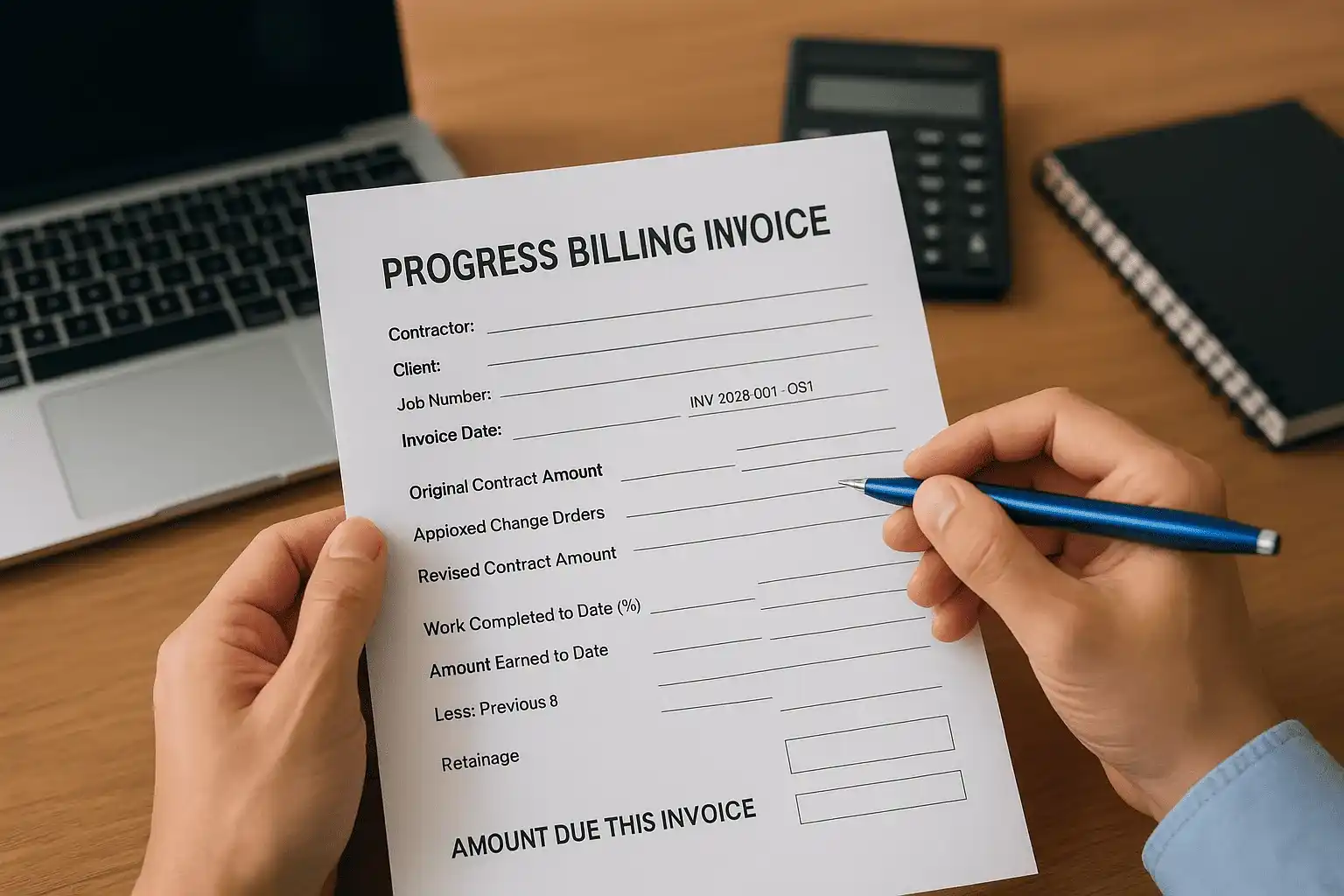
PROGRESS BILLING INVOICE

Contractor:        [Your Company Name]
Client:            [Client Name]
Job Number:        [2026-001]
Invoice Number:    [INV-2026-001-03]
Invoice Date:      [Date]

Original Contract Amount:          $___________
Approved Change Orders:            $___________
Revised Contract Amount:           $___________

Work Completed to Date (%):        _______%
Amount Earned to Date:             $___________
Less: Previous Billings:           $___________
Less: Retainage (____%):          $___________

AMOUNT DUE THIS INVOICE:           $___________
Build this invoice directly from your job cost reports so the percentage complete reflects actual costs incurred, not a rough guess. Each time you bill, post the retainage line as a credit to a dedicated retainage receivable account rather than leaving it buried in the revenue total.
Track retainage as a separate liability
Retainage is money you've earned but can't collect yet, and it needs to live in its own account so you never forget it exists. When you post a progress invoice, split the entry: record the full earned amount as revenue, post the retainage portion to a retainage receivable account, and record only the net amount as a receivable you expect to collect now. This keeps your accounts receivable balance accurate and shows you the total retainage outstanding across all jobs at a glance.
Run a retainage receivable report at the end of every month. When a job reaches substantial completion and the client releases the holdback, move the balance from retainage receivable to your regular accounts receivable and invoice for the final amount.
Step 5. Handle contractor payroll and subcontractors
Payroll and subcontractor costs are typically the largest line items on any job, and they carry the most compliance risk if you track them incorrectly. The IRS scrutinizes how construction businesses classify workers, and misclassifying an employee as a subcontractor can trigger back taxes, penalties, and interest that wipe out the savings you thought you were getting. Bookkeeping for contractors requires you to treat these two cost categories differently from the moment you record them.
Separate employees from subcontractors correctly
The IRS uses behavioral control, financial control, and the nature of the relationship to determine worker classification. If you direct how, when, and where someone works, supply their tools, and set their hours, they are almost certainly an employee regardless of what your contract with them says. Subcontractors operate independently, provide their own equipment, and work for multiple clients. Getting this distinction wrong is one of the fastest ways to end up with a tax problem that requires professional resolution.
The IRS can reclassify workers under Section 3509 and assess employment taxes retroactively for up to three years, along with substantial penalties.
For employees, run a formal payroll process that withholds federal and state income tax, Social Security, and Medicare on every paycheck. Post payroll costs to your job records using the same job number and cost code system you use for materials and equipment. Payroll software like QuickBooks Payroll or a dedicated payroll service can automate withholding calculations, but you still need to assign each payroll run to the correct job and labor cost code manually or through a timesheet integration.
Track subcontractor payments and issue 1099s on time
Every subcontractor you pay more than $600 in a calendar year requires a 1099-NEC form filed with the IRS and delivered to the subcontractor by January 31. To meet this deadline without scrambling, collect a completed W-9 from every new subcontractor before you issue their first payment. Store these forms in a dedicated folder organized by year so you can pull them quickly when filing season arrives.
Keep a subcontractor ledger that tracks payments by vendor, job number, and date throughout the year. At year-end, your accounting software can pull a summary report that feeds directly into your 1099 preparation. Use this simple log structure to stay current:
| Subcontractor Name | W-9 on File | Job Number | Total Paid YTD | 1099 Required |
|---|---|---|---|---|
| ABC Electrical LLC | Yes | 2026-001 | $14,500 | Yes |
| J. Martinez Framing | Yes | 2026-002 | $8,200 | Yes |
| Temp Labor Co. | Yes | 2026-001 | $450 | No |
Step 6. Reconcile accounts and close your books monthly
Monthly reconciliation is the process of matching every transaction in your accounting system against your actual bank and credit card statements to confirm they agree. Without this step, errors build on errors, and by the time you discover a discrepancy three months later, tracing it back consumes hours you don't have. For bookkeeping for contractors, a clean month-end close also gives you a reliable snapshot of each job's financial position before the next billing cycle starts.
Reconcile your bank and credit card accounts first
Start by pulling your bank statement and opening your reconciliation tool inside your accounting software. Match every cleared transaction line by line against what's posted in your books. Flag any transaction that appears in the bank feed but not in your records, such as a bank fee, a returned check, or a payment that hit before the invoice was entered. Work through each account separately, including checking, savings, and every business credit card, before moving on to the rest of the close process.
Leaving a single unreconciled month creates a compounding problem because the opening balance for the next month will be wrong, which makes that reconciliation harder to complete accurately.
Run a standard month-end close checklist
After your bank accounts reconcile, work through the remaining close steps in a consistent order every month. A repeatable sequence prevents you from skipping tasks under deadline pressure. Use the checklist below as your starting point and add steps specific to your business as you identify gaps:
MONTH-END CLOSE CHECKLIST

[ ] Reconcile all bank accounts
[ ] Reconcile all credit card accounts
[ ] Post all outstanding vendor bills
[ ] Review accounts payable aging for past-due items
[ ] Review accounts receivable aging for unpaid invoices
[ ] Verify retainage receivable balances match job records
[ ] Post depreciation for equipment and vehicles
[ ] Review payroll liabilities and confirm deposits made
[ ] Run job cost report for each active project
[ ] Compare actuals to budget for each job
[ ] Save and lock the period in your accounting software
Locking the period after you close it is a step that most contractors skip and later regret. Most accounting platforms let you set a closing date that blocks anyone from posting transactions into a period you've already reviewed. Turn this feature on immediately after you finish each close, and your prior-period reports stay clean no matter what gets entered later.
Step 7. Use job costing and WIP to spot problems early
Job costing and work-in-progress (WIP) schedules are the two tools that tell you whether a project is heading toward profit or loss before the damage is done. Most contractors wait until a job closes to see how it performed, at which point there's nothing left to fix. Running these reports actively throughout the project gives you time to adjust labor allocation, renegotiate subcontractor scope, or flag a billing shortfall while you still have leverage on the outcome.
Read your job cost report correctly
Your job cost report compares what you budgeted for each cost code against what you've actually spent. A variance column shows the difference. Positive variances mean you're under budget on that cost code. Negative variances mean you've already exceeded what you planned to spend, and that's the number that demands your attention immediately. Review this report for every active job at least twice per month, not at the end.
A negative variance on labor in the first third of a job almost always signals a productivity problem that compounds as the project continues, so catching it early is the difference between a correction and a loss.
When you spot a negative variance, trace it back to a specific week and a specific cost code. Compare the hours worked against the progress completed to determine whether the issue is a pricing error, a scope gap, or an inefficiency you can address operationally. That investigation is what makes bookkeeping for contractors a management tool rather than just a compliance task.
Build a WIP schedule and review it monthly
A WIP schedule tracks every active project and shows whether you've billed more or less than what you've earned based on actual completion. Over-billing creates a liability because you owe the client work you haven't done. Under-billing means you've done work you haven't collected on yet, which quietly drains your cash flow without showing up in your bank account as an obvious problem.

Use this template as a starting point and update it at every month-end close:
| Job Name | Contract Value | % Complete | Earned to Date | Billed to Date | Over-Billed | Under-Billed |
|---|---|---|---|---|---|---|
| Johnson Remodel | $180,000 | 65% | $117,000 | $122,000 | $5,000 | - |
| Retail Build-Out | $240,000 | 40% | $96,000 | $88,000 | - | $8,000 |
Flag any job with under-billing greater than 10 percent of its contract value for immediate invoicing review. That number represents money you've earned and haven't collected, and every week it sits unbilled is a week it's not working for your business.
Step 8. Forecast cash flow and prevent surprises
Cash flow is where profitable contracting businesses still fail. You can win good contracts, complete the work on schedule, and run clean books through every step of bookkeeping for contractors, and still find yourself short on payroll if your draw schedule doesn't line up with your expense cycle. A cash flow forecast gives you a forward-looking view of every dollar coming in and going out, so you see the gap before it becomes a crisis rather than after.
Build a 13-week cash flow forecast
A 13-week rolling forecast is the standard tool for businesses with irregular income. Thirteen weeks covers one full quarter without projecting so far into the future that the numbers lose accuracy. Each week you drop the oldest row and add a new one at the end, keeping your horizon constant. Update it every Friday using your actual bank balance as the starting point.
Populate each week with two columns: expected cash inflows from client draws, retainage releases, and any deposits due, and expected cash outflows for payroll, subcontractor payments, material purchases, equipment costs, and overhead. The difference between the two columns each week gives you the projected ending cash balance. If any week shows a negative or near-zero balance, you have time to act before the shortage hits.
Most cash flow problems in construction aren't caused by low revenue. They're caused by timing gaps between when costs go out and when draws come in.
Use this simple template structure as your starting point, then expand the columns to match your actual billing cycles:
13-WEEK CASH FLOW FORECAST

Week | Starting Balance | Inflows | Outflows | Ending Balance
-----|------------------|---------|----------|---------------
W1   | $42,000         | $28,000 | $31,500  | $38,500
W2   | $38,500         | $0      | $18,200  | $20,300
W3   | $20,300         | $55,000 | $22,800  | $52,500
Identify and close cash flow gaps before they happen
Once you spot a projected shortfall in a future week, you have several levers to pull. Submit your next draw request earlier than planned. Call a client to confirm payment timing on a pending invoice. Delay a discretionary material purchase by one week. None of these moves are possible if you're looking at your bank account the morning payroll is due.
Review the forecast alongside your accounts receivable aging report every week. Any invoice past 30 days needs a follow-up call, not just a reminder email. The faster you collect what clients already owe you, the less pressure your forecast shows in the weeks ahead.
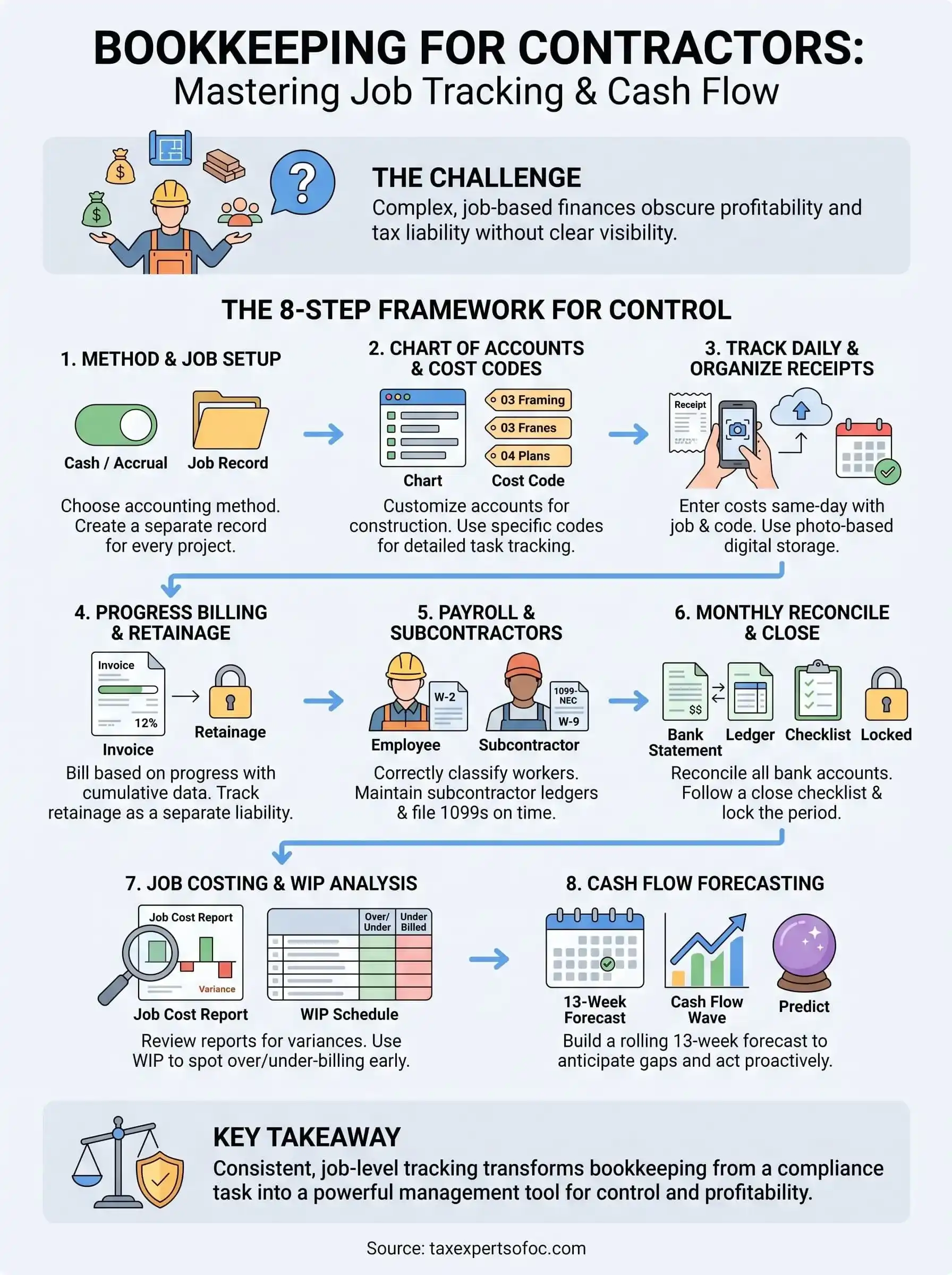
Keep your books on track
Bookkeeping for contractors rewards consistency more than any single tool or system. The steps in this guide build on each other: your job setup feeds your cost codes, your cost codes feed your job cost reports, and your WIP schedule and cash flow forecast only work when the underlying data is accurate and current. Skip one layer and the whole system loses reliability, which puts you back in the position of making financial decisions without real information.
If your books are already behind, or if tax debt or IRS notices have entered the picture, the right time to fix it is now. A licensed CPA or Enrolled Agent can help you reconstruct records, resolve outstanding tax issues, and build a system that works going forward. Contact the team at Tax Experts of OC for a free 30-minute consultation and get your construction finances back on solid ground.